web
You’re offline. This is a read only version of the page.
close
Skip to main content

Notifications

Announcements

No record found.

Community site session details

Community site session details

Session Id :
Supply chain | Supply Chain Management, Commerce
Answered

Consolidation of approved purchase requisitions lines

(0) ShareShare
ReportReport
Posted on by 15

Hello everyone,

I'm currently having a problem with the consolidation of approved purchase requisition lines. D365 is creating multiple Purchase Orders instead of just one as expected. The vendor is of course the same and I have already checked all other relevant setups (ex. Purchasing policies -> there is no split rule defined). The problem is the Accounting Date. The system is creating different POs if the accounting date in the consolidated lines differ. No budget check is setup. I understand that this is standard behavior. I haven't found any other parameter that allows the system to not consider the accounting date while creating purchase orders. Is there any way in standard to go around this problem and generate one PO if the accounting date differs between PR positions? (if all other conditions are satisfied of course)

Thank you in advance,

Daniele

I have the same question (0)
  • MATTGUO Profile Picture
    22,349 Moderator on at

    Hi Daniele,

    Could you give more steps and screenshots about the issue? And which specific version are you using?

    I have tested that PRs with the different accounting data will be consolidated into one PO.

  • Daniele Del Vecchio Profile Picture
    15 on at

    Hi Mattguo,

    thanks for the reply. So I'm on Version 10.0.13 (Update 37).

    So I'll make an example of the issue I'm having. For the purpose of this example I set up the policies so that I can enter the accounting date manually. Usually it would be Requested Date = Accounting Date. So in this example I will have the same requested date but different accounting date (just to prove the point).

    There are two different purchase requisitions created by two different users:

    -They both use the procurement category "hardware" and give a description of the item they need (Monitor and Laptop).
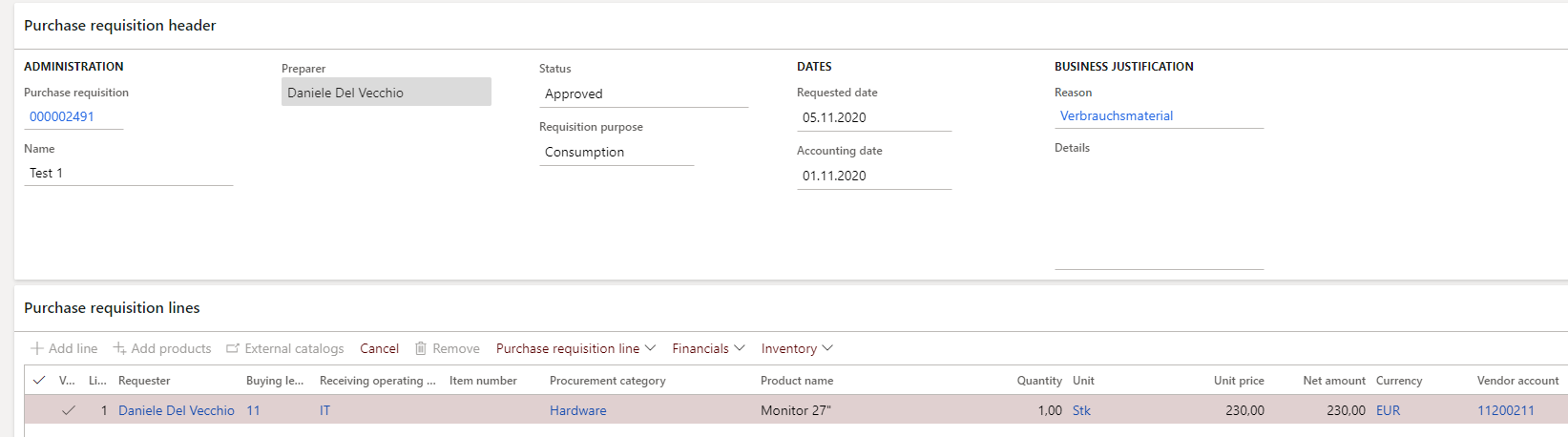
    2020_2D00_10_2D00_30-10_5F00_12_5F00_07_2D00_Purchase-requisitions-_2D002D00_-Finance-and-Operations.png

    2020_2D00_10_2D00_30-10_5F00_14_5F00_01_2D00_Purchase-requisitions-_2D002D00_-Finance-and-Operations.png

    -The accounting date on the first requisition is 01.11, while on the second PR it is 02.11. Other relevant fields are identical (Vendor, Category, Financial Dimensions,...).

    -After approval the Purchasing Department creates a Consolidation Opportunity and add the two approved lines, since they are for the same vendor and can therefore ordered together.

    2020_2D00_10_2D00_30-10_5F00_20_5F00_42_2D00_Purchase-requisition-consolidation-_2D002D00_-Finance-and-Operations.png

    -Clicking on "Create Purchase Order" I expect to only get one Purchase Order. Instead the System creates two.
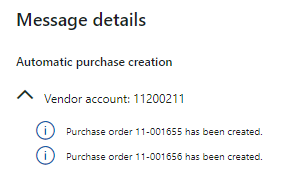
    2020_2D00_10_2D00_30-10_5F00_25_5F00_30_2D00_Purchase-requisition-consolidation-_2D002D00_-Finance-and-Operations.png

    -This are the relevant purchasing policies:

    2020_2D00_10_2D00_30-10_5F00_27_5F00_08_2D00_Purchase-order-creation-and-demand-consolidation-rule-_2D002D00_-Finance-and-Operations.png

    2020_2D00_10_2D00_30-10_5F00_27_5F00_31_2D00_Purchase-order-creation-and-demand-consolidation-rule-_2D002D00_-Finance-and-Operations.png

    2020_2D00_10_2D00_30-10_5F00_27_5F00_46_2D00_Purchase-order-creation-and-demand-consolidation-rule-_2D002D00_-Finance-and-Operations.png

    How did you manage to consolidate different lines with different accounting date into one PO? How is your setup?

    Best Regards,

    Daniele

    P:S I'll add that I already looked in the code with a developer. It looks like the system makes a check of the accounting date before creating the PO/POs. It looks like you can't deactivate this check. I was looking for a way to maybe go around it?

  • Daniele Del Vecchio Profile Picture
    15 on at

    Hi,

    here the same example but with the same accounting date:

    2020_2D00_10_2D00_30-11_5F00_57_5F00_23_2D00_Purchase-requisition-consolidation-_2D002D00_-Finance-and-Operations.png

    just one PO.

    Best Regards,

    Daniele

  • MATTGUO Profile Picture
    22,349 Moderator on at

    Hi Daniele,

    Thanks for your detailed information, i have tested in PU37, and it is indeed a normal behavior.

    I tested it in PU 33 before, it could be consolidated, so i thought it was normal behavior, but it's my fault. And it has be fixed in the KB 4537655.

    PROBLEM:

    Purchase requisition lines with different accounting date don’t generate different purchase orders. It takes the last date and create only one PO.

    DESCRIPTION OF CHANGE:

    Accounting date is a value on the purchase requisition line; and it is transferred to the purchase order header when creating a PO. There are no accounting date on the PO line.

    The accounting date is used to control in ledger, encumbrance and budget the date that posting referes to. The accounting date must not change when generating a PO from one or more requisition lines. Hence a fix is made to correct an earlier regression where requisition lines with different accounting dates was merged into a purchase order with one accounting date.  

  • Daniele Del Vecchio Profile Picture
    15 on at

    Hi Mattguo,

    thank you very much for your answer. That clears it up. I don't like it but there is not much that I can do about that :)

    Best Regards,

    Daniele

  • Verified answer
    Mallesh Deshapaga Profile Picture
    231 on at

    community.dynamics.com/.../consolidation-of-multiple-purchase-requisitions-into-a-single-purchase-order-if-the-different-purchase-requisition-have-different-accounting-dates

    There is a solution with the new feature and need to enable the new parameter in the policies for more information please find attached document.

  • Verified answer
    Danny Bilodeau Profile Picture
    4,918 Super User 2025 Season 2 on at

    I think Mallesh VarMa answers the issue in his word document atteched to the above thread.  There is a new feature available in Feature Management that was added recently (10.0.23 or 24) 

    pastedimage1651239810034v1.png

    The Purchasing Policy's Purchase Order Creation and Demand Consolidation Rule form has been modifidied to include a new parameter:  

    pastedimage1651241994330v2.png

    Here is a blow-up of the details for that feature:

    pastedimage1651242148416v3.png

    Thanks mallesh varma !

Under review

Thank you for your reply! To ensure a great experience for everyone, your content is awaiting approval by our Community Managers. Please check back later.

Helpful resources

Quick Links

Responsible AI policies

As AI tools become more common, we’re introducing a Responsible AI Use…

Neeraj Kumar – Community Spotlight

We are honored to recognize Neeraj Kumar as our Community Spotlight honoree for…

Leaderboard > Supply chain | Supply Chain Management, Commerce

#1
Laurens vd Tang Profile Picture

Laurens vd Tang 298 Super User 2025 Season 2

#2
Siv Sagar Profile Picture

Siv Sagar 183 Super User 2025 Season 2

#3
André Arnaud de Calavon Profile Picture

André Arnaud de Cal... 118 Super User 2025 Season 2

Last 30 days Overall leaderboard

Featured topics

Product updates

Dynamics 365 release plans



