web
You’re offline. This is a read only version of the page.
close
Skip to main content

Notifications

Announcements

No record found.

Community site session details

Community site session details

Session Id :
Customer experience | Sales, Customer Insights,...
Suggested Answer

Does Dynamics 365 sync with outlook 365 contacts and calendar?

(0) ShareShare
ReportReport
Posted on by 10

I am at the end of my rope. Setting this up for the first time and it doesn't seem to do what I want it to do. I want dynamics to work as an extension to outlook. I am a sales guy that is tired of multiple contact lists and calendars. I thought these would sync together. After hours on the phone with support, it is just a stand alone CRM like all the others. Am I missing something?

I have the same question (0)
  • LuHao Profile Picture
    40,892 on at

    Hi partner,

    Yes, Dynamics 365 sync the Appointments, Contacts, and Tasks with outlook 365 .

    First test your mailbox, check if the 'Appointments, Contacts, and Tasks Status' is Success.

    pastedimage1612252280217v1.png

    Then open your personal settings, under Synchronization tab, click filters.

    pastedimage1612252484897v2.png

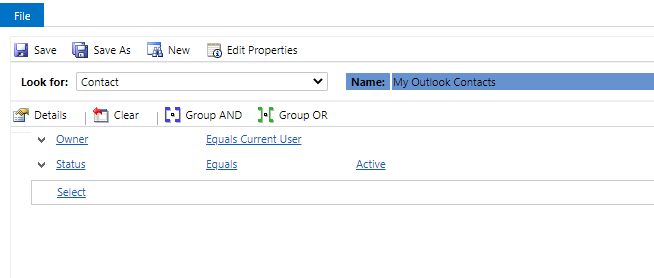
    Check if 'My Outlook Contacts' is Activate, then open it and check the condition filter.

    pastedimage1612252576659v3.png

    pastedimage1612252612657v4.png

  • KBerryG5 Profile Picture
    10 on at

    After more testing, I have found that the sync from dynamics to outlook works.  The sync from outlook to dynamics is broken.

    If I enter contacts, activities, or tasks in dynamics, they will show up in outlook.  Nothing entered or changed in outlook will show up in dynamics.

  • Suggested answer
    Adnan Jalees Profile Picture
    455 User Group Leader on at

    Hello, 

    Could you please refer the link

    docs.microsoft.com/.../configure-synchronization-appointments-contacts-tasks

  • Suggested answer
    LuHao Profile Picture
    40,892 on at

    Hi partner,

    This is by design. Contacts and activities in Outlook will not be automatically tracked to D365, we can only track them manually.

    The manual tracking method is to assign them the Tracked To Dynamics 365 category.

    pastedimage1612434008368v1.png

Under review

Thank you for your reply! To ensure a great experience for everyone, your content is awaiting approval by our Community Managers. Please check back later.

Helpful resources

Quick Links

Responsible AI policies

As AI tools become more common, we’re introducing a Responsible AI Use…

Neeraj Kumar – Community Spotlight

We are honored to recognize Neeraj Kumar as our Community Spotlight honoree for…

Leaderboard > Customer experience | Sales, Customer Insights, CRM

#1
Tom_Gioielli Profile Picture

Tom_Gioielli 171 Super User 2025 Season 2

#2
#ManoVerse Profile Picture

#ManoVerse 83

#3
Jimmy Passeti Profile Picture

Jimmy Passeti 50 Most Valuable Professional

Last 30 days Overall leaderboard

Product updates

Dynamics 365 release plans