web
You’re offline. This is a read only version of the page.
close
Skip to main content

Notifications

Announcements

No record found.

Community site session details

Community site session details

Session Id :
Microsoft Dynamics CRM (Archived)

CRM gmail configuration

(0) ShareShare
ReportReport
Posted on by

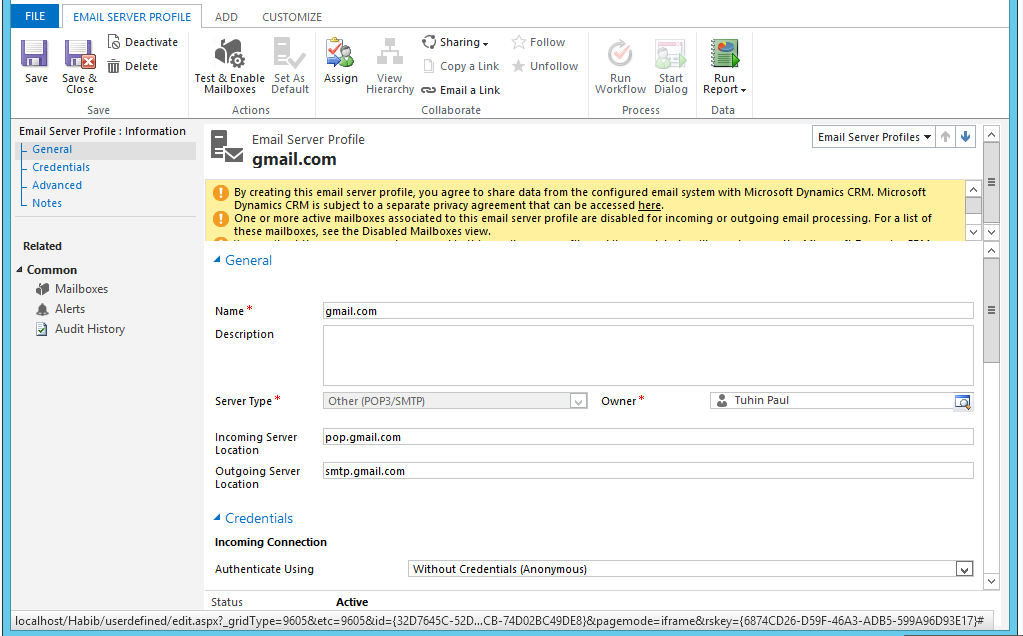
We are facing these following warning messages when we are trying to open "Email Server Profile" page. We are unable to send Email.    

1.By creating this email server profile, you agree to share data from the configured email system with Microsoft Dynamics CRM. Microsoft Dynamics CRM is subject to a separate privacy agreement that can be accessed here.

    2.One or more active mailboxes associated to this email server profile are disabled for incoming or outgoing email processing. For a list of these mailboxes, see the Disabled Mailboxes view.

    3.You can't set the user name and password in this email server profile and its associated mailboxes because the Microsoft Dynamics CRM server requires using a secure mode (SSL) to specify credentials. Use another mode of authentication, or contact the Microsoft Dynamics CRM server admin to allow setting credentials on a nonsecure channel.


*This post is locked for comments

I have the same question (0)
  • Suggested answer
    Community Member Profile Picture
    on at

    Hello,

    have you tried to follow this istructions?

    technet.microsoft.com/.../dn531109.aspx

  • Demian Rashkovan Profile Picture
    130 on at

    Hi cupid,

    once I tryied that, please check if in the gmail configuration you have enabled the POP3 option that is disabled by default.

    regards

  • Community Member Profile Picture
    on at

    Hi,

    Please have a look at below link.

    community.dynamics.com/.../108912.aspx

  • Community Member Profile Picture
    on at

    Hello Cupid:

    I just got done dealing with this

    For the email Serve profiles

    Use pop/smtp

    incoming Server Location: pop.gmail.com

    outgoing Server Location: smtp.gmail.com

    Authenticated using: Credentials Specified by a User or queue

    Set incoming port to 995

    Outgoing port 584

    For the mailboxes for each user you will need to

    Credentials

    Allow to use Credentials for Email to Yes

    User Names   Use their gmail address

    Password       Use their gmail password

    Use the Server-Side Synchronization or Email Router for both incoming email and outgoing email

    Appointments, Contact and task to none.

    Also you need to set each User Computer to the same settings Ie the gear icon on the top right.

    Hope this helps

Under review

Thank you for your reply! To ensure a great experience for everyone, your content is awaiting approval by our Community Managers. Please check back later.

Helpful resources

Quick Links

Responsible AI policies

As AI tools become more common, we’re introducing a Responsible AI Use…

Neeraj Kumar – Community Spotlight

We are honored to recognize Neeraj Kumar as our Community Spotlight honoree for…

Leaderboard > 🔒一 Microsoft Dynamics CRM (Archived)

#1
SA-08121319-0 Profile Picture

SA-08121319-0 4

#1
Calum MacFarlane Profile Picture

Calum MacFarlane 4

#3
Alex Fun Wei Jie Profile Picture

Alex Fun Wei Jie 2

Last 30 days Overall leaderboard

Featured topics

Product updates

Dynamics 365 release plans



