web
You’re offline. This is a read only version of the page.
close
Skip to main content

Notifications

Announcements

No record found.

Community site session details

Community site session details

Session Id :
Small and medium business | Business Central, N...
Suggested Answer

Make a vendor payments without making any EFT files

(0) ShareShare
ReportReport
Posted on by 75

Hi,

1. After approval of an invoice, the invoice amount is in the Payable account now.

2. We paid the invoice amount through our bank portal. No EFT file is needed.

3. I just want to debit the payable amount and credit cash. 

Here is what I did on D365 BC:

1122.JPG

When I select the above three payables and click on "Create Payment", it shows the window below and automatically makes the Template name "Payments" and the Batch Name "Default". However, these are not in the GL template lists that I made in Finance--> General Journals.
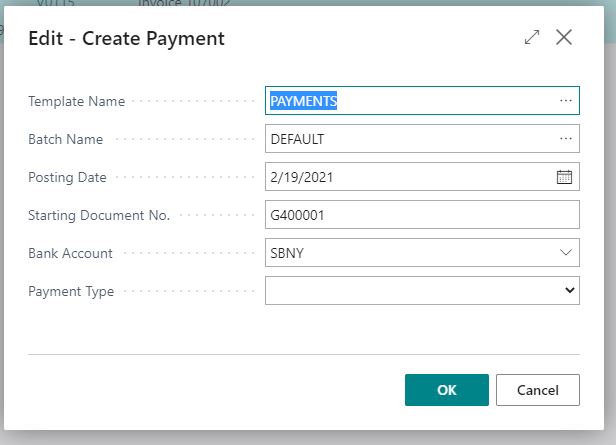
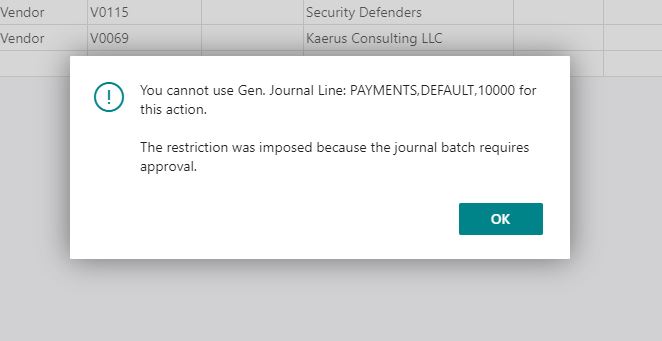
4667.JPG

1832.JPG

This is an error when I try to post the transaction.

Can anyone help?

Thank you!

I have the same question (0)
  • André Arnaud de Calavon Profile Picture
    301,095 Super User 2025 Season 2 on at

    Moved to the Dynamics 365 Business Central forum.

  • Suggested answer
    JAngle Profile Picture
    133 on at

    Does the payment journal default batch have records in it awaiting approval for eft? Have you tried running the create payment but adding the records to a different batch?

  • Suggested answer
    Community Member Profile Picture
    on at

    Mike,

    The utility, Create Payment, will try to create a Payment Journal with a Template = Payments and Batch = Default. I would select a Batch that has NO Balancing Account No. and then fill in the Edit Create Payment option and click OK

    pastedimage1614023450267v1.png

    You then should get a Payment Journal to properly enter the Manual Check number/wire information and post.

    pastedimage1614023496905v2.png pastedimage1614023516138v3.png

    I am paying 3 invoices in my example. I can then update the Document No., if allowed, or enter an External Document No. with Wire information.

    Hope this helps.

    Thanks,

    Steve

Under review

Thank you for your reply! To ensure a great experience for everyone, your content is awaiting approval by our Community Managers. Please check back later.

Helpful resources

Quick Links

Responsible AI policies

As AI tools become more common, we’re introducing a Responsible AI Use…

Neeraj Kumar – Community Spotlight

We are honored to recognize Neeraj Kumar as our Community Spotlight honoree for…

Leaderboard > Small and medium business | Business Central, NAV, RMS

#1
OussamaSabbouh Profile Picture

OussamaSabbouh 2,238

#2
YUN ZHU Profile Picture

YUN ZHU 773 Super User 2025 Season 2

#3
Sumit Singh Profile Picture

Sumit Singh 630

Last 30 days Overall leaderboard

Featured topics

Product updates

Dynamics 365 release plans



