web
You’re offline. This is a read only version of the page.
close
Skip to main content

Notifications

Announcements

No record found.

Community site session details

Community site session details

Session Id :
Microsoft Dynamics AX (Archived)

Error "Insufficient inventory transactions with status Picked." in Sales order invoice.

(0) ShareShare
ReportReport
Posted on by 3,008

HI all,

I have created a Sales order with a line of Catch weight item.

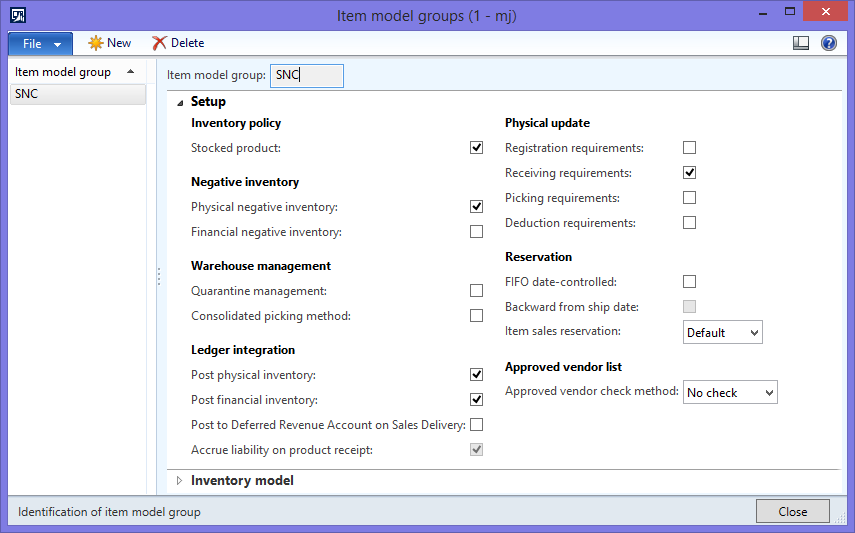
in the Item model group of Item

Registration requirements - un marked.

Deduction requirments    - un marked.

When we are invoicing Sales order with out registration the above error is prompted.
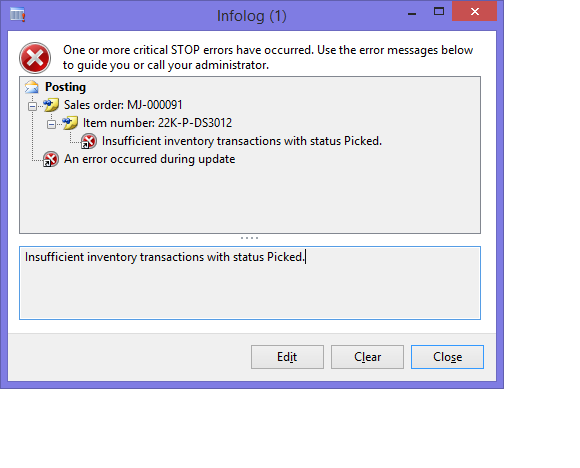
SOInvoice_5F00_error.png

ItemModelGroupSetup.png

Could you please guide what would be the cause of the above error?

*This post is locked for comments

I have the same question (0)
  • Suggested answer
    Ludwig Reinhard Profile Picture
    Microsoft Employee on at

    Hi Krishna,

    What selection did you make in the invoice posting form (all/picked/...)?

    Do you have sufficient items on stock that can be sold?

    Can you check your storage and tracking dimension groups whether a setup there triggers this error?

    Have you tried picking the item and posting the packing slip first? Does this work or does AX already stop the process when you try picking?

    Some additional Information would be great.

    Thanks,

    Ludwig

  • Weaveriski Profile Picture
    23,620 Moderator on at

    How many did you pick? How many did you ship and how many did you try to invoice?

  • krishna.rao@dax Profile Picture
    3,008 on at

    Thank you so much for the response.

    @Ludwig : 

    i)What selection : all

    ii)Do you have sufficient items : Yes

    iii)Have you tried picking the item .... : It's getting invoiced if you pick the item (with or with out packing slip).

       If you are not picking the item, getting error in both packing slip & invoice.

    @Steven Weaver I didn't pick anything. I've created a line of Qty 1, CW qty 1 after confirmation, invoicing the Sales order.

      StoraeTrackingDimGroupSetup.png

    StoraeTrackingDimGroupSetup.png                                             

  • Weaveriski Profile Picture
    23,620 Moderator on at

    Serial Number, Owner and Inventory Profile. What are these set to on the sales line and what On Hand do you have?

    You say the error occurs when you dont pick, which means the sales line has to hold the dimension information directly on the sales line as you dont register or pick.

  • Sagar Suman Profile Picture
    6,562 Super User 2025 Season 2 on at

    Hi Krishna,

    Even if PICKING REQUIREMENT check box in item model group is unchecked picking is mandatory for CW items.

    So you cannot post either packing slip or sales invoice until the quantity getting shipped on packing slip or quantity getting invoice is having status PICKED.

  • krishna.rao@dax Profile Picture
    3,008 on at

    @Sagar : As you are saying with out picking, can't invoice in case of Catch weight items.

    If this is the case then how can we post the Retail statement for Catch weigh item.

    Because same error is coming when you are posting the statement for this Catch weight 

    item.

    @Steve While creating the sales order line we are entering the serial number for the item.

  • Sagar Suman Profile Picture
    6,562 Super User 2025 Season 2 on at

    Hi Krishna,

    I am not sure about retail statement posting but for sales order processing its mandatory.

  • krishna.rao@dax Profile Picture
    3,008 on at

    But In the white paper Sales Order Management and Catch Weight.

    In the page 12. flow chart Outbound process flow for Catch weight items.

    mentioned for full visibility Catch weight items picking is not required.

    If picking //no

    & Uniquely identifiable on-hand weight? //yes

    then Packing slip/Invoice update with CWquantities.

     (full visibility Item: Serial number control check box is selected in tracking dimension group.)

    Kindly let me know if my statement needs correction?

  • Weaveriski Profile Picture
    23,620 Moderator on at

    You cannot base decisions on a white paper which by its nature is an expression of functionality that will be there. Frequently it is not our works differently.

    @Sagar can you provide a reference to your statement that it must be picked?

    @Krishna can you provide a screenshot of the sales line on hand with range dimensions set?

  • krishna.rao@dax Profile Picture
    3,008 on at

    Hi Steve,

    Thank you so much for your time.

    Please find the screen shot for the onhand

    InventOn_2D00_handPerDimension.png

    & also could you please comments on your statement "You cannot base decisions on a white paper"

Under review

Thank you for your reply! To ensure a great experience for everyone, your content is awaiting approval by our Community Managers. Please check back later.

Helpful resources

Quick Links

Responsible AI policies

As AI tools become more common, we’re introducing a Responsible AI Use…

Neeraj Kumar – Community Spotlight

We are honored to recognize Neeraj Kumar as our Community Spotlight honoree for…

Leaderboard > 🔒一 Microsoft Dynamics AX (Archived)

#1
Martin Dráb Profile Picture

Martin Dráb 4 Most Valuable Professional

#1
Priya_K Profile Picture

Priya_K 4

#3
MyDynamicsNAV Profile Picture

MyDynamicsNAV 2

Last 30 days Overall leaderboard

Featured topics

Product updates

Dynamics 365 release plans