web
You’re offline. This is a read only version of the page.
close
Skip to main content

Announcements

No record found.

News and Announcements icon
Community site session details

Community site session details

Session Id :
Finance | Project Operations, Human Resources, ...
Active Discussion

Picking list registration through x++ code with specified quantity

(0) ShareShare
ReportReport
Posted on by 3,020

Hi Team,

Navigation -> Inventory warehouse management -> Periodic -> Picking list registration

Background work and requirement : need to do picking list registration with partial quantity using x++ code. we will get xml files from third party WMS system, need to do picking list registration based on the quantity in xml.  Ideally data will come in to picking list registration form when picking list is posted(sales/transfer).

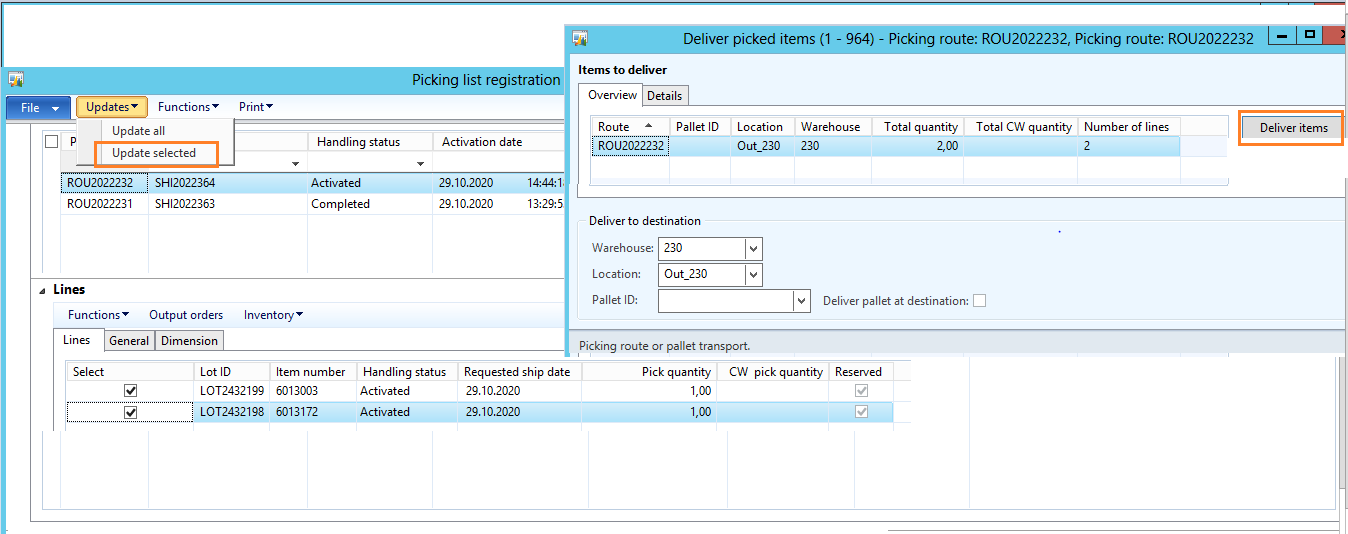
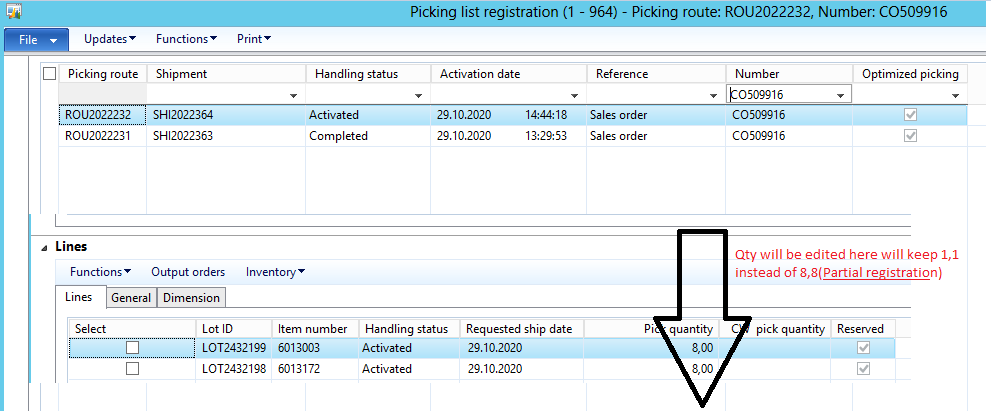
Manual process through user interface: Picking list registration(form) -> select lines and edit quanatity -> go to function "Updates" and select "update selected"  

                                                                                                               new form "Deliver picked Items" opens, click on "Deliver items".

We need code for partial quantity picking list registration mentioned above process , please share code guide/suggest if you already come across this scenario.

Attaching screenshots for reference, 

PickListRegNavigation.PNG       PickListRegPartialPosting-_2D00_-Copy.PNG

PickListRegPartialQty.PNG

Thank you.

  • krishna.rao@dax Profile Picture
    3,020 on at

    Hi Team,

    Navigation -> Inventory warehouse management -> Periodic -> Picking list registration (functions -> delivery picked items)

    We have to automate this process through code, After registration, select lines and  we will go to functions and do "Delivery picked items".

    Please share code if anyone come across this scenario.

    pastedimage1604372318185v1.pngpastedimage1604372318187v2.png

  • HenryXie Profile Picture
    Microsoft Employee on at

    Hi Krishna, 

    there is a code for sale order delivery, hope useful.

    # ttsbegin;
    # //1.0 WMSShipmentReservation
    # l_wmsShipment = WMSShipment::find(_wmsShipmentId,true);
    # if (l_wmsShipment.status == WMSShipmentStatus::Registered)
    # l_wmsShipment.reserve();
    #
    # if (l_wmsShipment.palletExpeditionStatus <= WMSExpeditionStatus::Registered)
    # l_wmsShipment.activatePallets();
    #
    # if (l_wmsShipment.pickExpeditionStatus <= WMSExpeditionStatus::Registered)
    # l_wmsShipment.activatePick();
    # //2.0 Post picking list
    # select firstonly forupdate l_WMSPickingRoute
    # where l_WMSPickingRoute.shipmentId == l_WMSShipment.shipmentId
    # ;
    # // 2.1 Post transport
    # while select forupdate l_WMSTransport
    # where l_WMSTransport.shipmentId == l_WMSShipment.shipmentId
    # {
    # l_WMSTransport.start();
    # l_WMSTransport.finish();
    # }
    #
    # ttscommit;

  • krishna.rao@dax Profile Picture
    3,020 on at

    I tried above, unfortunately didn't worked. Handling status still showing "Activated", When I am doing manually it's showing status "completed".

    Thank you.

  • HenryXie Profile Picture
    Microsoft Employee on at

    Hi Krishna,

    did you try below method? 

    public void pickAllLines()
    {
    List list = new List(Types::String);
    WMSPickingRoute localWMSPickingRoute;

    for (localWMSPickingRoute = wmsPickingRoute_ds.getFirst(true) ? wmsPickingRoute_ds.getFirst(true) : wmsPickingRoute_ds.cursor(); localWMSPickingRoute.RecId; localWMSPickingRoute = wmsPickingRoute_ds.getNext())
    {
    list.addEnd(localWMSPickingRoute.PickingRouteID);
    }

    WMSPickingRoute::finishMulti(list.pack());//Note - this is not in a single tts, so some routes might be posted and others fail

    wmsDeliverPickedItems::checkDeliverPickedItems(localWMSPickingRoute.PickingRouteID,list.pack());

    pastedimage1604394887193v1.png

  • krishna.rao@dax Profile Picture
    3,020 on at

    Thanks so much Henry for your prompt response.

    wmsDeliverPickedItems::checkDeliverPickedItems(localWMSPickingRoute.PickingRouteID,list.pack()); //this will open new form based on some conditions. we need to automate this process without UI.

  • krishna.rao@dax Profile Picture
    3,020 on at

    wmsDeliverPickedItems::checkDeliverPickedItems(localWMSPickingRoute.PickingRouteID,list.pack()); //this will open new form based on some conditions. we need to automate this process without UI

Under review

Thank you for your reply! To ensure a great experience for everyone, your content is awaiting approval by our Community Managers. Please check back later.

Helpful resources

Quick Links

Introducing the 2026 Season 1 community Super Users

Congratulations to our 2026 Super Stars!

Meet the Microsoft Dynamics 365 Contact Center Champions

We are thrilled to have these Champions in our Community!

Congratulations to the April Top 10 Community Leaders

These are the community rock stars!

Leaderboard > Finance | Project Operations, Human Resources, AX, GP, SL

#1
Giorgio Bonacorsi Profile Picture

Giorgio Bonacorsi 722

#2
André Arnaud de Calavon Profile Picture

André Arnaud de Cal... 605 Super User 2026 Season 1

#3
Subra Profile Picture

Subra 547

Last 30 days Overall leaderboard

Product updates

Dynamics 365 release plans