web
You’re offline. This is a read only version of the page.
close
Skip to main content

Notifications

Announcements

No record found.

Community site session details

Community site session details

Session Id :
Microsoft Dynamics CRM (Archived)

Find appointments with no contacts

(0) ShareShare
ReportReport
Posted on by 262

Hi,

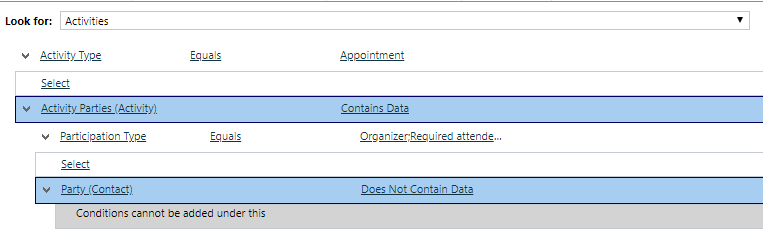
I'm trying to create a view that will show me all appointments, where there are no contacts in the organizer, required attendee or optional attendee fields.

I have created the query below - but that not working as supposed. It's still returning appointments where contacts are included in one of those fields.
pastedimage1568031304695v1.png

Am I missing anything in the query? 

*This post is locked for comments

I have the same question (0)
  • Verified answer
    erhan.keskin Profile Picture
    2,253 on at

    Hi,

    You have Participation Type criteria there, and it seems it has more than one options picked for that. Non-related ones will bring the records you don't want to see.

    Here is an example of what i am saying;

    Query in words from what you have in the screenshot;

    Let's assume there is 1 appointment which "required attendee" is a contact.

    Bring me Activities which Activity Type is Appointment

    and Party (Contact) does not contain data 

    and Participation Type is Organizer (It will bring the record because of this criteria)

    Or Required attendee (It will bring the record because of this criteria)

    In this example, if we remove the Organizer condition, and remain Required attendee then it would not bring the record.

    Regards,

  • NielsL Profile Picture
    262 on at

    Erhan Keskin

    Thanks for the input. 

    What if I leave participation type out of the query. Is it possible to just make a query, that returns all appointment where there's no contact as a party? E.g. we have some meetings, that only include users, and it's those I'm trying to find.

  • erhan.keskin Profile Picture
    2,253 on at

    Hi,

    There is no difference if you don't have the criteria or have the criteria with multiple options with "or" condition. The problem there is the set of records. You need to search the records within the same participation type. If you see the example above why it brings the record, that reason will be still there if you don't have the criteria.

    Regards,

  • NielsL Profile Picture
    262 on at

    Cheers,

    Thanks for the explanation.

Under review

Thank you for your reply! To ensure a great experience for everyone, your content is awaiting approval by our Community Managers. Please check back later.

Helpful resources

Quick Links

Responsible AI policies

As AI tools become more common, we’re introducing a Responsible AI Use…

Neeraj Kumar – Community Spotlight

We are honored to recognize Neeraj Kumar as our Community Spotlight honoree for…

Leaderboard > 🔒一 Microsoft Dynamics CRM (Archived)

#1
SA-08121319-0 Profile Picture

SA-08121319-0 4

#1
Calum MacFarlane Profile Picture

Calum MacFarlane 4

#3
Alex Fun Wei Jie Profile Picture

Alex Fun Wei Jie 2

Last 30 days Overall leaderboard

Featured topics

Product updates

Dynamics 365 release plans
