web
You’re offline. This is a read only version of the page.
close
Skip to main content

Notifications

Announcements

No record found.

Community site session details

Community site session details

Session Id :
Microsoft Dynamics CRM (Archived)

Top alignment of field label position issue while hiding field in crm 2013

(0) ShareShare
ReportReport
Posted on by

Hi, In our form all field label position are in top. 

when I am hiding a field through script(setVisible(false)), that field got hidden but that field space remains empty, below fields doesn't occupy that space. I don't want that empty space.

Also I have taken single column section, still I am facing this issue(empty space).

And this is happening in case of top alignment of field label only..

Any suggestion please(without taking another section with same fields)......????

before hiding =>>>
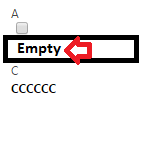
Aftr.png

after hiding(empty space) =>>>

Aftr.png

*This post is locked for comments

I have the same question (0)
  • Suggested answer
    Sean Michel Profile Picture
    340 on at

    Hi ak,

    Unfortunately, I have yet to see the JS setVisible(false); dynamically collapse white-space as you are asking with "Top" labels, when hiding fields.

    It seems to work fine and eliminates the white-space for hiding Sections and for hiding Tabs, but not for fields.

    I would suggest moving the fields you are hiding in such a way that the white-space is not noticeable, or, unfortunately, consider breaking out into separate sections.

    You could try Business Rules to hide/show the field, but I believe you will face the same issue, as they utilize the same JS methods.

    Alternatively, try to push your field labels in the Section to "Side" and this should allow the collapsing. Have you tried this?

  • Suggested answer
    Rajkumar Rajaraman Profile Picture
    on at

    Hello,

    Follow all the steps mentioned in the below Blog to see if this resolves your issue :

    inogic.com/.../tip-hide-fields-on-crm-form-without-messing-up-the-form-layout

    Also refer this:

    ashwaniashwin.wordpress.com/.../crm-2011-javascript-to-hide-fields-and-removeadjust-the-spaces-accordingly

    Hope this helps.

    Regards,

    R.Rajkumar

    "Please mark my answer as verified if you found it helpful"

  • Rajkumar Rajaraman Profile Picture
    on at
  • Community Member Profile Picture
    on at

    Hi Michel,

    I can't customize alignment or can't  do any customization form level...

  • Community Member Profile Picture
    on at

    Hi Rajkumar,

    That doesn't work...

  • Suggested answer
    Sean Michel Profile Picture
    340 on at

    Hi Ak,

    So you cannot change the label nor where the field is held? Why is this? Due to a business requirement I assume? Or are you blocked via permissions?

    If it is a permissions thing, you won't be able to do much about this yourself, and will need to contact your System Administrator.

    If it is a business requirement to have the labels be "top", AND you need the hide-show to occur, I do not believe you will have a solution to achieve your goal.

    You would either need to hide/show the sections (which would require moving the fields into separate sections), tabs, or change the label to "Side" rather than top.

Under review

Thank you for your reply! To ensure a great experience for everyone, your content is awaiting approval by our Community Managers. Please check back later.

Helpful resources

Quick Links

Responsible AI policies

As AI tools become more common, we’re introducing a Responsible AI Use…

Neeraj Kumar – Community Spotlight

We are honored to recognize Neeraj Kumar as our Community Spotlight honoree for…

Leaderboard > 🔒一 Microsoft Dynamics CRM (Archived)

#1
SA-08121319-0 Profile Picture

SA-08121319-0 4

#1
Calum MacFarlane Profile Picture

Calum MacFarlane 4

#3
Alex Fun Wei Jie Profile Picture

Alex Fun Wei Jie 2

Last 30 days Overall leaderboard

Featured topics

Product updates

Dynamics 365 release plans



