web
You’re offline. This is a read only version of the page.
close
Skip to main content

Notifications

Announcements

No record found.

Community site session details

Community site session details

Session Id :
Microsoft Dynamics CRM (Archived)

Quick Create was hanging in IE & Chrome browsers

(0) ShareShare
ReportReport
Posted on by 10

Hi All,

I am using Dynamics 365 Online instance[Version 1612 (9.0.1.621) (DB 9.0.1.569)]. When I am clicking the + button of Contact SubGrid.

The browser was hanged on the below 3 scenarios.

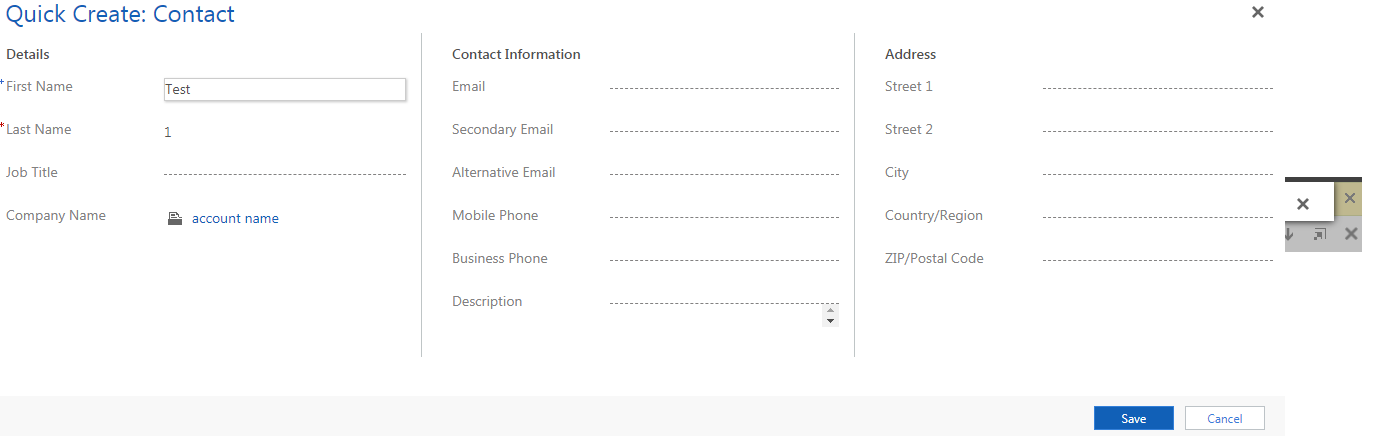
i) The Quick Create form was not loading fully (screenshot1)

ii) Update of required fields

ii)On clicking SAVE  button 

Screenshot 1:

2630.Screenshot1.png

Screenshot 2:

Screenshot2.png

Note: I didn't refer/use any scripts for the Quick Create form. 

Only IE and Chrome having this issue. I didn't find any issue with Mozilla Firefox.

Please give suggestions to resolve this issue.

Thanks,

Eliyas.

*This post is locked for comments

I have the same question (0)
  • Suggested answer
    Shahbaaz Ansari Profile Picture
    6,211 on at

    Please refer below link,

    www.crmug.com/.../viewthread;CommunityKey=5ab602e5-51fe-4cc2-b467-d970807c0e8a&tab=digestviewer

    Thanks,

    Shahbaaz

  • Suggested answer
    Rajkumar Rajaraman Profile Picture
    on at

    Try toggling the "Use legacy form rendering" to see if that makes a difference

    Refer this:

    dynamicscrmpros.com/microsoft-dynamics-crm-2015-2016-and-365-legacy-form-rendering

  • Eliyas Profile Picture
    10 on at

    Thanks RajKumar and Shahbaaz for your quick reply.

    I tried enabling the "Use Legacy form rendering". Even though the issue was not resolved the browser continuously hanging in all scenarios.

  • Suggested answer
    Community Member Profile Picture
    on at

    Hi,

    Try to clear cache and temporray files used by browser and check.

    Mansoor

  • Eliyas Profile Picture
    10 on at

    Thank you Mansoor for your reply.

    I cleared all temporary files, cache,cookies,form data from browsers and checked.

    Even though the issue was not resolved.

    This issue was occurring for all the users specifically in IE and Chrome.

    Any other idea to resolve this issue.

    Thanks!

    Eliyas

  • Community Member Profile Picture
    on at

    My issue is iFrame height in Chrome become 0 when rendering Quick Create Form second time; IE height is not 0 but really small.

    My issue is fixed by enabling Use Legacy Form Rendering.

  • Suggested answer
    riaandelange Profile Picture
    20 on at

    This bug happens when you click on a Sub Grid + to add a record on a related entity to open the Quick Create in Google Chrome. The first time the Quick Create form opens, but as soon as you try to add another one, it only shows the Save and Cancel buttons. The height of the css class mscrm-globalqc-iframe is set to 0px hence it's not showing in your browser.

    Add the following function to your Quick Form OnLoad event: Change the 320px to how big you want the form to render.

    function qc_FormOnLoad(context) {
        /// <summary>
        /// Quick Create Form OnLoad Event Handler
        /// </summary>
        /// <param name="context"></param>
        chromeQuickCreateFix("320px");
    }
    function chromeQuickCreateFix(height) {
        /// <summary>
        /// Google Chrome Fix where the Quick Create would not show in Chrome Browser
        /// </summary>
        var isChrome = true;
        var chrome = navigator.userAgent.indexOf('Chrome') > -1;
        var explorer = navigator.userAgent.indexOf('MSIE') > -1;
        var firefox = navigator.userAgent.indexOf('Firefox') > -1;
        var safari = navigator.userAgent.indexOf("Safari") > -1;
        var camino = navigator.userAgent.indexOf("Camino") > -1;
        var opera = navigator.userAgent.toLowerCase().indexOf("op") > -1;
        if ((chrome) && (safari)) safari = false;
        if ((chrome) && (opera)) isChrome = false;
     
        if (isChrome) {
            if (window.top.document.getElementsByClassName("mscrm-globalqc-iframe")[0].style.height === "0px") {
                console.log("Resizing mscrm-globalqc-iframe iframe for Chrome Bug");
                window.top.document.getElementsByClassName("mscrm-globalqc-iframe")[0].style.height = height;
            }
        }
    }

Under review

Thank you for your reply! To ensure a great experience for everyone, your content is awaiting approval by our Community Managers. Please check back later.

Helpful resources

Quick Links

Responsible AI policies

As AI tools become more common, we’re introducing a Responsible AI Use…

Neeraj Kumar – Community Spotlight

We are honored to recognize Neeraj Kumar as our Community Spotlight honoree for…

Leaderboard > 🔒一 Microsoft Dynamics CRM (Archived)

#1
SA-08121319-0 Profile Picture

SA-08121319-0 4

#1
Calum MacFarlane Profile Picture

Calum MacFarlane 4

#3
Alex Fun Wei Jie Profile Picture

Alex Fun Wei Jie 2

Last 30 days Overall leaderboard

Featured topics

Product updates

Dynamics 365 release plans