web
You’re offline. This is a read only version of the page.
close
Skip to main content

Notifications

Announcements

No record found.

Community site session details

Community site session details

Session Id :
Microsoft Dynamics CRM (Archived)

Tracking Emails in Outlook outside of the Sent folder (CRM 2015 On-Premise)

(0) ShareShare
ReportReport
Posted on by 760

Hello Community!

I recently discovered an odd issue with a user of mine. His workflow in sending emails to customers is to first track them to a record in CRM, and then he determines where he wants to save the sent item BEFORE sending. Thus the email never touches his sent folder in Outlook.
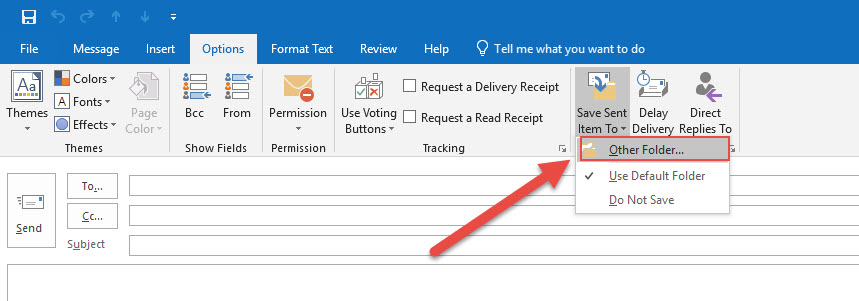
Outlook_5F00_SaveItem.jpg

I had him show me an email he sent yesterday morning, which he tracked and saved to a specific folder as mentioned above. I then instructed him to simply drag and drop it into his sent folder and then synchronize with CRM. After the sync completed, the email showed up under the tracked record in CRM.

My thought is that because the email never touches his sent folder, it doesn't trigger the CRM integration to actually sync with CRM. The problem for this user is that he has built up a custom folder structure with 12+ years worth of email history so he cannot simply move it all into sent and call it done - understandably he's freaking out about the possibility of doing so.

My questions are as follows:

  1. Is my hypothesis correct - that the email needs to touch the sent folder to trigger the sync?
  2. Is there any way to add custom folders to sync with CRM?
  3. Any other suggestions/things to try?

As always, thank you for your help in advance!

*This post is locked for comments

I have the same question (0)
  • Verified answer
    Community Member Profile Picture
    on at

    Your suspicion is correct, when using client-side sync changing the location of the 'Sent' copy of e-mails breaks tracking functionality. See: support.microsoft.com/.../when-an-email-is-sent-and-moved-to-an-alternative-location-other-than

    That URL refers to CRM 2011 I think, but we just chased down this issue with Microsoft support and they confirmed it still applies to our CRM 2016. Microsoft support also said this problem does not exist when using server-side sync, but I was unable to confirm that in my testing.

  • CRMTreky Profile Picture
    760 on at

    Thank you Todd for your response!

    The link you provided is exactly what I need to take back to my team for further discussion. The affected rep has server-side sync enabled and always had so that's ruled out but again, thank you for your suggestion.

    If I come up with a solution, I will post it here.

  • Community Member Profile Picture
    on at

    FWIW, I believe the Microsoft support representative misspoke when he indicated to us that Server-Side Sync is not affected; I think what he meant is that Folder-Based sync is not affected.

    That Microsoft Knowledgebase article would suggest the issue occurs when the Dynamics COM add-in for Outlook is used, regardless of whether client- or server-side sync is configured, and my testing confirms that. I do not know if the Dynamics 365 App for Outlook is affected or not.

Under review

Thank you for your reply! To ensure a great experience for everyone, your content is awaiting approval by our Community Managers. Please check back later.

Helpful resources

Quick Links

Responsible AI policies

As AI tools become more common, we’re introducing a Responsible AI Use…

Neeraj Kumar – Community Spotlight

We are honored to recognize Neeraj Kumar as our Community Spotlight honoree for…

Leaderboard > 🔒一 Microsoft Dynamics CRM (Archived)

#1
SA-08121319-0 Profile Picture

SA-08121319-0 4

#1
Calum MacFarlane Profile Picture

Calum MacFarlane 4

#3
Alex Fun Wei Jie Profile Picture

Alex Fun Wei Jie 2

Last 30 days Overall leaderboard

Featured topics

Product updates

Dynamics 365 release plans
