web
You’re offline. This is a read only version of the page.
close
Skip to main content

Announcements

No record found.

News and Announcements icon
Community site session details

Community site session details

Session Id :
Microsoft Dynamics NAV (Archived)

Comments overwrite in production order

(0) ShareShare
ReportReport
Posted on by 1,893

Hello All,

In my production order If i write the comments on every line...after filling the comments when I refresh the production order..comments on overwrite to each other...first line comments are automatically copied in second line...
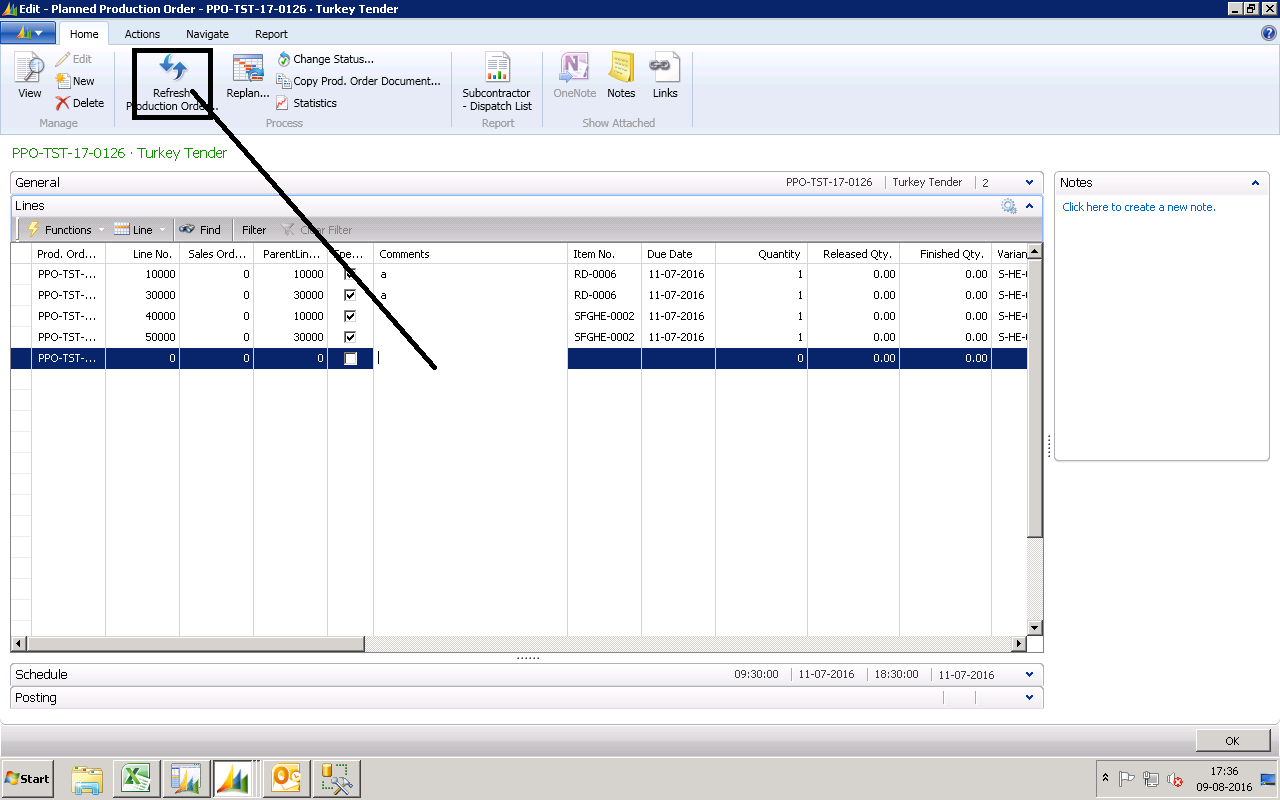
4338.UU.png

Manish

*This post is locked for comments

I have the same question (0)
  • Suggested answer
    Binesh Profile Picture
    7,887 on at

    see the Report 99001025 "Refresh Production Order"

    you will get idea.

  • Suggested answer
    Rabin Profile Picture
    2,976 on at

    Hi Manish,

    Refresh production Order recalculates the values in the line.

    As suggested by [tag:Binesh] you should look into the Report that is run when you click on that Refresh icon. It then carries out action and repopulates the field as per the calculation...

    If you want to keep the previous Comments just goto the report and hide the code that is populating the Description...

  • manish.yadav Profile Picture
    1,893 on at

    You mean i need to disable the code related the comments.

    manish

  • Suggested answer
    Rabin Profile Picture
    2,976 on at

    Hi,

    it depends on what you want...  

    If all the line of Record are being generated from another table and the code is not keeping the previous record then you might have to do some more coding to hold the Description data(may be some Temp Table with some reference) and once the Refresh function is carried out you can populate those Descriptions as per previous references...

    You have to find out what you want to do and how the code is behaving... Try

    Note: Try to study how the Values are being populated in the line after you click on Refresh Icon... you will understand what do to...

    -------------------

  • Suggested answer
    Alexander Ermakov Profile Picture
    28,096 on at

    It depends, what do you want to put in the Comments field, and where this information should be visible further. If this is just an info, related to the line of this document, then in order not to modify the code much, you can add a new (Comment2) field to the lines table and reveal it on the lines of production order; then, those should not be overwritten if you refresh the order.

Under review

Thank you for your reply! To ensure a great experience for everyone, your content is awaiting approval by our Community Managers. Please check back later.

Helpful resources

Quick Links

Introducing the 2026 Season 1 community Super Users

Congratulations to our 2026 Super Stars!

Meet the Microsoft Dynamics 365 Contact Center Champions

We are thrilled to have these Champions in our Community!

Leaderboard > 🔒一 Microsoft Dynamics NAV (Archived)

Last 30 days Overall leaderboard

Featured topics

Product updates

Dynamics 365 release plans
