web
You’re offline. This is a read only version of the page.
close
Skip to main content

Announcements

No record found.

News and Announcements icon
Community site session details

Community site session details

Session Id :
Microsoft Dynamics CRM (Archived)

How do I order the side navigation in Portals?

(0) ShareShare
ReportReport
Posted on by 440

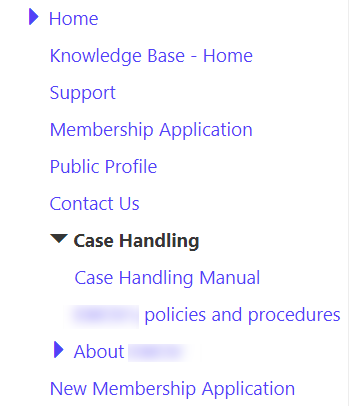
I have attempted to include the side navigation using {% include 'side_navigation' %}  on a web template, but can't work out how to order the links it shows.  I have also found the only way to not include a link is to have it in Draft (not Published).  Is this correct, and how do I get the links in a certain order.  I have tried using the display order field on the child pages, but this doesn't seem to work.

Thanks

Simon
side_5F00_navigation.png

*This post is locked for comments

I have the same question (0)
  • Suggested answer
    Nicholas Hayduk Profile Picture
    2,863 on at

    Hi Simon,

    I can confirm that the display order should be respected when using the 'side_navigation' liquid snippet.  Once you made your changes to the display order, did you clear the portals cache?  The easiest way to do that is to go to the following url (replacing it with your actual portal url) as a Portal administrator, and click the Clear Cache button:

    yourportal.microsoftcrmportals.com/.../about

    As for hiding links, both web pages and web files have an attribute called "Hidden From Sitemap".  If you check this box, they should no longer appear in any navigation.

    Also, it can also be useful to see the Liquid code that actually generates the markup.  Since Microsoft released the full source code of Portals v8.3, you can see the full Liquid code for 'side_navigation':

    github.com/.../side_navigation.liquid

    Nick

  • Suggested answer
    Arpit Shrivastava Profile Picture
    7,518 User Group Leader on at

    Hi Simon,

    Weblinks display order is the only setting which defines the order of Side Navigation Links too.

    As suggested by Nicholas, please clear portal cache and try it should work.

    If my answer helped to resolve your issue, kindly verify it by clicking 'Yes'. It would be helpful to the other community members seeking to resolve a similar issue.

    Cheers
    Arpit
    https://arpitmscrmhunt.blogspot.in

Under review

Thank you for your reply! To ensure a great experience for everyone, your content is awaiting approval by our Community Managers. Please check back later.

Helpful resources

Quick Links

Introducing the 2026 Season 1 community Super Users

Congratulations to our 2026 Super Stars!

Meet the Microsoft Dynamics 365 Contact Center Champions

We are thrilled to have these Champions in our Community!

Congratulations to the April Top 10 Community Leaders

These are the community rock stars!

Leaderboard > 🔒一 Microsoft Dynamics CRM (Archived)

#1
ScottDurow Profile Picture

ScottDurow 2

#2
GJones Profile Picture

GJones 1

Last 30 days Overall leaderboard

Featured topics

Product updates

Dynamics 365 release plans
