web
You’re offline. This is a read only version of the page.
close
Skip to main content

Notifications

Announcements

Community site session details

Community site session details

Session Id :
Business Central forum

Unable to couple or synchronize Item Price List into CRM

(1) ShareShare
ReportReport
Posted on by

Hello,

Currently i'm doing a manual synchronization or coupling from Dynamics BC to Dynamics 365 and visa-versa for Sales Integration. I am able to sync records for other mapping entities (e.g., Salespeople, UOM, Currency,etc.) except "Customer Price Group" to "Price List" (I created a record CPG-Retail in D365 BC and linked it with PL-Retail in D365 Sales). An example of a product I coupled is shown below:
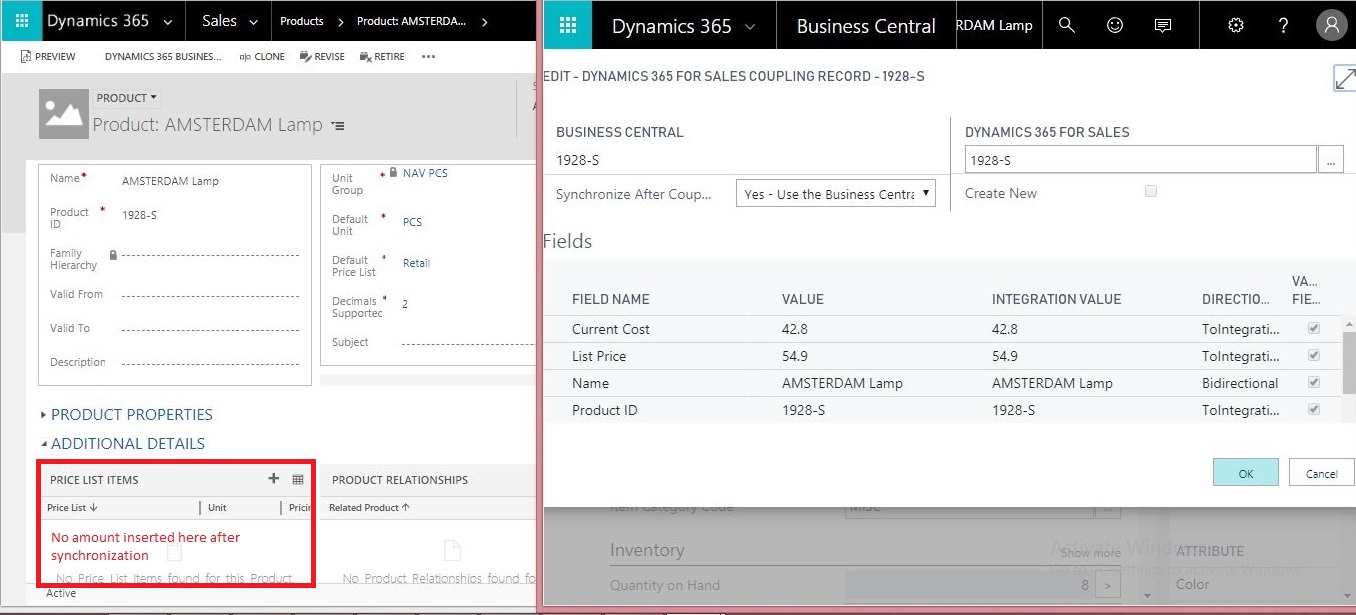
dynBC_5F00_to_5F00_dyn365_5F00_pricelist.JPG

Not sure what is going wrong here so would appreciate your suggestions!

Thank You

Categories:
I have the same question (0)
  • Amayara_2020 Profile Picture
    15 on at

    i am having the same issue. Do have solution for this issue?

  • Timussch Profile Picture
    on at

    I'm eager to see when they'll get this fixed. It's been 6 months :(. Btw, I got another error message. That's why I did not link them together...

  • Suggested answer
    Community Member Profile Picture
    on at

    Hi Timussch,

    Got it resolved!

    Found this link and it seems even you were facing the same issue. As pointed out by Ivan, a validation plugin(PreProductPriceCreateReadOnlyCheck) is applied on D365 Sales SDK which had to be deactivated. Though this is a temporary solution, I hope that Microsoft PSA team fix this bug in their upcoming updates.

  • Community Member Profile Picture
    on at

    Hi,

    Apologies for the late reply. I cleared all records and re-coupled the entities. Below are the synchronization log of Business Central for:

    1. Unit of Measure

    currency_5F00_coupling.PNG

    2. Currencies

    currency_5F00_coupling.PNG

    3. Items

    product_5F00_coupling.PNG

    As you can see the item synchronization failed for the same product which was earlier inserted into CRM. Not sure what the issue is now, would appreciate your help!

    Regards

  • Timussch Profile Picture
    on at

    Did the UOM sync ran correctly?

Under review

Thank you for your reply! To ensure a great experience for everyone, your content is awaiting approval by our Community Managers. Please check back later.

Helpful resources

News and Announcements

Season of Giving Solutions is Here!

Quick Links

November Spotlight Star - Khushbu Rajvi

Congratulations to a top community star!

Forum Structure Changes Coming on 11/8!

In our never-ending quest to help the Dynamics 365 Community members get answers faster …

Dynamics 365 Community Platform update – Oct 28

Welcome to the next edition of the Community Platform Update. This is a status …

Leaderboard > Business Central

Last 30 days Overall leaderboard

Featured topics

Product updates

Dynamics 365 release plans
