web
You’re offline. This is a read only version of the page.
close
Skip to main content

Notifications

Announcements

No record found.

Community site session details

Community site session details

Session Id :
Small and medium business | Business Central, N...
Suggested Answer

Error - The field No. of table Sales Line contains a value (RREN) that cannot be found in the related table (Resource)

(0) ShareShare
ReportReport
Posted on by 662

Hi all,

One of my users in Finance department experience this error when trying to close.

Please advise.

joycelyn.png

Thank you!

I have the same question (0)
  • Suggested answer
    Gulshan Shubham Profile Picture
    2,210 on at

    Hi,

    It seems that you are trying to select a Resource on your Sales Line which actually doesn't exist in the Master. So, please make sure the related resource (RREN) exist in your Resource Master.

    Thanks. Hope it helps.

  • Suggested answer
    Nitin Verma Profile Picture
    21,708 Moderator on at

    You need to define your Resource master with this PREN code, and then try to select on Line TAB. Hope it will help you.

  • Suggested answer
    jerome77 Profile Picture
    on at

    Hi

    Is this resource exists?

    Kind regards

  • joshlabtech Profile Picture
    662 on at

    Hi Gulshan,

    Thank you.

    May I know where and how can I find this related resource?

  • joshlabtech Profile Picture
    662 on at

    Hi Jerome,

    Thank you.

    May I know where and how can I find this related resource?

  • Anik22 Profile Picture
    85 on at

    Go to the resource Master & create the new resource. Create a new code with RREN

  • joshlabtech Profile Picture
    662 on at

    MicrosoftTeams_2D00_image-_2800_2_2900_.png

    The Resource List already has the RREN.

  • Suggested answer
    jerome77 Profile Picture
    on at

    Hi

    I just tried to enter a resource that does not exist using NAV 2018 last update, error message is different:
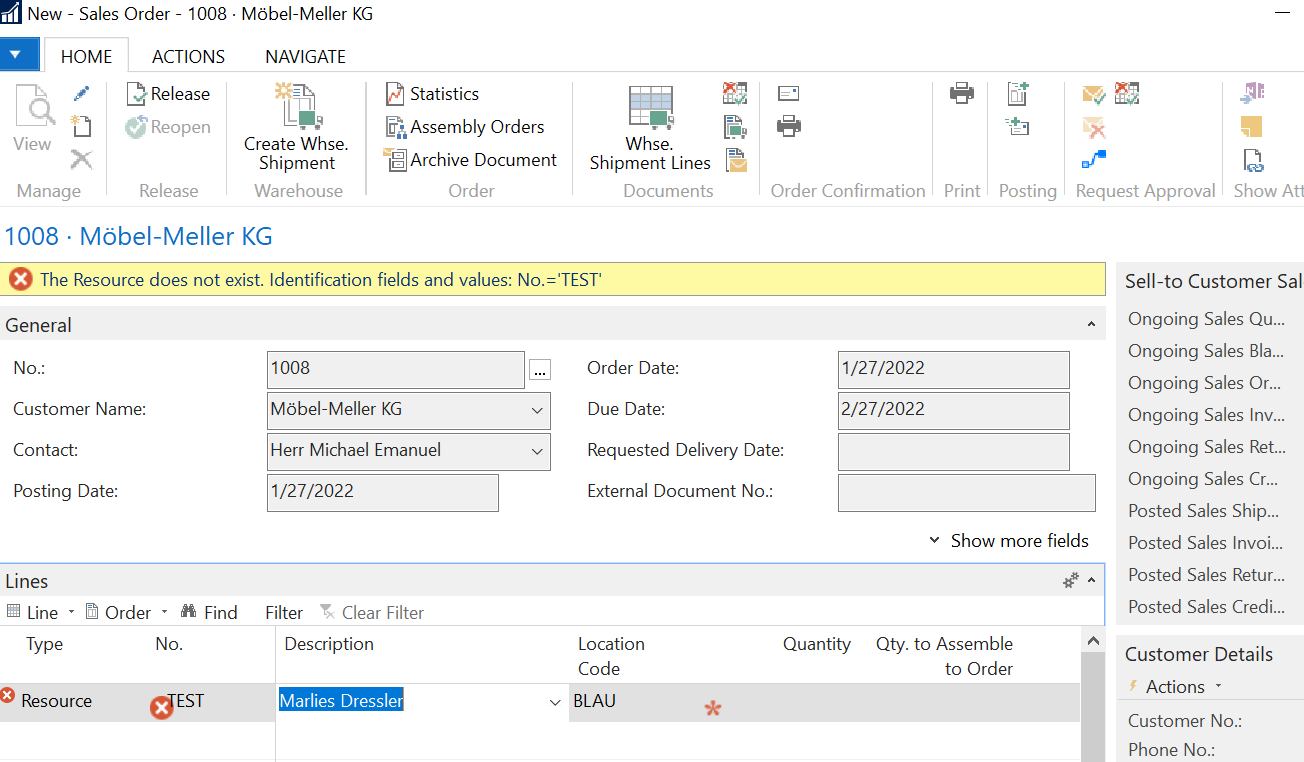
    pastedimage1601541102936v1.png

    You may need to debug or ask your partner to debug that

    As a test, if you select another resource name, does it work? Or is it same issue with all resources?

    If all resources are failing, then... maybe permission access but I would expect a different error message.

    Is it first time user tries to use a resource?

    Jerome

  • Anik22 Profile Picture
    85 on at

    If your type is resource...you can only use those names which are there on the list. You cannot type any name which is not there is the resource list

  • joshlabtech Profile Picture
    662 on at

    Hi,

    So apparently, she was able to create that field for every other customers. All the fields being same except that all other customers don't have the Special Service ticked. I tried to untick that but I was not able to unticked.

    1. Any idea where I can go to untick it?

    2. Also what does Special Service means?

    Appreciate all your help rendered.

    joy1.png

    joy2.png

Under review

Thank you for your reply! To ensure a great experience for everyone, your content is awaiting approval by our Community Managers. Please check back later.

Helpful resources

Quick Links

Responsible AI policies

As AI tools become more common, we’re introducing a Responsible AI Use…

Neeraj Kumar – Community Spotlight

We are honored to recognize Neeraj Kumar as our Community Spotlight honoree for…

Leaderboard > Small and medium business | Business Central, NAV, RMS

#1
OussamaSabbouh Profile Picture

OussamaSabbouh 2,238

#2
YUN ZHU Profile Picture

YUN ZHU 773 Super User 2025 Season 2

#3
Sumit Singh Profile Picture

Sumit Singh 630

Last 30 days Overall leaderboard

Featured topics

Product updates

Dynamics 365 release plans



