web
You’re offline. This is a read only version of the page.
close
Skip to main content

Announcements

No record found.

News and Announcements icon
Community site session details

Community site session details

Session Id :
Microsoft Dynamics AX (Archived)

Depreciation Journal value is incorrect if it's generated with another fixed asset number

(0) ShareShare
ReportReport
Posted on by

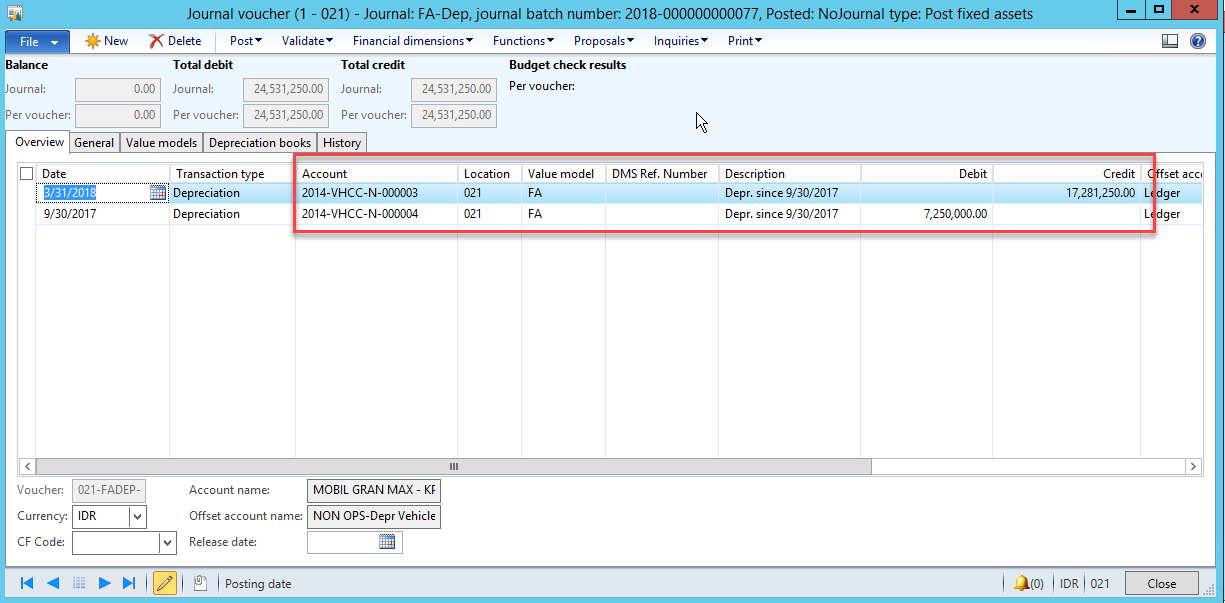
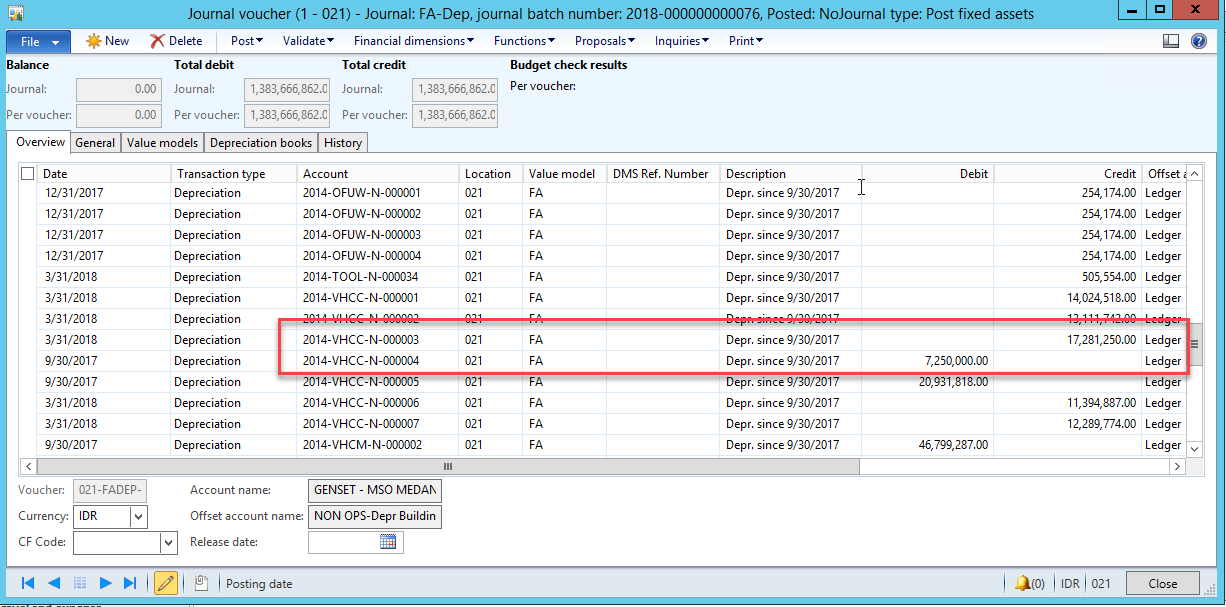
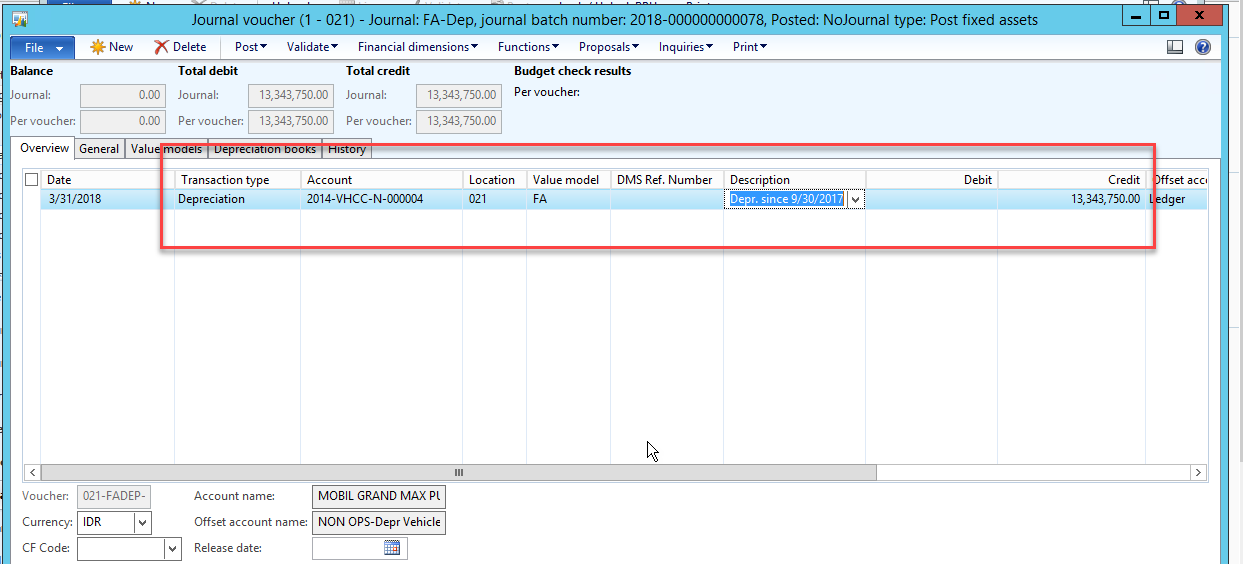
I have a problem about depreciation journal in AX 2012. I give an example (from dev environment) of fixed asset number 2014-VHCC-N-000004. At this number, if I do a depreciation journal involving another fixed asset number, the value in the journal is wrong. If my journal of depreciation is only with fixed asset numbers it (2014-VHCC-N-000004), the value that appears in the journal, is true. Is there a wrong setting? i beg for this help.

Thank you,

vega
2018_2D00_04_2D00_17_5F00_10_2D00_41_2D00_49.png2018_2D00_04_2D00_17_5F00_10_2D00_39_2D00_35.png2018_2D00_04_2D00_17_5F00_10_2D00_29_2D00_05.png

*This post is locked for comments

I have the same question (0)
  • Ludwig Reinhard Profile Picture
    Microsoft Employee on at

    Hello vega,

    Can you explain what exactly is wrong with the value in the journal?

    How can you assess that the value is wrong?

    Please also mention in which journal you identified the wrong values because the screenprints show three different journals no. 76, 77 and 78.

    What is the relationship of fixed asset ending with no. 3 and the one ending with no. 4?

    Would be great if you could clarify.

    Many thanks and best regards,

    Ludwig

  • Community Member Profile Picture
    on at

    for fixed asset number 2014-VHCC-N-000004 it should be in the credit column. If I do a depreciation journal by selecting only the fixed asset number 2014-VHCC-N-000004, then the depreciation journal results are correct.

    But if I do a depreciation journal with 2 fixed asset numbers or more (for example, fixed asset number 2014-VHCC-N-000004 and 2014-VHCC-N-000003), then the value of fixed assets 2014-VHCC-N-000004, wrong. Because it goes to the debit column and its value is also incorrect.

    All the journal numbers, 76, 77 and 78 show an example of a fixed asset journal with numbers 2014-VHCC-N-000004, and the results differ from each journal

  • Khaled Alloud Profile Picture
    3,658 on at

    Strange! Can you attached a screenshot for the FA balance inquiry to see the asset values.

  • Ludwig Reinhard Profile Picture
    Microsoft Employee on at

    Hello Vega,

    Many thanks for this update.

    Let's take journal no 77 as an example.

    Why is it that the depreciation for the fixed asset 2014-VHCC-N-000004 is run as of 09/30/2017 but the depreciation for the other asset is run as of 03/31/2018?

    Can this date difference be an issue?

    In journal 78 where the depreciation is run until 03/31/2018 for fixed asset 2014-VHCC-N-000004, the amount seems to be on the correct side.

    How did you create the lines in journal 78?

    Manually or by using a depreciation proposal?

    Best regards,

    Ludwig

  • Community Member Profile Picture
    on at

    Depreciation-fixed-asset.png

    I have one example of fixed asset numbers where I try to depreciate with 2 different fixed asset numbers.

    journal fixed asset number : 2014-VHCM-N-000002, the value is different. If 2014-VHCM-N-000002, I combined with 2014-VHCM-N-000007, the result is correct, but if with 2014-VHCM-N-000006 the result is wrong (at debit). I created this journal by using a depreciation proposal.

    why fixed asset number 2014-VHCM-N-000002 of results can be different?

Under review

Thank you for your reply! To ensure a great experience for everyone, your content is awaiting approval by our Community Managers. Please check back later.

Helpful resources

Quick Links

Introducing the 2026 Season 1 community Super Users

Congratulations to our 2026 Super Stars!

Meet the Microsoft Dynamics 365 Contact Center Champions

We are thrilled to have these Champions in our Community!

Congratulations to the March Top 10 Community Leaders

These are the community rock stars!

Leaderboard > 🔒一 Microsoft Dynamics AX (Archived)

#1
Joris dG Profile Picture

Joris dG 5

#2
Andrew Jones a1x Profile Picture

Andrew Jones a1x 2

#3
Basit Profile Picture

Basit 1

Last 30 days Overall leaderboard

Featured topics

Product updates

Dynamics 365 release plans