web
You’re offline. This is a read only version of the page.
close
Skip to main content

Announcements

No record found.

News and Announcements icon
Community site session details

Community site session details

Session Id :
Microsoft Dynamics AX (Archived)

Wrong planned transfer order start date

(0) ShareShare
ReportReport
Posted on by

Hello everyone.

We have a problem in calculating of delivery lead times between tow warehouses in master planning.

Situation:

Item: Z0001, default order type = Production, Inventory lead time = 1 day, Item coverage settings: transfer from production warehouse 13 to sales warehouse 11, Transfer lead time = 3 days. Item Z0001 has no route, only BOM, so MP considers lead time.

Sales order: from sales warehouse 11, sales Qty = 1, delivery date = 2017-11-30

Problem:

After master scheduling:

In case when item Z0001 is on hand in production warehouse 13, master planning creates transfer order to sales warehouse 11 with transfer order start date 2017-11-27 and transfer order end date 2017-11-30 (the date of sales order delivery), that is correct.
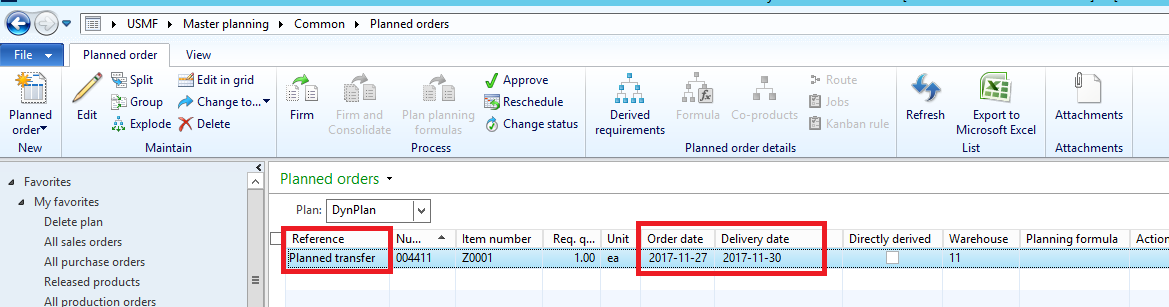
TO_5F00_correct_5F00_dates.png

In case, when there is no on hand in production warehouse 13, master planning creates tow planned orders, transfer and production, but planed orders start and end dates are wrong: MP creates planned production order with start 2017-11-29 and end 2017-11-30, and then planned transfer order with start in 2017-11-30 and end 2017-12-05, that is definitely wrong. In my opinion, planned transfer order dates must be as in first case (with on hand), transfer order start date 2017-11-27 and transfer order end date 2017-11-30 and then planned production order with start 2017-11-27 and end of 2017-11-26.
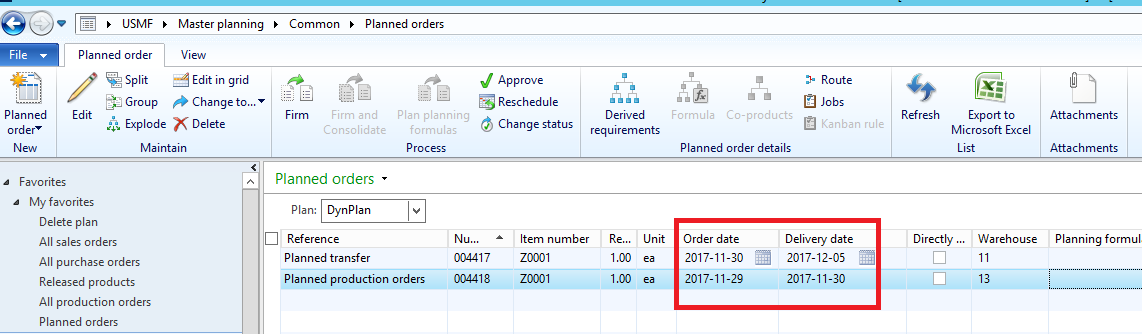
TO_5F00_wrong_5F00_dates.png

Please explain to me why a’m getting such a wrong dates? 

*This post is locked for comments

I have the same question (0)
  • Guy Terry Profile Picture
    28,972 Moderator on at

    Master Planning should want to do what you want it to do:

    PlannedOrder.jpg

    So you must have some setting which is causing it not to.

    Do you have an Item coverage record for warehouse 13? If yes, can we get a screenshot of the 'General' tab. If not, can we get a screenshot of the first two tabs of the Item's coverage group?

  • Community Member Profile Picture
    on at

    Hi,

    there are:

    Item coverage

    Coverage_5F00_group_5F00_Req.png

    Coverage group parameters

    Coverage_5F00_group_5F00_Req.png

    and Master Plan parameters

    DynPlan_5F00_param.png


    I also believe that MP should do what I want it to do, but I’m missing something and expecting any help.  :)

  • Weaveriski Profile Picture
    23,620 Moderator on at

    Show the explosion of the planned production order - is all stock on hand to start immediately?

    Are you infinite or finite (if finite do you have available capacity?)?

    What are the margins set on the plan?

    Do you have dynamic days configured? Wondering if there is impact here at the component level.

  • Community Member Profile Picture
    on at

    Hi Steven.

    All stock is on hand.

    Item Z0001 has no route, only BOM, so MP considers lead time.

    There are all MP parameters in my previous post. Please take a look.

    BOM component is on hand.

    Could you please replicate my simple case in your system and share the setup?

  • Weaveriski Profile Picture
    23,620 Moderator on at

    In your post you question is about dates where there is no on hand.

    The plan screen does not show the setting I asked for as it is cut off.

    The explosion would give us more information hence the request.

    What actually is your question if it is not to do with the date change when there is no stock and the production order is later than the transfer order with stock? I am confused. You now say all stock is on hand, so why would a production order be created anyway?

  • Community Member Profile Picture
    on at

    Steven,

    sorry, row material for Planned production order is on hand.

    MP has no safety margins:

    3056.Explosion.png


    There is explosion:

    3056.Explosion.png

    The main question is why MP add future dates, instead of planning backward from  2017-11-30? I really do not understand.

  • Weaveriski Profile Picture
    23,620 Moderator on at

    Hi Anastasija

    Thank you for the additional information, could you tell me what is the demand on the 30-11 (I would like to reproduce to check)

    What are the action and future messages it is telling you?

    What CU are you on?

  • Community Member Profile Picture
    on at

    I’m doing this tests on MS contoso DEMO app, AX 2012 R3 (app version 6.3.5.000.133). 

    Demand: sales order of  1 ea, item Z0001, from sales warehouse 11, Requested ship and Requested receipt dates are 2017-11-30, Delivery date control = None. There are no any lead times on Customer or any else.

    Futures and Action:

    Future_5F00_action.png

  • Weaveriski Profile Picture
    23,620 Moderator on at

    That application version is the same as the one I have used. I have copied the settings you defined and I have no issue, it works as expected, no action messages, no future messages. However your plan screen shots are not from that version, you are missing one element. The field does not matter, but I would question your screen shot and version combination here, your screen shot for the second half of the plan is also not a follow on from the first, but the data does not matter for your issue.

    I suggest checking the calendar setup against your coverage group or warehouse, it is understanding why it is delayed when you have stock and the means to make it - the calendar for the lead time is the only thing I can think of. 

    2017_2D00_11_2D00_17_5F00_23_2D00_24_2D00_30.jpg

    2017_2D00_11_2D00_17_5F00_23_2D00_24_2D00_30.jpg

  • Community Member Profile Picture
    on at

    Hi, Steven.

    I‘m still searching for solution, maybe you can  take a look at explosion explanation from sales order.

    I do not understand why AX planned production order date is 2017-11-30 and systems calculates future dates.

    expl2.png

     expl2.png

    About app version: maybe you have some additional hotfixes installed?

    Can you take a look at code in your version, Table ReqTrans.createTransferDemand.

    If we using transferDemand.ReqDateDlvOrigin system works as expected.

     8117.code.png

Under review

Thank you for your reply! To ensure a great experience for everyone, your content is awaiting approval by our Community Managers. Please check back later.

Helpful resources

Quick Links

Introducing the 2026 Season 1 community Super Users

Congratulations to our 2026 Super Stars!

Meet the Microsoft Dynamics 365 Contact Center Champions

We are thrilled to have these Champions in our Community!

Congratulations to the March Top 10 Community Leaders

These are the community rock stars!

Leaderboard > 🔒一 Microsoft Dynamics AX (Archived)

#1
CP04-islander Profile Picture

CP04-islander 39

#2
Michel ROY Profile Picture

Michel ROY 14

#3
imran ul haq Profile Picture

imran ul haq 8

Last 30 days Overall leaderboard

Featured topics

Product updates

Dynamics 365 release plans
