web
You’re offline. This is a read only version of the page.
close
Skip to main content

Announcements

No record found.

News and Announcements icon
Community site session details

Community site session details

Session Id :
Microsoft Dynamics AX (Archived)

error while creating inventory transfer journal

(0) ShareShare
ReportReport
Posted on by

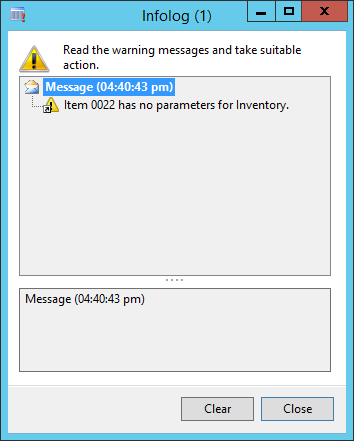
hello everyone.........whenever i try to enter the item number in inventory transfer journal an info log appears that "item 0022 has no parameters for inventory" can anyone tell me why is it so??
6545.Error.PNG

*This post is locked for comments

I have the same question (0)
  • Suggested answer
    Ludwig Reinhard Profile Picture
    Microsoft Employee on at

    Hi RIDA ALI,

    Can you open the release products page and check what item/inventory/item-model group has been assigned to your product? It seems that something is missing there.

    Best regards,

    Ludwig

  • Community Member Profile Picture
    on at

    Hi Ludwig Reinhard ,

    every thing has been assigned, we can generate sales order and purchase order against that item and system throws no error. Only at the time of adjustment and transfer entry this error appears.

    when i double click that infolog it takes me to the AOT (form) as shown below

    0841.aot.PNG

  • Ludwig Reinhard Profile Picture
    Microsoft Employee on at

    Hi RIDA ALI,

    If you minimize the AOT you should be able to see the method and the line that triggers the error. Can you share that?

    Can you also let us know what AX2012 version you operate?

    Best regards,

    Ludwig

  • Suggested answer
    axk Profile Picture
    925 on at

    Hi Rida,

    You are probably missing site specific order settings for the destination's invent dimension. Please check at Released products > Action Pane > Inventory > Site specific order settings. You should create a record for you site and warehouse.

  • Community Member Profile Picture
    on at

    when i minimize the AOT it shows the following code.

    3465.code.png

  • Ludwig Reinhard Profile Picture
    Microsoft Employee on at

    Hi RIDA ALI,

    Can you check the setup of your released product especially if a product type and product subtype have been correctly assigned.

    Your screenshot shows DAT on the top. Are you operating in the DAT default company? If so, have you tried making use of a different company environment?

    Best regards,

    Ludwig

Under review

Thank you for your reply! To ensure a great experience for everyone, your content is awaiting approval by our Community Managers. Please check back later.

Helpful resources

Quick Links

Introducing the 2026 Season 1 community Super Users

Congratulations to our 2026 Super Stars!

Congratulations to our 2025 Community Spotlights

Thanks to all of our 2025 Community Spotlight stars!

Leaderboard > 🔒一 Microsoft Dynamics AX (Archived)

#1
Joris dG Profile Picture

Joris dG 5

#2
Sagar Suman Profile Picture

Sagar Suman 2 Super User 2026 Season 1

#2
Alexey Lekanov Profile Picture

Alexey Lekanov 2

Last 30 days Overall leaderboard

Featured topics

Product updates

Dynamics 365 release plans
