web
You’re offline. This is a read only version of the page.
close
Skip to main content
Community site session details

Community site session details

Session Id :
Small and medium business | Business Central, N...
Suggested Answer

Business Central Foreign Currency Vendor Payment

(0) ShareShare
ReportReport
Posted on by 247

Hi

In Dynamics 365 Business Central, the tenant account LCY is MYR

A purchase invoice has been created in USD. 

A payment has been sent to this vendor from the SGD bank account. 

Let's say the PI amount is $1000 USD and the payment amount is 1441.20 SGD.

What is the best way to record this? 

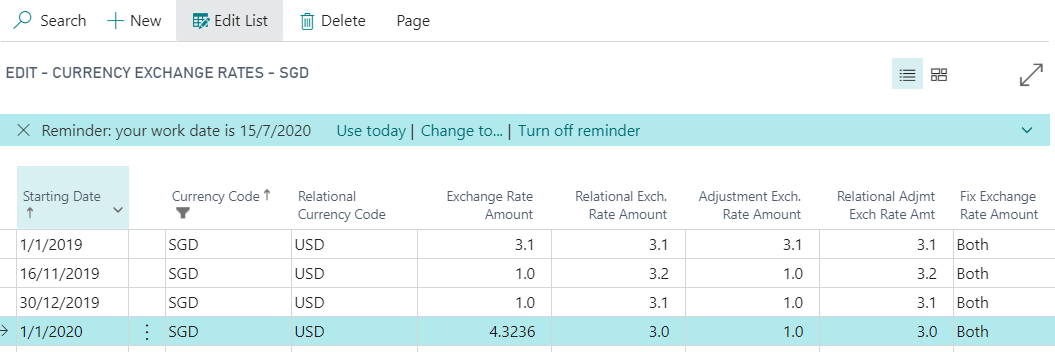
Exchange Table:

  • In Currencies SGD, set Relational Currency Code to USD 
  • Exchange Rate Amount = (SGD amount x Relational Exch. Rate Amount) / USD Amount 
  • Fix Exchange Rate Amount set as Both 

pastedimage1594905160196v1.png

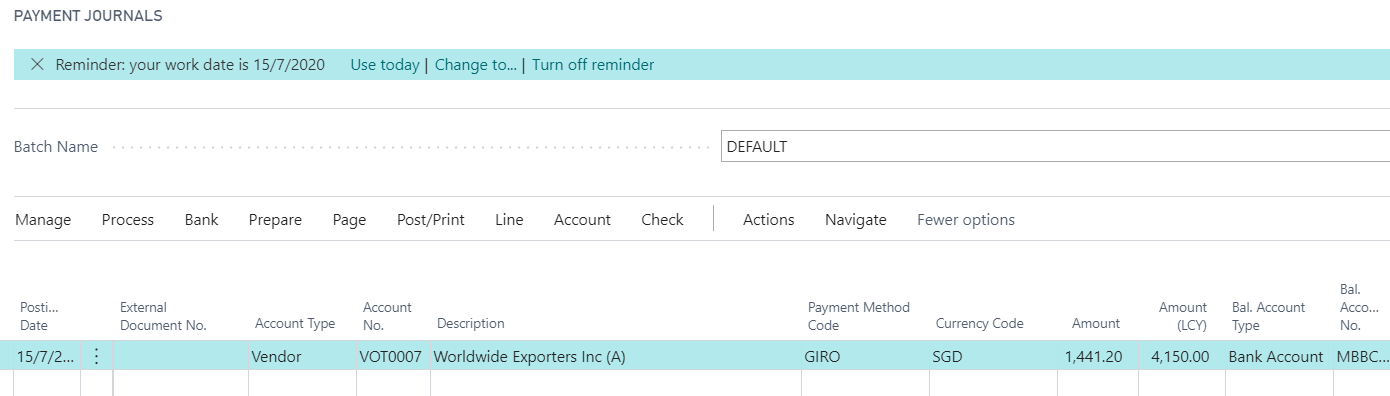
Payment Journal 

  • Choose Bank account in SGD
  • Amount field indicate SGD amount 
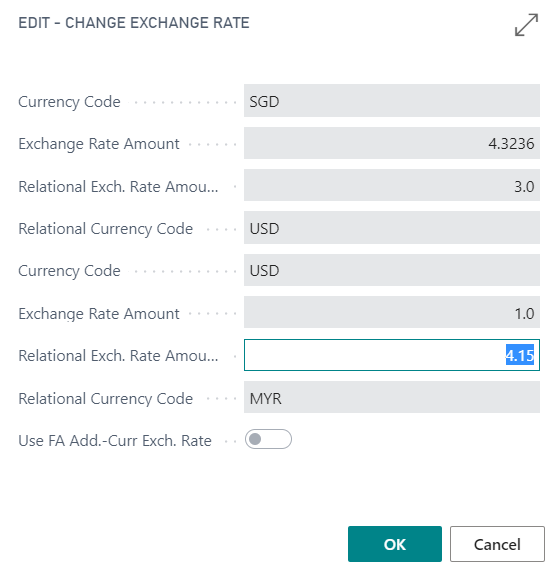
  • Amount (LCY) = USD amount x rate 

(1,441.20 / 3) x 4.3236 = 1,000.00

1,000.00 x 4.15 = LCY 4,150.00
pastedimage1594905563613v2.png

pastedimage1594905591530v4.png

If this way, we always need to reset the exchange table else system always count dual currency rate.

Any other best practice or correct way to do this would be much appreciated.

I have the same question (0)
  • Suggested answer
    Dirk Profile Picture
    on at
    RE: Business Central Foreign Currency Vendor Payment

    Hi,
    I would say that ... if you use currencies frequently ... you should work with accurate up to date exchange rates every day.
    I am irritated to see a Relational Exchange Rate Amount of 3 and also differences between the Exchange Rate Amount and the Adjusment Exchange Rate Amount, for example for 01.01.2020.
    If you work with up-to-date rates every day then there should not need to change the Exchange Rate in the Payment Journal

  • Terrance Morgan Profile Picture
    515 on at
    RE: Business Central Foreign Currency Vendor Payment

    Adj.Exchange Rates is needed (and works only with) OPEN invoices/payments. OPEN here means "Unapplied yet" - if it even is paid and has corresponding payment and zero balance on Card, AER will keep on going to adjust LCY amount.

    This is used for long-hanging unpaid invoices to correctly show the current debt amount in LCY if the invoice is in another currency.

    So, you should as soon as possible Apply invoice(s) to payment(s) to exclude them from AER adjustments. Besides, Applying will calculate and post the differences in ForEx rates to corresponding Gains/Losses account without special intervention from the user, and AER has nothing to do with fully Applied invoices/payments (where Remaining Amount = 0).

Under review

Thank you for your reply! To ensure a great experience for everyone, your content is awaiting approval by our Community Managers. Please check back later.

Helpful resources

Quick Links

Responsible AI policies

As AI tools become more common, we’re introducing a Responsible AI Use…

Neeraj Kumar – Community Spotlight

We are honored to recognize Neeraj Kumar as our Community Spotlight honoree for…

Leaderboard > Small and medium business | Business Central, NAV, RMS

#1
OussamaSabbouh Profile Picture

OussamaSabbouh 3,377

#2
Jainam M. Kothari Profile Picture

Jainam M. Kothari 2,696 Super User 2025 Season 2

#3
YUN ZHU Profile Picture

YUN ZHU 1,512 Super User 2025 Season 2

Last 30 days Overall leaderboard

Featured topics

Product updates

Dynamics 365 release plans