web
You’re offline. This is a read only version of the page.
close
Skip to main content

Notifications

Announcements

No record found.

Community site session details

Community site session details

Session Id :
Supply chain | Supply Chain Management, Commerce
Suggested Answer

External vendor catalog (E punch-out) - how long does it take to setup+coding external vendor catalog?

(0) ShareShare
ReportReport
Posted on by 2,438

Hi All, 

I'm trying to get an estimate of the time consumes for setting the catalog.  This function allows users to make purchases directly from vendors' websites.  I have 3 questions.

1. Does it require coding? 

2. How long does it take to set up 1 vendor catalog? 

3. After 1 vendor catalog is set up, can you import the list of vendors or do you have to set up 1 vendor catalog at a time?  Thanks so much!
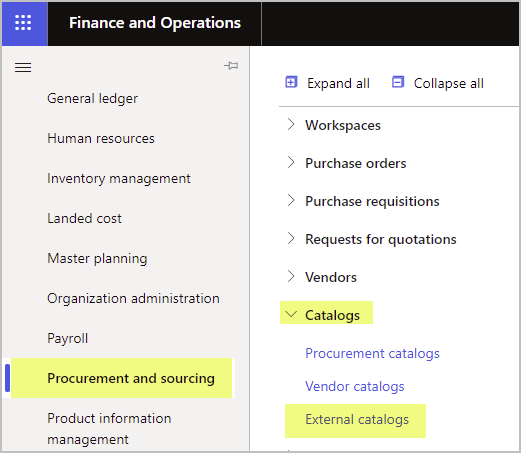
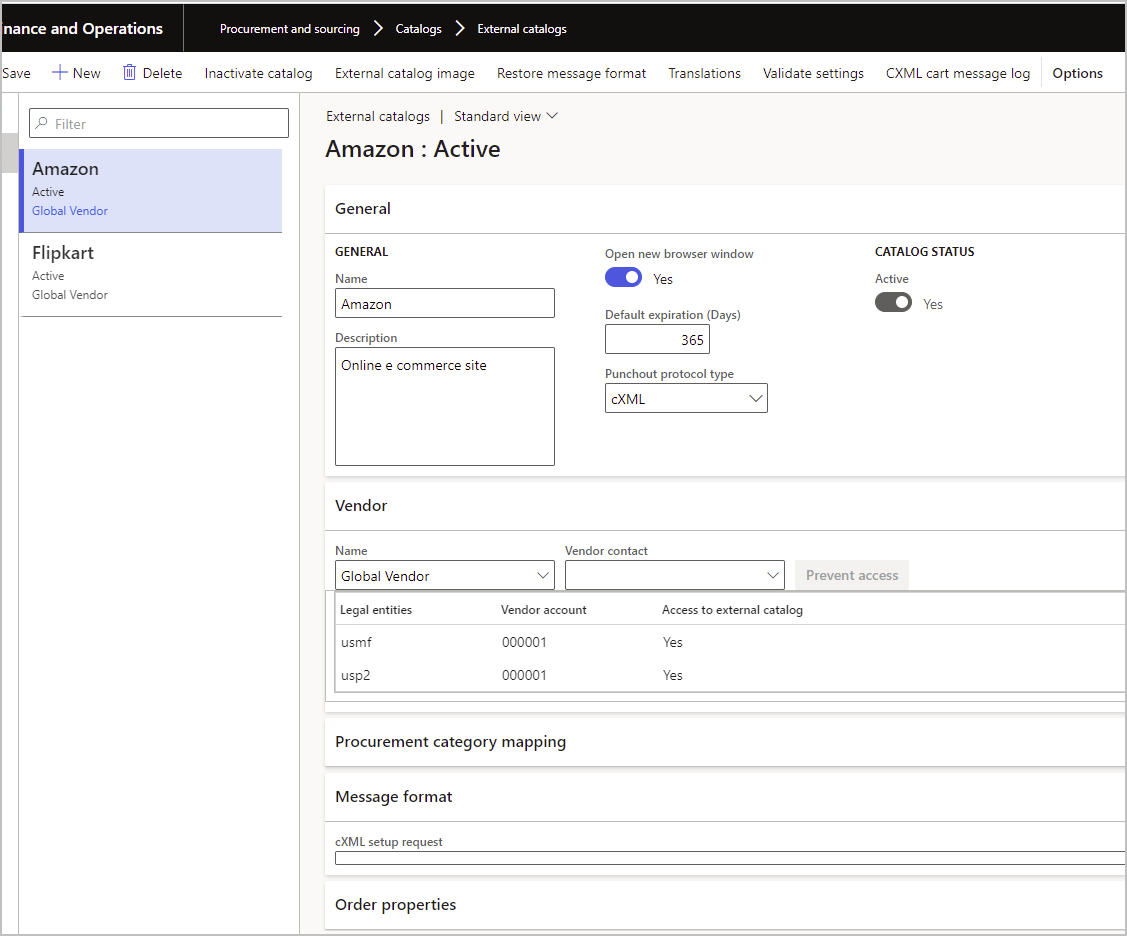
pastedimage1622740423375v1.png

pastedimage1622741000057v2.png

I have the same question (0)
  • Suggested answer
    Allen Dejoux Profile Picture
    on at

    1. No coding for base functionality

    2. Punchout does not require a vendor catalog.  I think those are used for Vendor Collaboration sites

    You just go to a site, shop, import cart and process the PR and then the PO.  In all my testing I have never set up a catalog for PunchOut

    3. Should not need to set one up.  

  • Guy Terry Profile Picture
    28,924 Moderator on at

    Hi Kim,

    There is no coding to do to setup Purchase requisition and Purchase order integration with a vendor's PunchOut website. You need four or five pieces of information from the vendor (Your user id, their user id, password, PunchOut website address (and possibly Purchase order website address, if it is not the same)).

    You do not need to create a Vendor catalog. You create a single External catalogue for each of your vendors that offers PunchOut capability (and if a vendor is used by multiple F&O Legal Entities, that External catalog needs only creating once).

    If you have the details, once you get the hang of it, it takes only 10 minutes to do the setup. However, when you start talking to vendors about enabling PunchOut, how quickly they respond should be factored in. In some cases, vendors have been ready to go within a week, but others I have dealt with the process takes several weeks. (And I am talking about vendors who already have PunchOut capability). 

  • lmai Profile Picture
    2,438 on at

    cXLM.jpg

    Thanks, Guy, for your response.  I can't seem to find the right instruction on how to set up the cXLM.  What steps do I need to configure from here?  Thanks so much!

  • Guy Terry Profile Picture
    28,924 Moderator on at

    I am finding that with new functionality, like this, the documentation is rather good. There are a couple of pages here on the setup for PunchOut.

    https://docs.microsoft.com/en-us/dynamics365/supply-chain/procurement/set-up-external-catalog-for-punchout

    If you minimize all the fast tabs on that screen, you should see a Message format tab, and a box headed cXML setup request.

    You just need to fill in the details you got from the vendor in there. Here's an example.


    FinOpsCOMPANY VENDORCOMPANY FinOpsCOMPANY secretpassword Dynamics 365 for Operations
    URL of Vendor's PunchOut website

    In the example, I have used Credential domain="NetworkID". I have also seen used Credential domain="DUNS". Your vendor will tell you which to use.

    deploymentMode can be set to "test" or "production".

Under review

Thank you for your reply! To ensure a great experience for everyone, your content is awaiting approval by our Community Managers. Please check back later.

Helpful resources

Quick Links

Responsible AI policies

As AI tools become more common, we’re introducing a Responsible AI Use…

Neeraj Kumar – Community Spotlight

We are honored to recognize Neeraj Kumar as our Community Spotlight honoree for…

Leaderboard > Supply chain | Supply Chain Management, Commerce

#1
Laurens vd Tang Profile Picture

Laurens vd Tang 303 Super User 2025 Season 2

#2
André Arnaud de Calavon Profile Picture

André Arnaud de Cal... 122 Super User 2025 Season 2

#3
Siv Sagar Profile Picture

Siv Sagar 105 Super User 2025 Season 2

Last 30 days Overall leaderboard

Product updates

Dynamics 365 release plans