web
You’re offline. This is a read only version of the page.
close
Skip to main content

Notifications

Announcements

No record found.

Community site session details

Community site session details

Session Id :
Microsoft Dynamics SL (Archived)

Quick Query - Custom Base View not adding to menu correctly

(0) ShareShare
ReportReport
Posted on by 641

Hello,

We are trying to implement a couple of custom SQL views for Quick Query but are running into some problems.

1) We've created the view(s) in SQL

2) We've updated Dynamics with the Database Maintenance tool (as per the manual)

3) We've created a new base query with the Quick Query Viewer (as per the manual)

The problems start when adding the new base query to the menu (Screen 9835000). For some reason the "Command Line for Application" selects a standard quick query view and not the custom one created for the screen. In the below screen shot the "QQ_poreceipt" should be "QQ_pjinvdetnew"

If we manually change the "QQ_" part of the command line and try to run the query we get this error.
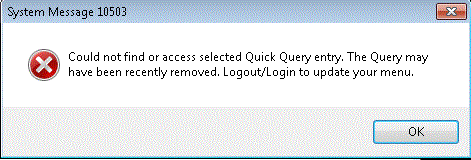

Any guidance would be appreciated

*This post is locked for comments

I have the same question (0)
  • Community Member Profile Picture
    on at

    Lewis,

    Based on the description,  it sounds like you left the Base Query View Name as QQ_poreceipt in the Quick Query Viewer.      If you look at the QQ Viewer> Save Base Query View does the base query view name display as QQ_poreceipt   instead of qq_pjinvdetNEW ?   

    In the past when items were added to QQ Viewer incorrectly,   deleting them and recreating in QQ Viewer has resolved my menu items.

  • Community Member Profile Picture
    on at

    I am having the same issue :-(

  • Erich Strelow F Profile Picture
    16 on at

    In order for a Quick Query to work, the following objects should exist:

    1. SQL view.
    2. The quick query.
    3. The screen number.
    4. The menu item.
    5. The access rights to the screen number.

    The screen ID (QQTESTS in your example) is only loosely bound to the QQ. That's why you have to enter the command line yourself at the Menu Item creation phase even though the screen number is correct.

    The quick query itself is the main object and it's not the same as the SQL View, but they usually have the same name, though. According to your post, is this object that's missing somehow. This is what you create inside QQ viewer when asked for a screen id, and related module.

    Please try to debug this by querying the SYS.QVCatalog table. There should be a row for QQ_pjinvdetnew and maybe it's missing.

    Please also consider that the SL menu has to be rebuilt on run-time in order for the changes to apply. This can be acomplished simply by logging out from SL and entering again. Sometimes old menu definitions are kind of sticky. In order to force the menu rebuild, you should delete a Microsoft Dynamics SL\MenuCache folder located somewhere under the user profile. 

    On a weirdest twist, try to full qualify QQVI00.EXE on the menu item's command line. 

Under review

Thank you for your reply! To ensure a great experience for everyone, your content is awaiting approval by our Community Managers. Please check back later.

Helpful resources

Quick Links

Responsible AI policies

As AI tools become more common, we’re introducing a Responsible AI Use…

Neeraj Kumar – Community Spotlight

We are honored to recognize Neeraj Kumar as our Community Spotlight honoree for…

Leaderboard > 🔒一 Microsoft Dynamics SL (Archived)

Last 30 days Overall leaderboard

Featured topics

Product updates

Dynamics 365 release plans



