web
You’re offline. This is a read only version of the page.
close
Skip to main content

Notifications

Announcements

No record found.

Community site session details

Community site session details

Session Id :
Microsoft Dynamics CRM (Archived)

How to hide add new + button in a sub grid

(0) ShareShare
ReportReport
Posted on by

Hi ,

I have sub grid in the account entity called committee History sub grid , based on the selected contact details this sub grid reading relevant data from a custom entity called Committee. 

Now I want end user stop adding Committee details from the account entity form using the sub grid I have explain above. So I would like to hide the + (add new) button from the committee History sub grid in the account form.

I have tried ribbon work bench as Shivaram  mentioned below link, I tired the hide option.

https://community.dynamics.com/crm/f/117/t/244901

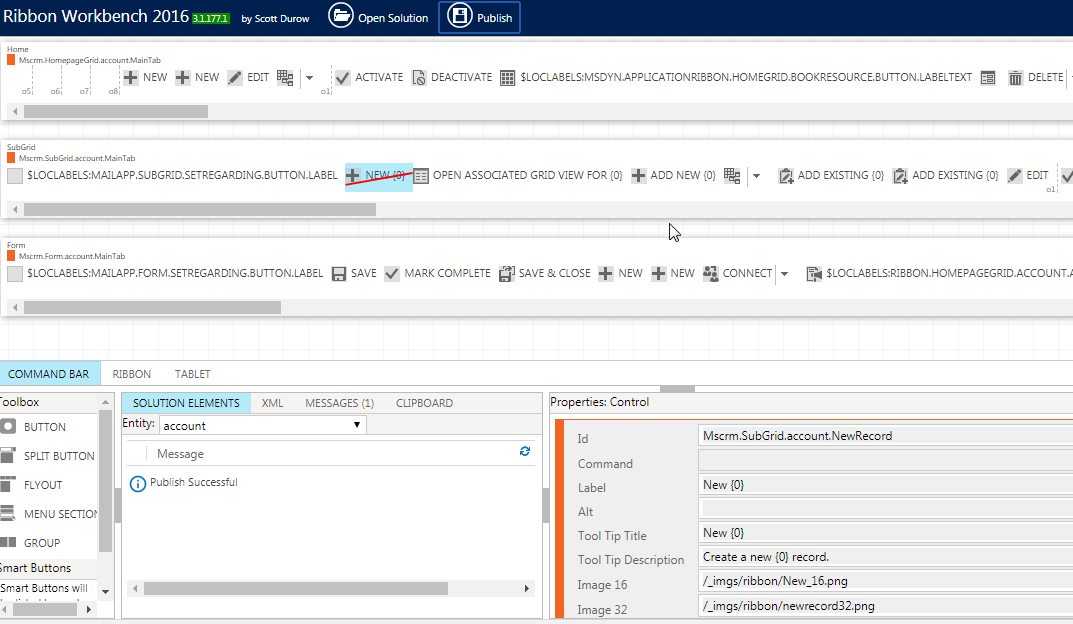
see below screenshot what I have done.
rib.png

I have done the same thing for committee history entity as well. I mean as shown above screenshot I have selected committee history for the entity from drop down and then hide the + in the sub grid section.

Can someone please help on this. still I can see the + button add successfully committee history record from the sub grid in the account form. 

Thanks.

*This post is locked for comments

I have the same question (0)
  • Karsten Wirl Profile Picture
    4,477 on at

    Hello Dineth.

    Do you mean the "+"-Button or the ADD-Button the the sub-grid?

    As far as i know you cannot hide the "+"-Button in subgrids.

    Kind regards,

    Karsten

  • Dineth Profile Picture
    on at

    + button on the sub grid ribbon as follows.

    subg.png

    Thanks.

  • Suggested answer
    khoait Profile Picture
    450 on at

    Hi Dineth,

    You may want to try hiding ADD NEW {0}, and two ADD EXISTING {0} if it is N:N relationship.

  • Suggested answer
    Karsten Wirl Profile Picture
    4,477 on at

    Hello Dineth...

    Try this:

    ribbonworkbench.uservoice.com/.../489288-show-or-hide-the-add-new-button-on-form-sub-grid

    Kind regards,

    Karsten

  • Dineth Profile Picture
    on at

    Khoa, it doent worked.

    Thanks.

  • Dineth Profile Picture
    on at

    @Karsten, I ll try this and let you know.

    Thanks.

  • Suggested answer
    khoait Profile Picture
    450 on at

    Hi Dineth. I'll put more details:

    •  If the relationship is 1:N and the primary entity is not business required, there are actually 2 "plus" icons in the subgrid
      • One is the ADD NEW {0}: when you click it, a new window open for you to create a new related record
      • One is the ADD EXISTING {0}: when you click it, a lookup field shows up for you to select an existing record.

    When you hide one of them, the other will show, so you need to hide both of them in the subgrid ribbon.

    • If the relationship is 1:N and the primary entity is business required, you always have to create a new related record (because you can't create any related record without primary entity lookup for select an existing one in the subgrid). So you just need to hide the ADD NEW {0}
    • If the relationship is N:N, you only have one option is to select an existing one. So you just need to hide the ADD EXISTING {0}

    In conclusion, just hide both of them and no need to worry about what relationship it is.

  • Suggested answer
    Aric Levin - MVP Profile Picture
    30,190 Moderator on at

    As mentioned by Khoa, if you completely want to eliminate the button, you need to hide the following three buttons from the subgrid command bar:

    ADD NEW {0}

    ADD EXISTING {0} - Appears twice.

    That's basically it.

Under review

Thank you for your reply! To ensure a great experience for everyone, your content is awaiting approval by our Community Managers. Please check back later.

Helpful resources

Quick Links

Responsible AI policies

As AI tools become more common, we’re introducing a Responsible AI Use…

Neeraj Kumar – Community Spotlight

We are honored to recognize Neeraj Kumar as our Community Spotlight honoree for…

Leaderboard > 🔒一 Microsoft Dynamics CRM (Archived)

#1
SA-08121319-0 Profile Picture

SA-08121319-0 4

#1
Calum MacFarlane Profile Picture

Calum MacFarlane 4

#3
Alex Fun Wei Jie Profile Picture

Alex Fun Wei Jie 2

Last 30 days Overall leaderboard

Featured topics

Product updates

Dynamics 365 release plans



