web
You’re offline. This is a read only version of the page.
close
Skip to main content

Notifications

Announcements

No record found.

Community site session details

Community site session details

Session Id :
Small and medium business | Business Central, N...
Answered

Inventory Analysis Report Total show same number for all column - Possible Bug

(0) ShareShare
ReportReport
Posted on by 15,529

Hi

I think this is [tag:bug]

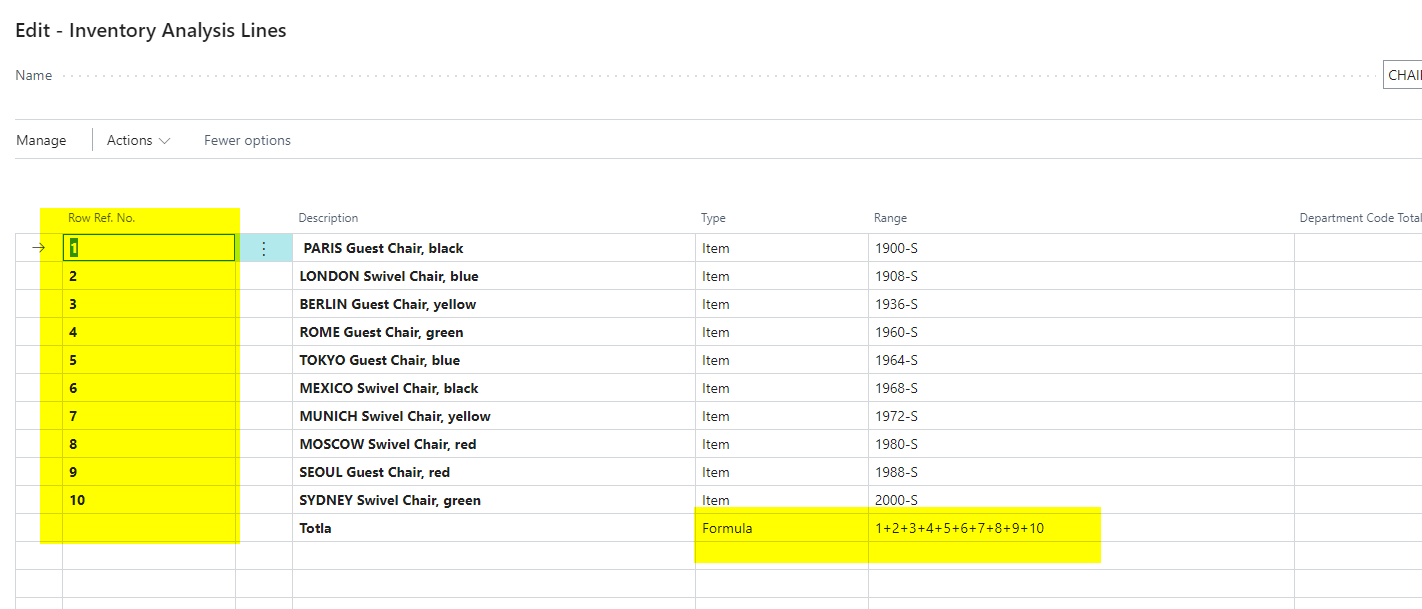
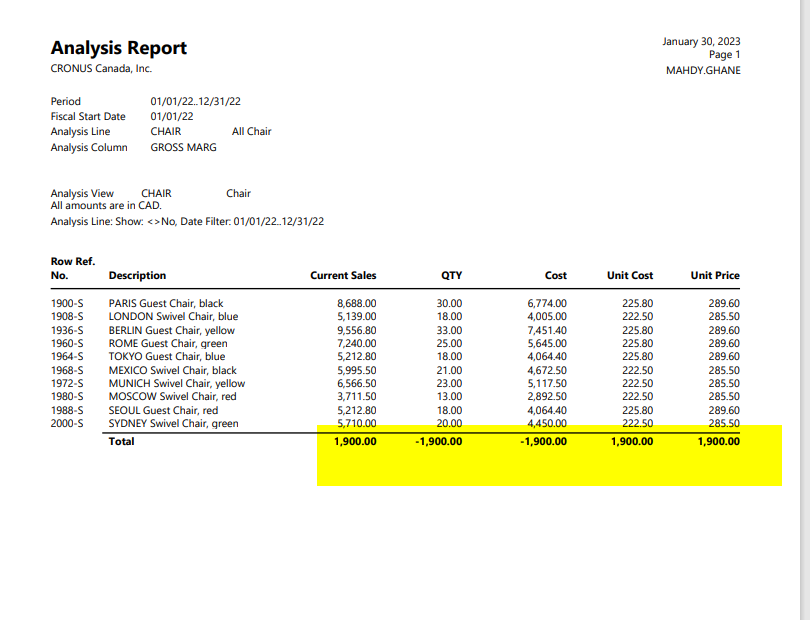
I tried to setup Inventory Analysis Report but when I run the report it shows same value for all column. See below report which all lines show as 1900. Also I copied my setup for lines and column as well. 

Then I went to line, change line numbers to 1,2,... then report is pulling the correct amount. 

Why when I use line number is row No I do not get the same result? Does report has the bug that does not recognize long numbers or number with dash (-)? Or am I missing something? 

Thanks
pastedimage1675098513354v1.png

pastedimage1675100002547v1.png

pastedimage1675098590951v3.png

With Row Number

pastedimage1675100046515v2.png

pastedimage1675100066318v3.png

I have the same question (0)
  • Suggested answer
    Marco Mels Profile Picture
    on at

    Hello,

    If you are not getting further responses from the community, please consider to raise a ticket to Microsoft via your partner or CSP.

    Thank you.

  • MahGah Profile Picture
    15,529 on at

    Hi Marco Mels

    Thanks. I asked CSP to open the ticket with Microsoft. But I think I know what is happening.

    Many Cronus parts have “-“ in their part no (it is common practice with many companies). But if user uses this part no as Row No (Part No will provide more clear report to user) then I think report consider "-" as negative and then creates wrong result.

    I will report back if Microsoft send any info.

  • Suggested answer
    MahGah Profile Picture
    15,529 on at

    Hi

    This is an answer from Microsoft if anyone has the same issue in the future:

    "Any time you have a special character, the 'formula type' fields will struggle.  The field being used to sort, is looking for alphameric values to know how to apply the formula.  I tried using single and double quotes, as well as parentheses, to prove this theory and I achieved the same results each time.  My recommendation will be to stay away from any kind of special characters."

  • Verified answer
    Marco Mels Profile Picture
    on at

    Thank you for sharing final outcome.

  • YouEl Profile Picture
    on at

    Where are the special characters in your example? I don't see any

Under review

Thank you for your reply! To ensure a great experience for everyone, your content is awaiting approval by our Community Managers. Please check back later.

Helpful resources

Quick Links

Responsible AI policies

As AI tools become more common, we’re introducing a Responsible AI Use…

Neeraj Kumar – Community Spotlight

We are honored to recognize Neeraj Kumar as our Community Spotlight honoree for…

Leaderboard > Small and medium business | Business Central, NAV, RMS

#1
OussamaSabbouh Profile Picture

OussamaSabbouh 2,577

#2
YUN ZHU Profile Picture

YUN ZHU 888 Super User 2025 Season 2

#3
Jainam M. Kothari Profile Picture

Jainam M. Kothari 778 Super User 2025 Season 2

Last 30 days Overall leaderboard

Featured topics

Product updates

Dynamics 365 release plans