web
You’re offline. This is a read only version of the page.
close
Skip to main content

Announcements

No record found.

News and Announcements icon
Community site session details

Community site session details

Session Id :
Microsoft Dynamics AX (Archived)

Production order Warning while 'Report as Finished'

(0) ShareShare
ReportReport
Posted on by 710

Hi,

I am doing a process of Production control and have been getting the following message when I click 'Report as Finished'. Please help understand what is that I am missing out on and how to fix this to continue to complete the Production order.
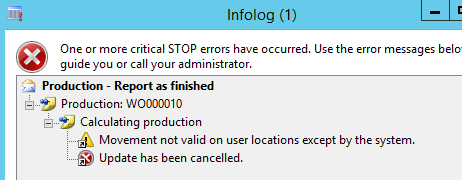
Report-as-Finished-message.png

Thank you,

Kind Regards,

Neeta

*This post is locked for comments

I have the same question (0)
  • Suggested answer
    Raheel-Khan Profile Picture
    1,371 on at

    Hi Neeta,

    Trust you are fine!

    Have you defined the type/profile for USER locations in Warehouse management parameters?

    This type will be assigned to locations automatically generated by the system to represent workers.

    This type should not be used for actual storage locations

    Warm Regards,

    Raheel

  • nyk Profile Picture
    710 on at

    Hi Raheel,

    I am well thank you..just that this message is not giving me way to proceed. Please correct me..From you message I understand that I should allocate a location in the Report as Finished form which does not belong to the User location profile id? Please let me know if I have learnt it correct. Appreciate your help.

    Thank you,

    Neeta

  • Suggested answer
    Weaveriski Profile Picture
    23,620 Moderator on at

    Hi Neeta

    You cannot report as finished into the user defined location, that is the location for the terminals when a user is producing work. Set the location to be an actual physical location in the warheouse, and check your location setup to ensure the physical ones are not user locations.

Under review

Thank you for your reply! To ensure a great experience for everyone, your content is awaiting approval by our Community Managers. Please check back later.

Helpful resources

Quick Links

Introducing the 2026 Season 1 community Super Users

Congratulations to our 2026 Super Stars!

Congratulations to our 2025 Community Spotlights

Thanks to all of our 2025 Community Spotlight stars!

Leaderboard > 🔒一 Microsoft Dynamics AX (Archived)

#1
Joris dG Profile Picture

Joris dG 5

#2
Sagar Suman Profile Picture

Sagar Suman 2 Super User 2026 Season 1

#2
Alexey Lekanov Profile Picture

Alexey Lekanov 2

Last 30 days Overall leaderboard

Featured topics

Product updates

Dynamics 365 release plans
