web
You’re offline. This is a read only version of the page.
close
Skip to main content

Notifications

Announcements

No record found.

Community site session details

Community site session details

Session Id :
Microsoft Dynamics GP (Archived)

Management Reporter 2012 Report Viewer email error

(0) ShareShare
ReportReport
Posted on by

We have MR 2012 installed and 2 users who access MR report designer and report viewer on a Terminal Server instance. I can click on a Report Group in the report viewer and then click on the email icon in the ribbon at the top of the application. A new Outlook email opens with a link to the report group that was highlighted. I can email that link to myself or others without issue. My other user cannot do the same. I'm the IT Director and have all the global and local admin permissions assigned to my login in Active Directory. My other user is only a standard remote desktop user. Are there any local or global permissions I need to be aware of that would grant other users the ability to email these linked reports out of MR? Here is a copy of the error message he receives.
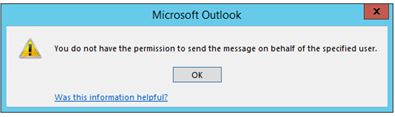
MR-Email-Error.JPG

Any suggestions would be helpful.

Thank you in advance.

*This post is locked for comments

I have the same question (0)
  • Community Member Profile Picture
    on at

    Update - I gave the other user administrative privileges on the terminal server and made sure the user had administrative privileges in Management Reporter.

    The only option at my disposal at this point are the privileges in Active Directory.

    I am a member of:

    Domain Admins, Enterprise Admins, Group Policy Creator Owners, Netmon Users, Operations, Organization Management, Recipient Management, and Schema Admins

    The other user is not a member of any of these.

  • babubaskaran@outlook.com Profile Picture
    12 on at

    Hi Victor,

    does this user has outlook access on this terminal server with his login credentials.

  • Community Member Profile Picture
    on at

    Yes, we both have Outlook configured for our Exchange accounts on the Terminal Server.

  • babubaskaran@outlook.com Profile Picture
    12 on at

    Have you checked the user have full access to MR library folder.

  • Community Member Profile Picture
    on at

    Where would I check that for any user?

    Both of us are setup as Administrators within MR.

  • babubaskaran@outlook.com Profile Picture
    12 on at

    Hi Victor,

    Please refer following link by BKD in community detailing security, the last one is about report viewer library folder.

    community.dynamics.com/.../management-reporter-security-the-basics

  • Community Member Profile Picture
    on at

    We are both set to the same Administrator control in MR.

    Administrator—Complete all activities in Management Reporter

    Which means all of those checkboxes are checked for both of us.

    Before you ask, my end user built the report he is trying to email the link for.

    He can initiate the email pop up with the link in it and then copy and paste the link into another email and sent it that way without issue. He just can send the original pop up email with the link in the email.

  • Bill Campbell Profile Picture
    12 on at

    As the user with the problem - connect to the Terminal Server, and find the folder where the MR Reports are stored.

    To determine if the user has access - when you first try to access the folder you will know.  IF you can access the folder - be sure to create a file - just right click and create a new word file - again if you can not, then you do not have the correct permissions.

  • babubaskaran@outlook.com Profile Picture
    12 on at

    Hi Victor,

    I understand what you say, this error look like MS office and nothing to do with MR have you look at the following link.

    support.microsoft.com/.../2518898

  • Community Member Profile Picture
    on at

    Babu,

    This article does not apply. The end user is not sending on behalf of another user. He is sending out on his own account. Also, the Terminal Server is setup with Office 2013 Pro Plus, not Office 365.

Under review

Thank you for your reply! To ensure a great experience for everyone, your content is awaiting approval by our Community Managers. Please check back later.

Helpful resources

Quick Links

Responsible AI policies

As AI tools become more common, we’re introducing a Responsible AI Use…

Neeraj Kumar – Community Spotlight

We are honored to recognize Neeraj Kumar as our Community Spotlight honoree for…

Leaderboard > 🔒一 Microsoft Dynamics GP (Archived)

#1
Community Member Profile Picture

Community Member 2

#2
mtabor Profile Picture

mtabor 1

#2
Victoria Yudin Profile Picture

Victoria Yudin 1

Last 30 days Overall leaderboard

Featured topics

Product updates

Dynamics 365 release plans



