web
You’re offline. This is a read only version of the page.
close
Skip to main content

Notifications

Announcements

No record found.

Community site session details

Community site session details

Session Id :
Small and medium business | Business Central, N...
Suggested Answer

Requisition Worksheet Vendor Number not transferred

(0) ShareShare
ReportReport
Posted on by 2,100

Hi all,

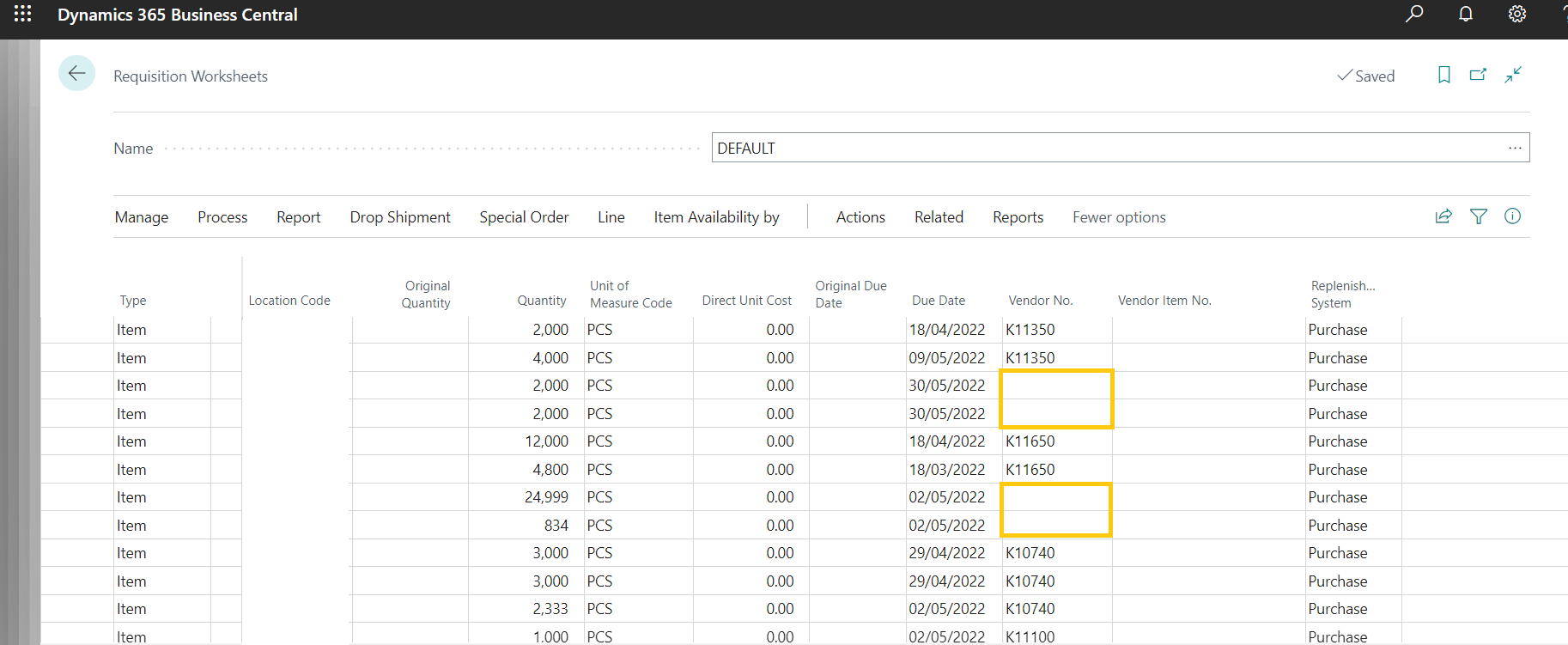
We are trying to create requisition worksheet, when we try to calculate plan the item lines gets created. We noticed that there are some items with one particular Vendor (i.e. V101) Only the items with a Vendor code (V101) does not get populated.

Can anyone please suggest what could be the possible solution for the same.
pastedimage1647266561704v1.png

The error we are facing with the requisition worksheet is quite weird. We tried to investigate and realize that only a few items are not able to populate the item line with Vendor Nos (V101) in the requisition worksheet.

I have the same question (0)
  • rosenbergl Profile Picture
    39 on at

    For the Item, check the item card AND any Stockkeeping units to make sure that

    (1) Replenishment System = Purchase

    (2) Vendor No. = V101

  • Guy McKenzie Profile Picture
    1,336 on at

    Also check the vendor item catalogue as that is the table the requisition worksheet pulls the data from.

    This is where you can link all possible vendors to an item.

    The one that shows on the front of the item or Stockkeeping Unit card is simply telling planning which is the preferred vendor out of all the ones listed in this table.

    If you click in that blank cell you have highlighted, if it shows an empty list, it is the Vendor item catalogue that is empty.

  • Inkey Solutions Profile Picture
    2,100 on at

    Hi Lewis,

    Thanks for your response but we have Replenishment System and Vendor No both in our vendor and item card.

  • Suggested answer
    MahGah Profile Picture
    15,529 on at

    Hi

    Have you checked stockkeeping as Guy suggested?

  • Suggested answer
    Dallefeld Profile Picture
    211 User Group Leader on at

    Like Guy stated, check the Vendor Item record. I believe that there needs to be a record in the Vendor Item Catalog.

  • Suggested answer
    Ben Baxter Profile Picture
    6,612 Super User 2025 Season 2 on at

    Lewis, Guy, and MahGah are all correct.  This is caused by the Vendor No. field on your SKU record being blank.  To clarify, the Item Vendor Catalog does not impact the Req. Line default Value, it is populated based on the Item Card (if no SKU) or the Stockkeeping Unit Card for the Item.

    The Item Vendor Catalog is the table look-up for the Vendor No. field in the Req. Worksheet.  While you can type in any valid Vendor No. into that field, if you want the find as you type or look-up to work you need to populate the Item Vendor Catalog.  This is accessed from an Item List > Purchases > Vendors.

    The only other reason the Vendor No. would be blank is if your Replenishment Policy was set to something other than Purchase.

Under review

Thank you for your reply! To ensure a great experience for everyone, your content is awaiting approval by our Community Managers. Please check back later.

Helpful resources

Quick Links

Responsible AI policies

As AI tools become more common, we’re introducing a Responsible AI Use…

Neeraj Kumar – Community Spotlight

We are honored to recognize Neeraj Kumar as our Community Spotlight honoree for…

Leaderboard > Small and medium business | Business Central, NAV, RMS

#1
OussamaSabbouh Profile Picture

OussamaSabbouh 3,151

#2
Jainam M. Kothari Profile Picture

Jainam M. Kothari 1,443 Super User 2025 Season 2

#3
YUN ZHU Profile Picture

YUN ZHU 1,092 Super User 2025 Season 2

Last 30 days Overall leaderboard

Featured topics

Product updates

Dynamics 365 release plans
