web
You’re offline. This is a read only version of the page.
close
Skip to main content

Announcements

No record found.

News and Announcements icon
Community site session details

Community site session details

Session Id :
Microsoft Dynamics AX (Archived)

Setup document types ERROR: Could not determine the login page for the specified SharePoint site.

(1) ShareShare
ReportReport
Posted on by

When setting up a document type for a Template library stored within a SharePoint site, AX in unable to retrieve a list of Document libraries, and displays an infolog error message Could not determine the login page for the specified SharePoint site.


I have attempted to set up the document type following instructions on Technet:

Configure and use Microsoft Dynamics AX document management with Microsoft SharePoint document libraries [AX 2012]

https://technet.microsoft.com/en-us/library/dn631953.aspx


 Step 2 --> Create document types for SharePoint document libraries

For document templates:

Field

Value

Class

Template library

Group

Document

Location

Archive directory

Archive directory

SharePoint site

Enter the URL for the SharePoint site where the document templates are stored.

Be sure to include only the parts of the URL that are required. For example, do not include “Allitems.aspx” at the end of the URL.

Document library

Select the document library where the templates are stored.

Attempting to select the document library will result in above mentioned error. Screenshots attached below.

Any ideas on how to solve this issue?

---

Authentication type is set to SharePoint Online:
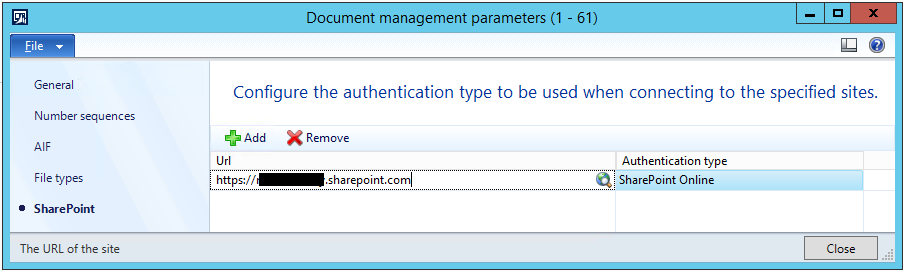
DocMgmtParameters.png

Error is triggered when creating a Document type of class Template library.
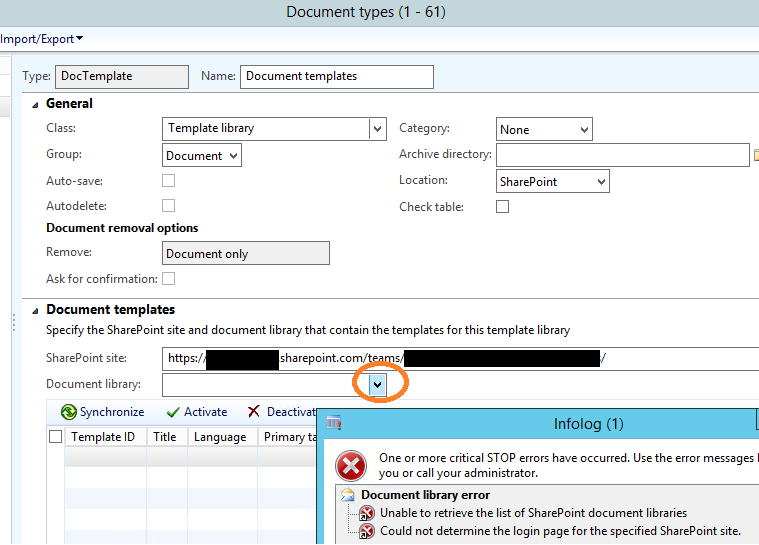
DocTypes.png

*This post is locked for comments

I have the same question (0)
  • Community Member Profile Picture
    on at

    Hi,

    Even am facing the same issue. Can you please let me know if this is resolved for you.

    Thanks in advance

  • Suggested answer
    Fato Abdulfattah Profile Picture
    145 on at

    I was having the same error. I followed this article: https://blogs.msdn.microsoft.com/axsupport/2015/04/30/ax-2012-r3-a-user-cannot-synchronize-to-a-document-template-library-with-federated-authentication-and-no-error-message-displays/ and the problem was solved.

    While I can open the list of available document libraries, I'm unable to sync the library templates. More on that if I succeed.

Under review

Thank you for your reply! To ensure a great experience for everyone, your content is awaiting approval by our Community Managers. Please check back later.

Helpful resources

Quick Links

Introducing the 2026 Season 1 community Super Users

Congratulations to our 2026 Super Stars!

Meet the Microsoft Dynamics 365 Contact Center Champions

We are thrilled to have these Champions in our Community!

Congratulations to the April Top 10 Community Leaders

These are the community rock stars!

Leaderboard > 🔒一 Microsoft Dynamics AX (Archived)

#1
CP04-islander Profile Picture

CP04-islander 24

#2
Michel ROY Profile Picture

Michel ROY 14

#3
Jagadabi Profile Picture

Jagadabi 6

Last 30 days Overall leaderboard

Featured topics

Product updates

Dynamics 365 release plans
