web
You’re offline. This is a read only version of the page.
close
Skip to main content

Announcements

No record found.

News and Announcements icon
Community site session details

Community site session details

Session Id :
Microsoft Dynamics AX (Archived)

Warehouse: Put Location not coming automatically on WORK Create

(0) ShareShare
ReportReport
Posted on by

Hi,

I am trying to configure location directive for automatic suggestion of Pick and Put location in Work created.

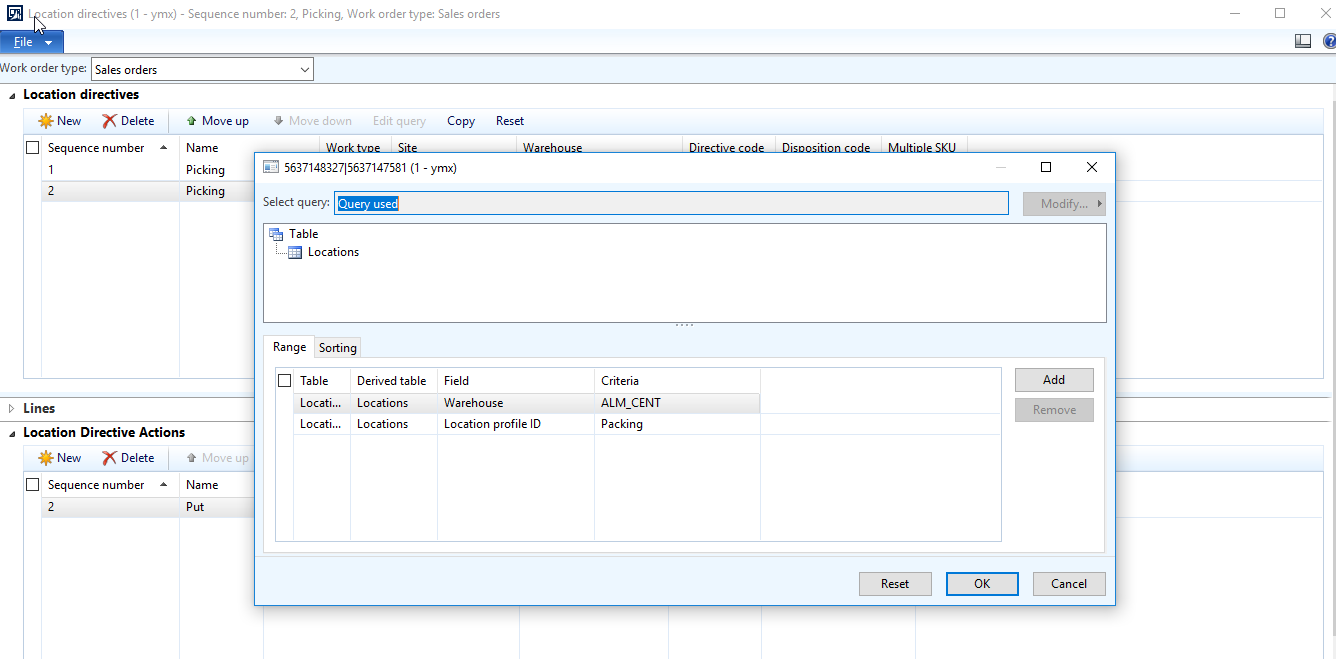
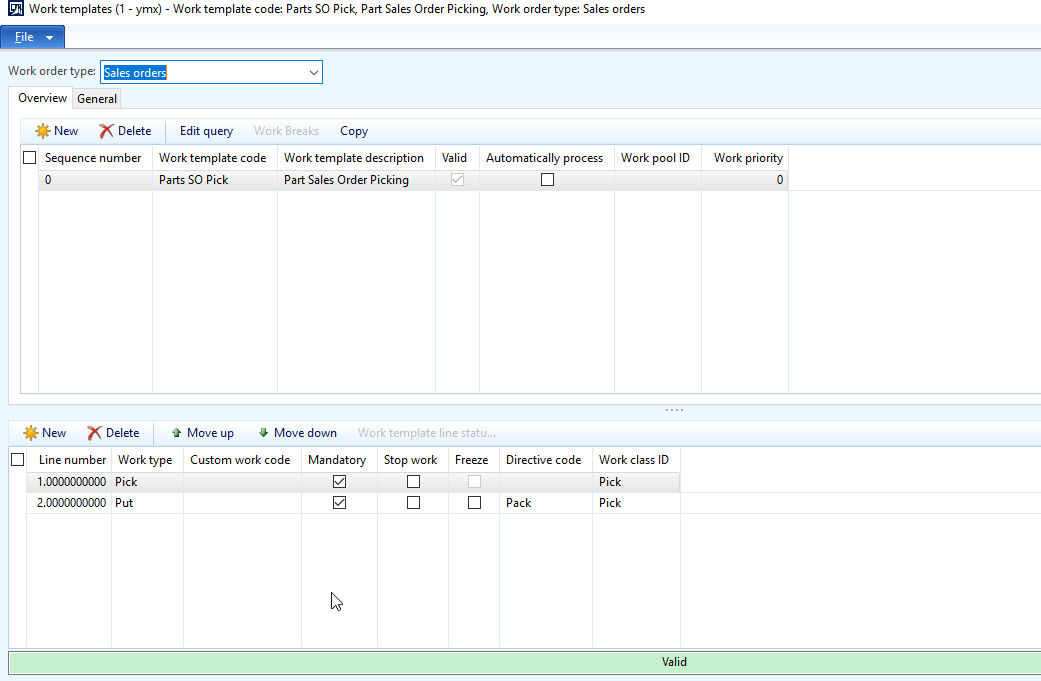
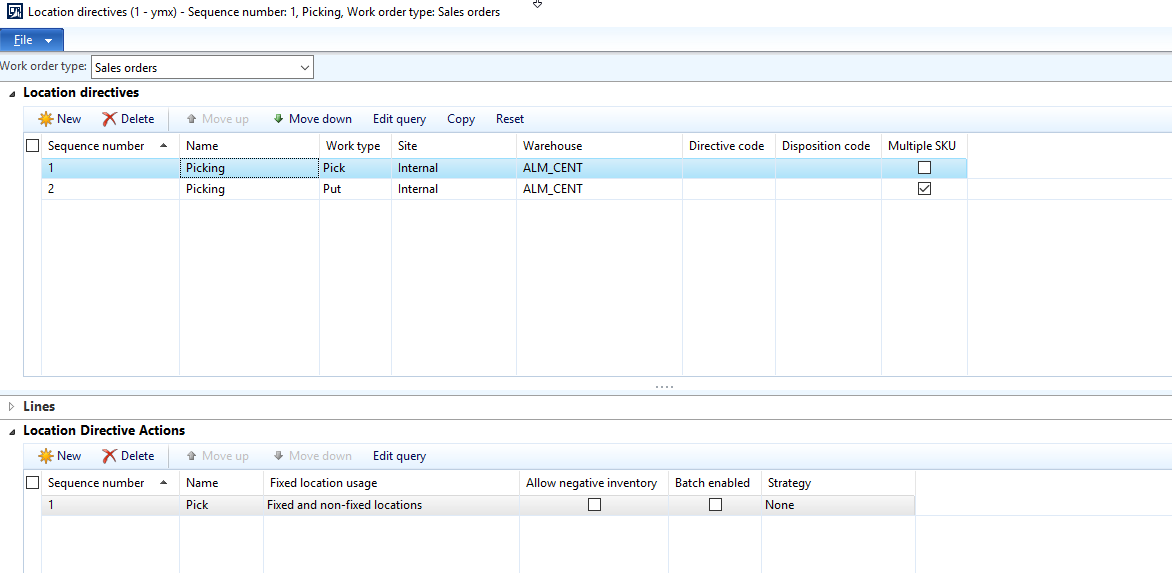
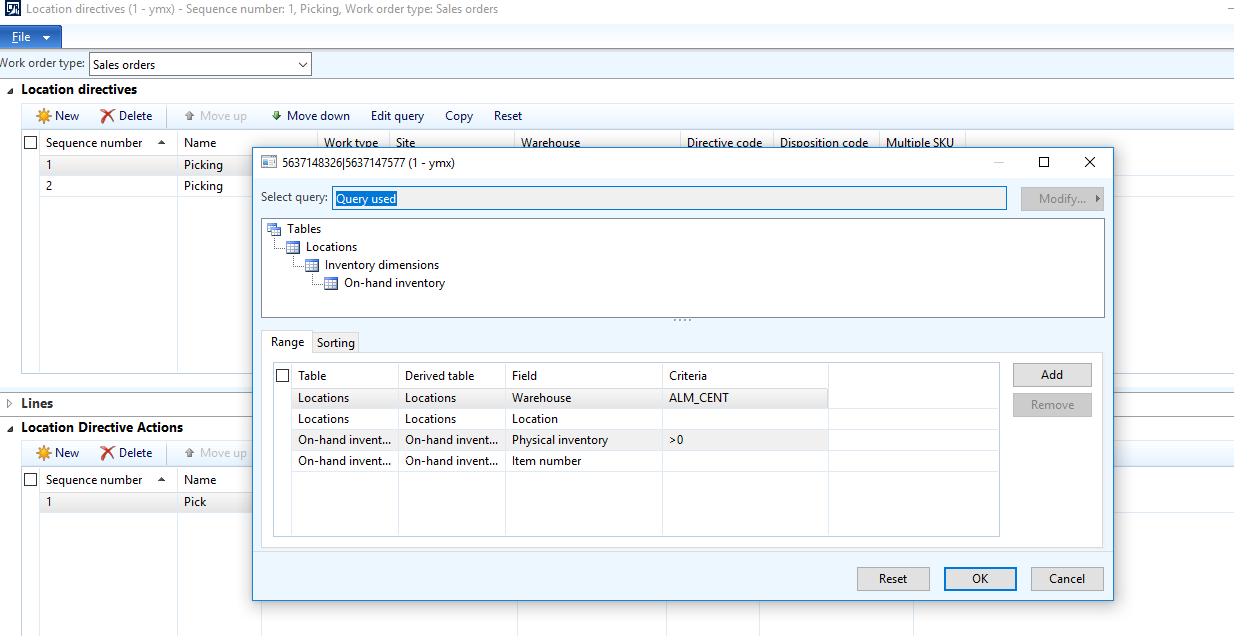
This Work is for Sales Order Picking. System suggests Pick location, but does not suggests PUT location. I believe, I am doing some mistake in location directive configuration. please guide.
4237.1.png

20413.2.png

5008.3.png

8357.4.png

Thanks.

*This post is locked for comments

I have the same question (0)
  • Suggested answer
    Galyna Fedorova Profile Picture
    3,566 on at

    Hi,

    Have you set Unit on the Lines section for the Location directive? If yes, try to clear it.

    Please share this screenshot

  • Suggested answer
    Mea_ Profile Picture
    60,286 on at

    Hi KGS_AX,

    On the first screenshot you don't have Directive code specified, however, on the work template you have it set to "Pack". That is why the system cannot find location directive. You can either clear directive code on the work template or specify it on location directive for "put".

  • Community Member Profile Picture
    on at

    Thanks for help.

    I tried to follow suggested configuration, still issue exists.

    let me share new screenshots.

    4064.14.png

    8358.12.png

    6266.13.png

    4064.14.png

    Thanks.

  • Suggested answer
    Galyna Fedorova Profile Picture
    3,566 on at

    Several other options:

    -  Have you put Packing location type into Pick Work class?

    -  Have you had Location associated with Packing Location profile ID?

    -  Create 1 location directive with a single item and 1 location directive with Multiple SKU for the put work for the sales orders work order type.

  • Community Member Profile Picture
    on at

    Thanks Galyna for your help, I did all 3 configurations and checked again. please see below images.

    Regarding work class id, it is taking PICK work class in PUT line also. Please check work created. This is because, I configured PICK work class in PUT line of work template. Is this is the reason for not suggesting pack location?but, if I want to change to pack, it shows me error that combination is not valid.

    0724.14.png

    7282.12.png

    6644.13.png

    0724.14.png

    Thanks

  • Suggested answer
    Galyna Fedorova Profile Picture
    3,566 on at

    I see that you have added Packing location type into Pack work class. But you need to add Packing location type into Pick work class. Let me know If it's fixed the issue.

  • Community Member Profile Picture
    on at

    Yes, but if I want to correct work template (modify put line with 'pack' work class ), it gives me error.

    "Invalid, pairs must belong to same work class id".

    7635.21.png

  • Guy Terry Profile Picture
    28,977 Moderator on at

    If you're having problems getting it working at all, I would start by making the config as simple as possible.

    e.g.

    • Remove the Valid put location type from the Work class 'Pick' (and use this Work class on both Work template lines).
    • Remove the Directive code from the Work template line and the Location directive.
    • Set it to use a single specific Location via the Query on the Location directive action of the Put Location Directive.

    Then, if it works, add back in your configuration one at a time.

    If it doesn't work, check the Work creation history log. And if that is empty, enable 'Create work creation history log' in Warehouse parameters.

  • Suggested answer
    fatihgork Profile Picture
    3,817 on at

    Hi,

    Your warehouse location's Location Profile ID is "Packing".

    Make sure it is LP controlled and also you have this profile specified in your warehouse parameters for packing location type.

  • Gepoy Profile Picture
    496 on at

    Hi @KGS_AX, were you able to configure it according to your requirement?

Under review

Thank you for your reply! To ensure a great experience for everyone, your content is awaiting approval by our Community Managers. Please check back later.

Helpful resources

Quick Links

Introducing the 2026 Season 1 community Super Users

Congratulations to our 2026 Super Stars!

Meet the Microsoft Dynamics 365 Contact Center Champions

We are thrilled to have these Champions in our Community!

Congratulations to the April Top 10 Community Leaders

These are the community rock stars!

Leaderboard > 🔒一 Microsoft Dynamics AX (Archived)

#1
CP04-islander Profile Picture

CP04-islander 39

#2
Michel ROY Profile Picture

Michel ROY 14

#3
imran ul haq Profile Picture

imran ul haq 8

Last 30 days Overall leaderboard

Featured topics

Product updates

Dynamics 365 release plans