web
You’re offline. This is a read only version of the page.
close
Skip to main content

Announcements

No record found.

News and Announcements icon
Community site session details

Community site session details

Session Id :
Finance | Project Operations, Human Resources, ...
Answered

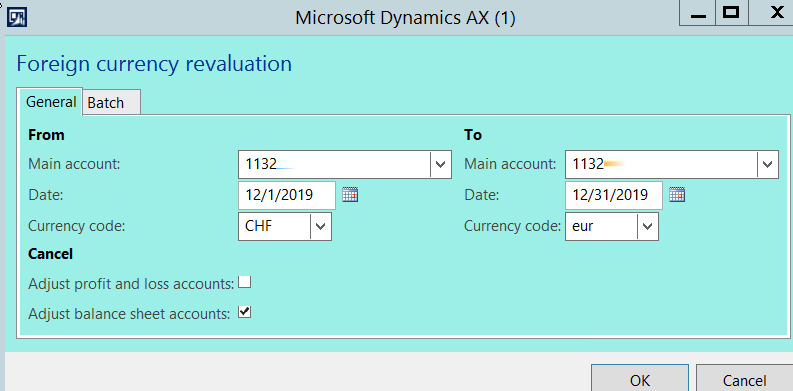
Currency Revaluation. From currency code. To currency code

(0) ShareShare
ReportReport
Posted on by 2,442

Hi All, 

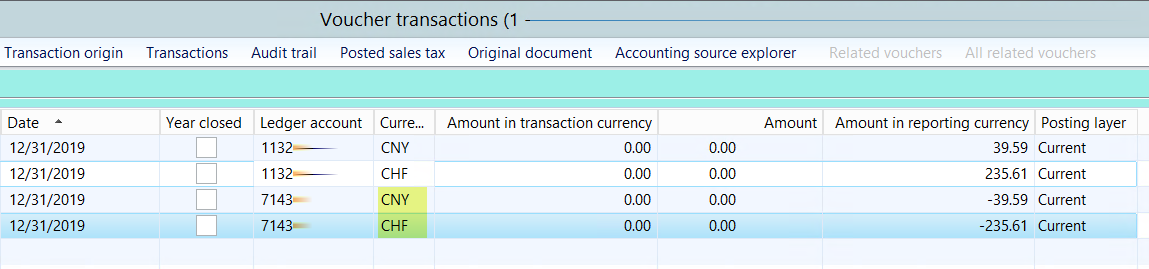
For some reason, each currency revaluation run, AX only picks up two currency to generate gain/loss (screenshot 2). 

If I leave the From currency code blank and To currency code EUR, AX picks up the remaining 2 to generate gain/loss. 

If I leave the From currency code EUR To currency code USD, it also picks up the remaining 2 currency code to generate gain/loss.  

It seems to me that regardless of what From currency code or To currency code is, AX takes the transaction currency and convert them to the accounting currency but only two transactions at a time.  

Does anyone see different results? 
Currency-Revau.-From.-To.png

2-currency.png1.png

I have the same question (0)
  • Suggested answer
    Ludwig Reinhard Profile Picture
    Microsoft Employee on at

    Hi,

    Can't you leave the currency code fields simply blank to get a revaluation of all currencies that you use?

    I usually never make use of the currency code restrictions. Why would you?

    Best regards,

    Ludwig

  • André Arnaud de Calavon Profile Picture
    303,988 Super User 2026 Season 1 on at

    Hi Kim,

    What transaction do you currently have on this account and what is the expected outcome? Dynamics AX is evaluating the balance for the revaluation; not the individual transactions. A revaluation per currency is correct.

    Do you have transactions in currencies between CHF and EUR which are skipped?

  • lmai Profile Picture
    2,442 on at

    Hi Andre',

    Yes, they all have transaction amounts and the gains/losses are much bigger than the rounding.

  • Community Member Profile Picture
    on at

    If you know you have transactions, double check the posting period. Can you share those transactions?

  • Verified answer
    Ludwig Reinhard Profile Picture
    Microsoft Employee on at

    Hello Kim,

    Can you elaborate what you mean by saying that the gains/losses are much bigger than the rounding?

    Some illustrative screenprints would help.

    Many thanks,

    Ludwig

  • lmai Profile Picture
    2,442 on at

    Hi Ludwig,

    I do a manual calculation outside of the system, in my spreadsheet, to make sure that when I run a currency revaluation, AX gives me the same gain/loss numbers.  Mostly yes, AX gives me the same numbers.  

    To answer your question, my GL parameter rounding is .10.  My gain/loss is $.06.  AX does not have the $.06 in the Revaluation Report.  This is what I meant, on the previous thread, that my gains/losses are higher than my rounding.

  • lmai Profile Picture
    2,442 on at

    I have looked into the GL parameter and the currency setting.  I guess there are not many set up to look into.  It wouldn't be something technical, right?

    If you think of something, anything at all, please let me know.  Thanks so much!

  • Verified answer
    Ludwig Reinhard Profile Picture
    Microsoft Employee on at

    Hello Kim,

    If you round values to 0.10 then your excel calculation will never match what you see in AX.

    Yet, before performing those double checks assess whether this makes really sense because at the end of the day those revaluations are unrealized profits/loss and unless you talk about really large currency fluctuation amounts, I would not worry about penny's that are not material from a financial / auditing perspective.

    About your second response:

    Please double check your main accounts whether the revaluation parameter is set for all of the accounts that you use. You can find it in each account in your CoA.

    Best regards,

    Ludwig

Under review

Thank you for your reply! To ensure a great experience for everyone, your content is awaiting approval by our Community Managers. Please check back later.

Helpful resources

Quick Links

Introducing the 2026 Season 1 community Super Users

Congratulations to our 2026 Super Stars!

Meet the Microsoft Dynamics 365 Contact Center Champions

We are thrilled to have these Champions in our Community!

Congratulations to the March Top 10 Community Leaders

These are the community rock stars!

Leaderboard > Finance | Project Operations, Human Resources, AX, GP, SL

#1
Giorgio Bonacorsi Profile Picture

Giorgio Bonacorsi 653

#2
André Arnaud de Calavon Profile Picture

André Arnaud de Cal... 493 Super User 2026 Season 1

#3
Syed Haris Shah Profile Picture

Syed Haris Shah 317 Super User 2026 Season 1

Last 30 days Overall leaderboard

Product updates

Dynamics 365 release plans