web
You’re offline. This is a read only version of the page.
close
Skip to main content

Announcements

No record found.

News and Announcements icon
Community site session details

Community site session details

Session Id :
Finance | Project Operations, Human Resources, ...
Suggested Answer

Travel Requisition to Expense Report Authorized amount is not coming automatically

(0) ShareShare
ReportReport
Posted on by 22,805 Most Valuable Professional

Dear Experts,

I have a question on expense management module.

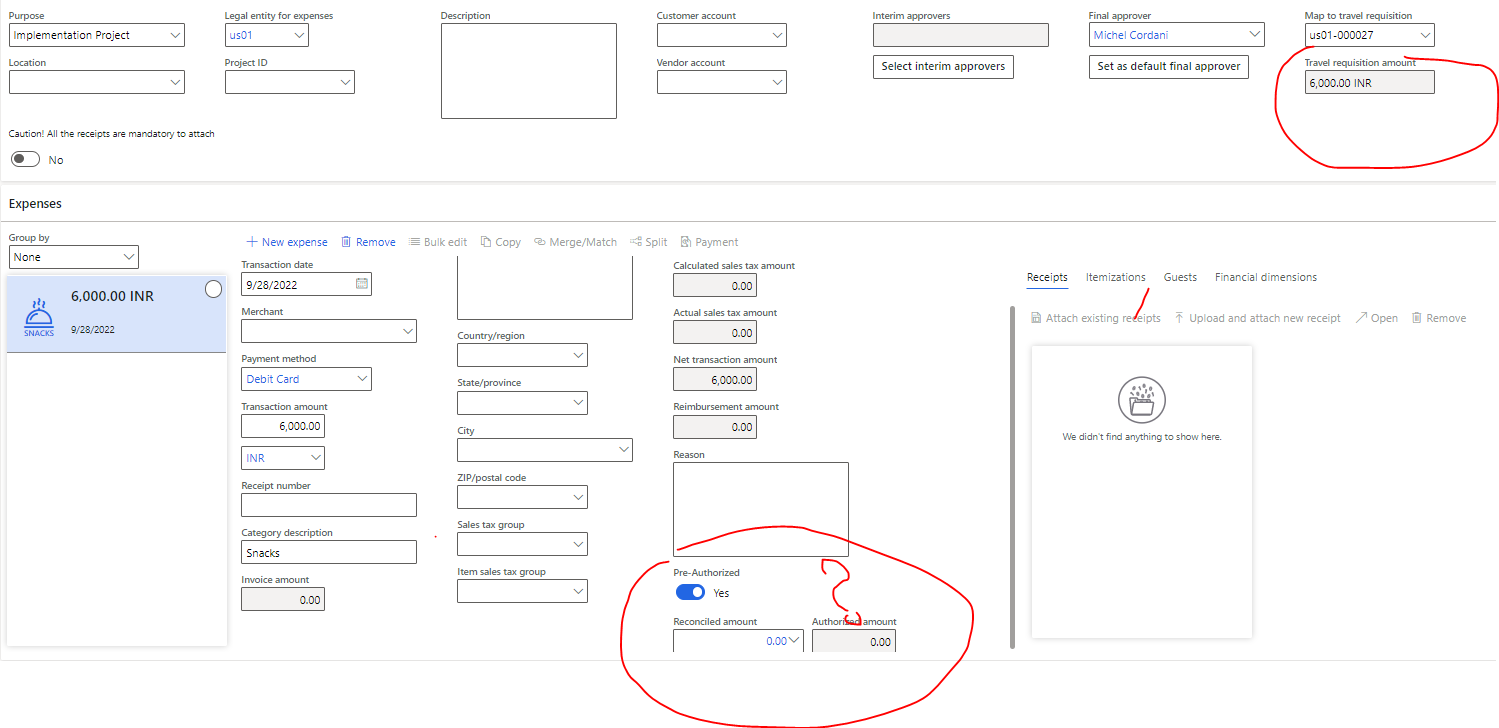
While selecting Travel Requisition in Expense management, the Reconciled amount and Authorized amount is not coming automatically, instead we are selecting from the drop down in Reconciled amount.

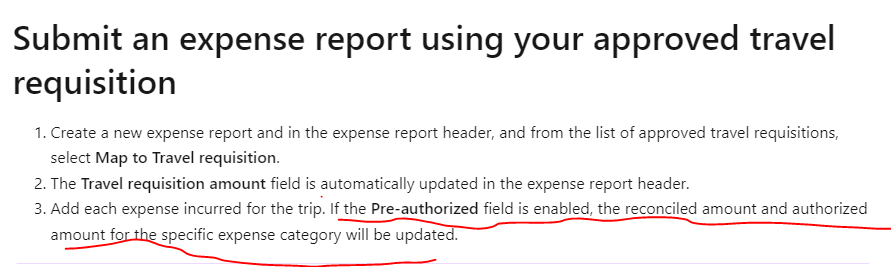
However, as per MS DOC, it has to update automatically 
pastedimage1664399665180v1.png

pastedimage1664399839909v2.png

I have the same question (0)
  • Charlotte X Profile Picture
    Microsoft Employee on at

    Hi Ramit Paul,

    Do you enable the "Pre-authorization of travel is mandatory" parameter in Expense Management Parameters?

    Best Regards,

    Charlotte

  • Ramit Paul Profile Picture
    22,805 Most Valuable Professional on at

    Yes, it's enabled.

  • Charlotte X Profile Picture
    Microsoft Employee on at

    Hi,

    According to the  MS DOC, when you map an expense report to an approved travel requisition, the transaction amount can't be greater than the authorized amount. Please make sure that you meet this requirement.

  • Ramit Paul Profile Picture
    22,805 Most Valuable Professional on at

    That's the question, how can I book more than the requisition amount?

  • Suggested answer
    Charlotte X Profile Picture
    Microsoft Employee on at

    Hi,

    Regarding your initial question about the Reconciled amount and Authorized amount is not coming automatically, I found another possible cause:

    Travel requisition does not show the authorized amount on the line - Dynamics 365 Finance Forum Community Forum

    Did you use the date of the day?

    And In the standard, I think you can't book more than the requisition amount.

  • Ramit Paul Profile Picture
    22,805 Most Valuable Professional on at

    I think the link is not the same issue, for my case its coming from the drop down.

    My question is- does that get auto populated or we need to select from the drop down and add it?

Under review

Thank you for your reply! To ensure a great experience for everyone, your content is awaiting approval by our Community Managers. Please check back later.

Helpful resources

Quick Links

Introducing the 2026 Season 1 community Super Users

Congratulations to our 2026 Super Stars!

Meet the Microsoft Dynamics 365 Contact Center Champions

We are thrilled to have these Champions in our Community!

Congratulations to the April Top 10 Community Leaders

These are the community rock stars!

Leaderboard > Finance | Project Operations, Human Resources, AX, GP, SL

#1
Giorgio Bonacorsi Profile Picture

Giorgio Bonacorsi 608

#2
André Arnaud de Calavon Profile Picture

André Arnaud de Cal... 591 Super User 2026 Season 1

#3
CP04-islander Profile Picture

CP04-islander 430

Last 30 days Overall leaderboard

Product updates

Dynamics 365 release plans