web
You’re offline. This is a read only version of the page.
close
Skip to main content

Notifications

Announcements

No record found.

Community site session details

Community site session details

Session Id :
Microsoft Dynamics CRM (Archived)

Moving Custom Entity attributes to Accounts Entity

(0) ShareShare
ReportReport
Posted on by 40

HI there, I'm pretty new to CRM but what I am looking to do doesn't seem to be too complicated, but I haven't been able to figure it out.  We currently have a few custom entities set up with a N:1 relationship to the account entity, so that when you click on an account, you see the custom entity (called Servers) on the left hand side:
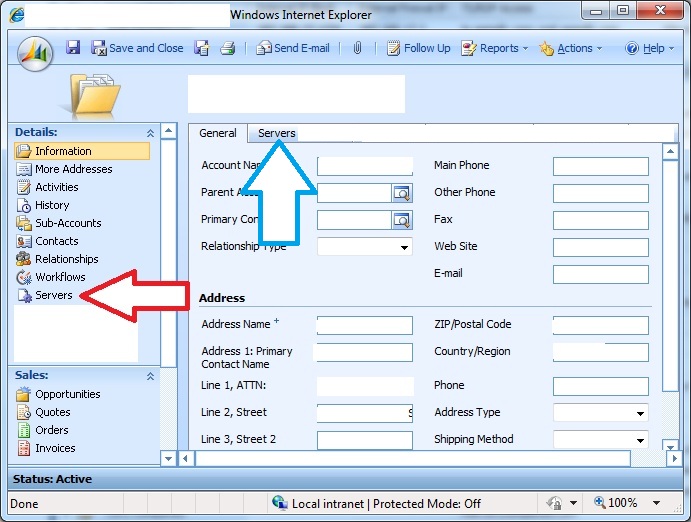
What we want to do is basically take the data (or the custom attributes) in the "Servers" custom entity (red arrow), and make those attributes available in the "accounts" form so that we can add them under the "servers" tab (blue arrow).  More or less, we want to move them from the left, and make them available to add to the accounts form under the servers tab, without losing the data.

Is there an easy way to do this?


*This post is locked for comments

I have the same question (0)
  • Community Member Profile Picture
    on at

    Hello Jimmy

    See if this post helps you with your problem: blogs.msdn.com/.../copying-attributes-from-one-entity-to-another.aspx

  • Jimmy R. Profile Picture
    40 on at

    Hi Sven, thank you for the response.  I Google'd this question furiously and did find that there was no way to do this from within CRM, but did not see the article you posted which actually might offer a solution.  I will try it tomorrow and report back.  If it solves the issue, I will mark this as solved.  Thank you!

  • Ankit Shah Profile Picture
    on at

    Dear Jimmy,

    Visit below two links. It may help you in your needs of server tab  

    mscrm4ever.blogspot.com/.../display-fetch-in-iframe-part-2.html

    jianwang.blogspot.com/.../crm-40-iframe-show-advanced-find-result.html

    Here in above example you need to have IFrame in another tab.

    Let me know if you have any queries.

    Regards,

    Ankit Shah

    www.inkeysolutions.com/MicrosoftDynamicsCRM.html

Under review

Thank you for your reply! To ensure a great experience for everyone, your content is awaiting approval by our Community Managers. Please check back later.

Helpful resources

Quick Links

Responsible AI policies

As AI tools become more common, we’re introducing a Responsible AI Use…

Neeraj Kumar – Community Spotlight

We are honored to recognize Neeraj Kumar as our Community Spotlight honoree for…

Leaderboard > 🔒一 Microsoft Dynamics CRM (Archived)

#1
SA-08121319-0 Profile Picture

SA-08121319-0 4

#1
Calum MacFarlane Profile Picture

Calum MacFarlane 4

#3
Alex Fun Wei Jie Profile Picture

Alex Fun Wei Jie 2

Last 30 days Overall leaderboard

Featured topics

Product updates

Dynamics 365 release plans



