web
You’re offline. This is a read only version of the page.
close
Skip to main content

Announcements

No record found.

News and Announcements icon
Community site session details

Community site session details

Session Id :
Service | Customer Service, Contact Center, Fie...
Answered

Created model driven app but wont show in list of available apps on field service mobile app

(0) ShareShare
ReportReport
Posted on by

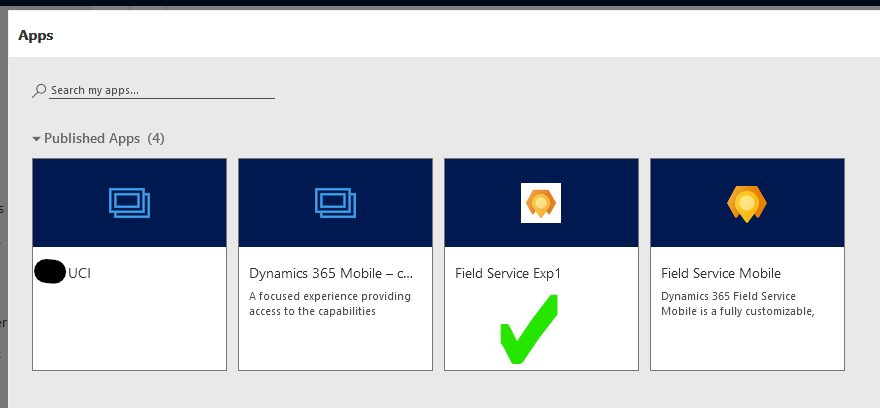
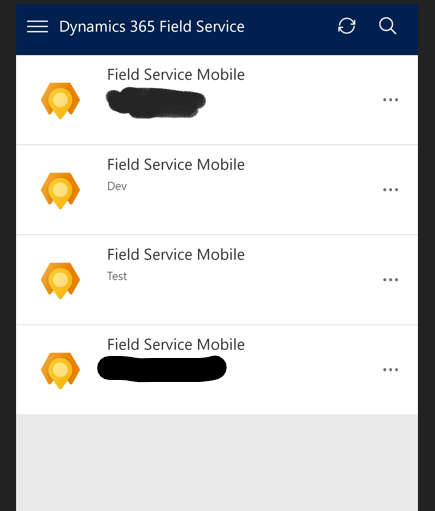
Hi All, I thought I would have a little delve into the world of the Field Service Mobile App, but rather than use the existing one I created my own model driven app with a cut down amount of information. I can access this via apps section on my PC but when I try to find the app in the Field Service App from the Play Store, I cannot see my app in the list. I have also changed it to show non production sites but it wont show, am I missing something simple?

View of Apps available via PC
pastedimage1625580312045v2.png

View of Field Service App on Phone (Field Service Exp1 not visible)
pastedimage1625580371886v3.png

I have the same question (0)
  • Suggested answer
    Dhruv G Profile Picture
    Microsoft Employee on at

    Hi srdd,

    Best practice is to customize the OOB app module as that will continue to receive the latest updates as part of our wave release cycle.

    This doc describes how you can make the custom app module available in the new Field Service Mobile app - docs.microsoft.com/.../mobile-powerapp-copy-app-module

    Another thing to keep in mind as you create a custom app module is regarding offline - you would need add the mobile offline profile to the custom app module as described here - docs.microsoft.com/.../mobile-power-app-system-offline

  • srdd Profile Picture
    on at

    Hi Dhruv G, thats the document I have been searching for! I will give it a read and see how I go from there, much appreciated.

Under review

Thank you for your reply! To ensure a great experience for everyone, your content is awaiting approval by our Community Managers. Please check back later.

Helpful resources

Quick Links

Introducing the 2026 Season 1 community Super Users

Congratulations to our 2026 Super Stars!

Meet the Microsoft Dynamics 365 Contact Center Champions

We are thrilled to have these Champions in our Community!

Congratulations to the March Top 10 Community Leaders

These are the community rock stars!

Leaderboard > Service | Customer Service, Contact Center, Field Service, Guides

#1
11manish Profile Picture

11manish 34

#2
Mallesh Deshapaga Profile Picture

Mallesh Deshapaga 32

#3
Goloknath Profile Picture

Goloknath 28 User Group Leader

Last 30 days Overall leaderboard

Featured topics

Product updates

Dynamics 365 release plans
