web
You’re offline. This is a read only version of the page.
close
Skip to main content

Announcements

No record found.

News and Announcements icon
Community site session details

Community site session details

Session Id :
Microsoft Dynamics AX (Archived)

AP-Vendor Invoice journal

(0) ShareShare
ReportReport
Posted on by 7

AX2012 RTM

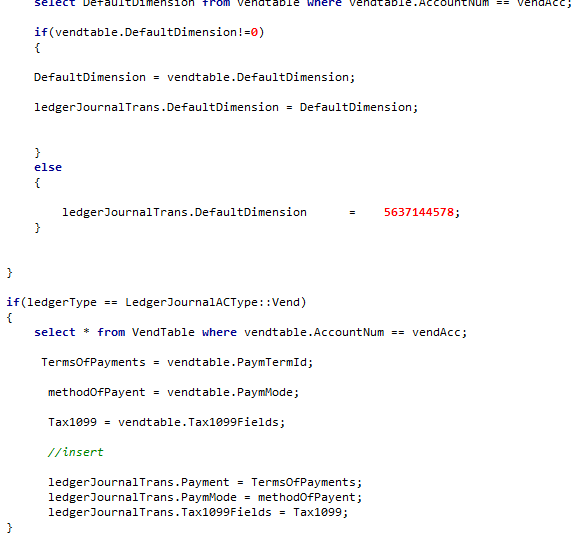
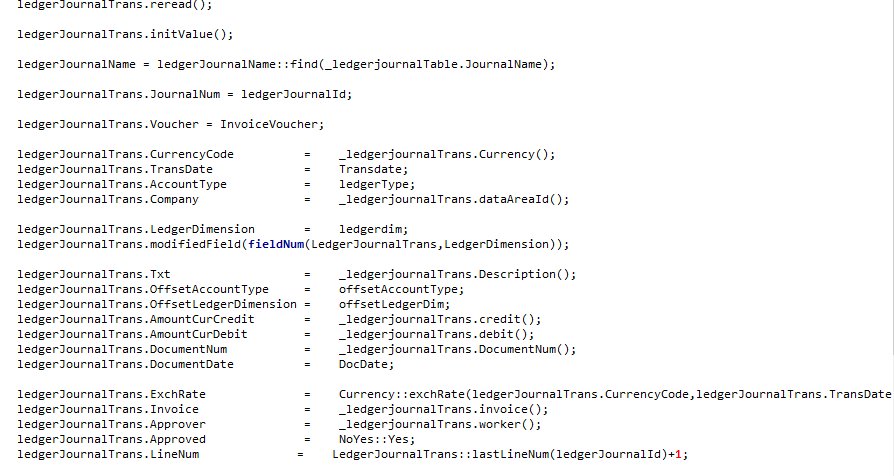
I'm importing vendor invoice journal from CSV via X++,i could see the fields like remittance address , method of payment Tax1066 inserted into the table,but it's not showing in the form .....i'm i missing some fields..? also what is ledger journal Trans Extension IN...? i cant find in RTM version..........kindly suggest...
pastedimage1563790997370v1.pngpastedimage1563791058979v2.png

*This post is locked for comments

I have the same question (0)
  • Suggested answer
    Ludwig Reinhard Profile Picture
    Microsoft Employee on at

    Hi,

    Have you tried using the Excel addin for this import process? The Excel addin should be able to import those data without coding. Because you are running a pretty old AX2012 version, is an upgrade to a later version an option for you?

    Best regards,

    Ludwig

  • AXFreak Profile Picture
    7 on at

    upgrading latest version and Excel addin not possible...import via code is the only option.

  • Suggested answer
    Ludwig Reinhard Profile Picture
    Microsoft Employee on at

    Hello AXFreak,

    Have you checked the following blog post already?

    daxingwitheshant.blogspot.com/.../importing-invoice-journal-lines-from.html

    Best regards,

    Ludwig

  • Suggested answer
    KishorJadhav Profile Picture
    162 on at

    Hi AxFreak,

    The possibility of data is missing on form is might be table relations. Kindly check the table relations and insert data into all required tables.

    Ledger journal trans extension_IN is storing data related to the line level transaction and GST details. You have to insert record in this table as well with reference data.

  • Suggested answer
    Satish Panwar Profile Picture
    14,673 Moderator on at

    Hi.. Here is what you can try:

    1. Try creating a single record from the code.

    2. Go to AX in same journal and create record manually and this will be another line

    Now compare what's different. Address may be an issue if linkages are not there, MOP etc. you should be able to see as they might be stored in the table directly.

    This should give you a very good idea on what's wrong with the line created by code. If there are differences (not like voucher number OR line number etc. as they should vary by line in certain scenarios), try to resolve them. Hope this let you see the data on the form.

    Thanks,

    Satish Panwar

    Please help verify answer(s) if they guide you in right direction so other community members can also benefit from your question with verified answer.

  • AXFreak Profile Picture
    7 on at

    yes,.... made some changes on referring to that.....still not resolved.

  • AXFreak Profile Picture
    7 on at

    But I couldn't find that table in AX2012 RTM.

Under review

Thank you for your reply! To ensure a great experience for everyone, your content is awaiting approval by our Community Managers. Please check back later.

Helpful resources

Quick Links

Introducing the 2026 Season 1 community Super Users

Congratulations to our 2026 Super Stars!

Meet the Microsoft Dynamics 365 Contact Center Champions

We are thrilled to have these Champions in our Community!

Congratulations to the March Top 10 Community Leaders

These are the community rock stars!

Leaderboard > 🔒一 Microsoft Dynamics AX (Archived)

#1
CP04-islander Profile Picture

CP04-islander 16

#2
GiacomoRovai Profile Picture

GiacomoRovai 4

#3
Douglas Noel Profile Picture

Douglas Noel 2

Last 30 days Overall leaderboard

Featured topics

Product updates

Dynamics 365 release plans
