web
You’re offline. This is a read only version of the page.
close
Skip to main content

Announcements

No record found.

News and Announcements icon
Community site session details

Community site session details

Session Id :
Finance | Project Operations, Human Resources, ...
Answered

Form event with Detail Master pattern

(0) ShareShare
ReportReport
Posted on by 709

Hello everyone,

Looking for some advice for I'm a beginner in D365 development. If we create a custom form with pattern Detail Master, the one that like a listpage and then we click the row and display to detail of it, what is the event being called in that transition from Grid list to detail ?

If the form is like this :
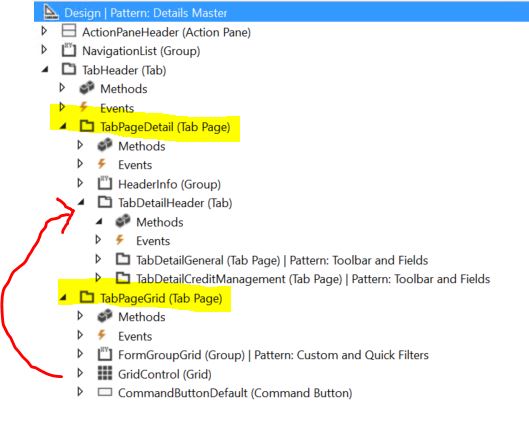
4722.Capture.JPG

So, in design wise, it will goes from Grid in TabPageGrid to the other TablPage (TabPageDetail) which is inside I created some more tab and group to display the detail or more fields.

Purpose is I want to hide some of the fields in that Detail Tab based on other field . I noticed in TabDetailHeader has some method and I tried to override its method like "GotFocus" but the code not hit. Tried" PageActivated" in the same TabDetailHeader Tab, but strangely, this method also called at the first I open from menu item, so it's  like this TabDetail already activated the same time when TabPageGrid showing.

Or how can I accomplished, to hide some field in the Detail view according to the current record selected.

Thanks in advance.

I have the same question (0)
  • Verified answer
    Martin Dráb Profile Picture
    239,451 Most Valuable Professional on at

    Your requirement sounds like you should do it when switching between records and that the view is not really important.

    You activate a record, evaluate your conditions and either hide or unhide the fields. You can switch to between grid and detail views back and forth, but if you stay on the same record, there is no point in evaluating the conditions and dealing with the fields again. You would always get the same result. The point where you need to evaluate it is when you go to another record. This can be done in active() method of the data source.

  • Blue Wang Profile Picture
    Microsoft Employee on at

    HI ShaqAX,

    For example, In CustTable form, there is a system-defined button that can be used to switch between Grid and Details View, you can check it.

    5658.PNG

  • ShaqAX Profile Picture
    709 on at

    Hi Martin,

    I put the visible evaluation in Data source and override method Active. It worked.

    Got a new knowledge then.

    Many thanks.

    Cheers,

Under review

Thank you for your reply! To ensure a great experience for everyone, your content is awaiting approval by our Community Managers. Please check back later.

Helpful resources

Quick Links

Introducing the 2026 Season 1 community Super Users

Congratulations to our 2026 Super Stars!

Meet the Microsoft Dynamics 365 Contact Center Champions

We are thrilled to have these Champions in our Community!

Congratulations to the April Top 10 Community Leaders

These are the community rock stars!

Leaderboard > Finance | Project Operations, Human Resources, AX, GP, SL

#1
Giorgio Bonacorsi Profile Picture

Giorgio Bonacorsi 608

#2
André Arnaud de Calavon Profile Picture

André Arnaud de Cal... 591 Super User 2026 Season 1

#3
CP04-islander Profile Picture

CP04-islander 430

Last 30 days Overall leaderboard

Product updates

Dynamics 365 release plans
