web
You’re offline. This is a read only version of the page.
close
Skip to main content

Notifications

Announcements

No record found.

Community site session details

Community site session details

Session Id :
Microsoft Dynamics CRM (Archived)

Unresolved e-mail sender cannot be resolved to Lead or Contact

(0) ShareShare
ReportReport
Posted on by 17

Hi all

We have following problem:

An unresolved e-mail sender (in an e-mail record) cannot be resolved to a lead or contact (as the default functionality/dialog offers).
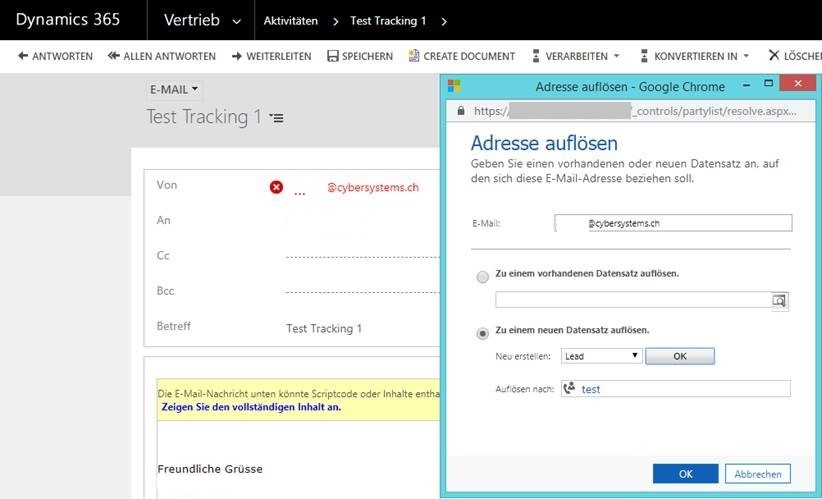
4113.bug1.jpg
After clicking on the unresolved sender e-mail address (in red) and generating a new lead from it, the e-mail address appears resolved, but you cannot save the e-mail with this resolved address/lead and a red X sign appears next to the sender, showing the error "LOOKUP CONTROL ERROR: Cannot add item of typename= to the lookup control".

pastedimage1562597077786v2.png
If you reload the page, the e-mail address is again unresolved / red.

For reproduction:

- Our CRM Version: 9.0.4.5 (OnPrem)
- The user uses Category Based Tracking and tracks an e-mail with a sender e-mail address that is not yet in the CRM system.
- The user navigates to the CRM and tries to resolve the unresolved e-mail address.

According to the following update, certain problems with the "from" field should be fixed:
support.microsoft.com/.../service-update-5-for-microsoft-dynamics-365-9-0-2
We have the update, but it doesn't help either.

*This post is locked for comments

I have the same question (0)
  • RaviKashyap Profile Picture
    55,410 Moderator on at

    Hi,

    Below blog may help you-

    community.dynamics.com/.../d365-quick-tip-allow-messages-with-unresolved-email-recipients-to-be-sent

    Hope this helps.

  • Staniko Profile Picture
    17 on at

    Hi Ravi,

    Thanks for your response, unfortunately the described setting is only for the "To" field, not for the "From" field.

    Best regards

    Stan

  • Suggested answer
    Staniko Profile Picture
    17 on at

    Microsoft confirmed the bug, their resolution steps are as follows:

    1. Create a new solution containing only email entity (Existing entity ) .

    2. Select "From" field in the subsequent entity assets window, Save and Publish the solution followed by exporting it as managed.

    3. In the Customization .xml, add the supported lookup types to avoid the error in the From field attribute xml (In our case - 4,8,2020 ).

    4. Zip the 3 files and import , publish the changes.

    NOTE: SOLUTION MUST BE EXPORTED AND IMPORTED AS MANAGED FOR THE RESOLUTION TO WORK.

Under review

Thank you for your reply! To ensure a great experience for everyone, your content is awaiting approval by our Community Managers. Please check back later.

Helpful resources

Quick Links

Responsible AI policies

As AI tools become more common, we’re introducing a Responsible AI Use…

Neeraj Kumar – Community Spotlight

We are honored to recognize Neeraj Kumar as our Community Spotlight honoree for…

Leaderboard > 🔒一 Microsoft Dynamics CRM (Archived)

#1
SA-08121319-0 Profile Picture

SA-08121319-0 4

#1
Calum MacFarlane Profile Picture

Calum MacFarlane 4

#3
Alex Fun Wei Jie Profile Picture

Alex Fun Wei Jie 2

Last 30 days Overall leaderboard

Featured topics

Product updates

Dynamics 365 release plans



