web
You’re offline. This is a read only version of the page.
close
Skip to main content

Announcements

No record found.

News and Announcements icon
Community site session details

Community site session details

Session Id :
Microsoft Dynamics AX (Archived)

Sales Line Dimension Configuration Drop-down Grid

(0) ShareShare
ReportReport
Posted on by 800

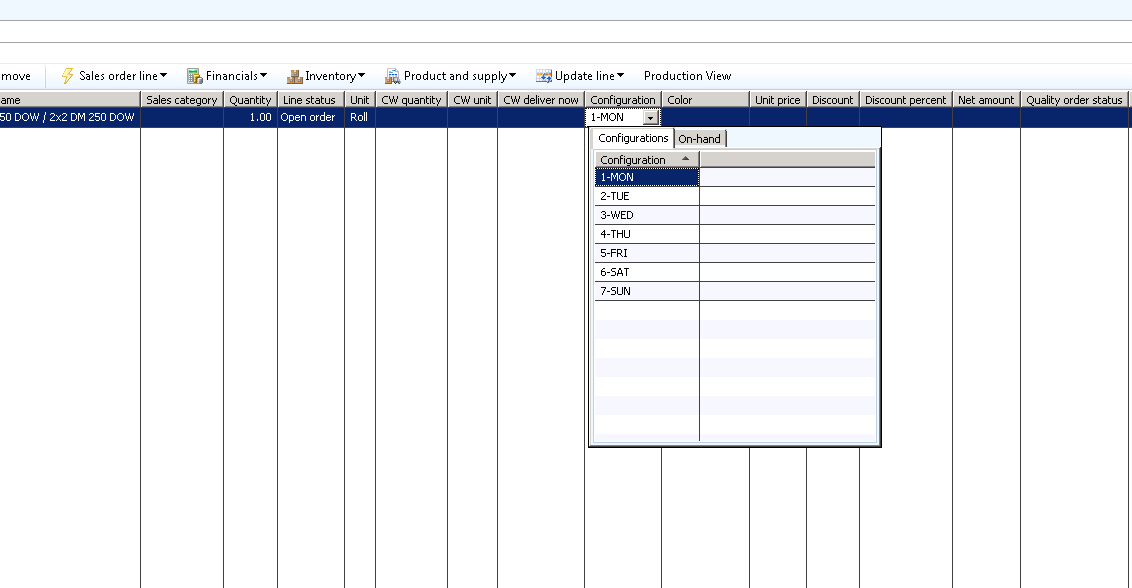
Hi, I am trying to determine how to add additional columns to the grid shown in this .png on the Sales Line in AX 2012.  I can't seem to determine how this grid is generating when you click the Configuration dimension field.  I'm hoping someone can point me in the right direction.
*This post is locked for comments

I have the same question (0)
  • Verified answer
    Ivan (Vanya) Kashperuk Profile Picture
    Microsoft Employee on at

    InventProductDimensionLookup is the form being invoked.

  • Bashir Ahmad Profile Picture
    5,248 on at

    This may help to understand:

    msdn.microsoft.com/.../cc584514.aspx

Under review

Thank you for your reply! To ensure a great experience for everyone, your content is awaiting approval by our Community Managers. Please check back later.

Helpful resources

Quick Links

Introducing the 2026 Season 1 community Super Users

Congratulations to our 2026 Super Stars!

Congratulations to our 2025 Community Spotlights

Thanks to all of our 2025 Community Spotlight stars!

Leaderboard > 🔒一 Microsoft Dynamics AX (Archived)

#1
Joris dG Profile Picture

Joris dG 5

#2
Alexey Lekanov Profile Picture

Alexey Lekanov 2

#2
Henrik Nordlöf Profile Picture

Henrik Nordlöf 2 User Group Leader

Last 30 days Overall leaderboard

Featured topics

Product updates

Dynamics 365 release plans
