web
You’re offline. This is a read only version of the page.
close
Skip to main content

Notifications

Announcements

Community site session details

Community site session details

Session Id :
Customer experience | Sales, Customer Insights,...
Suggested Answer

Add + button on the Marketing List sub grid is not functioning.

(0) ShareShare
ReportReport
Posted on by 40

Hi,

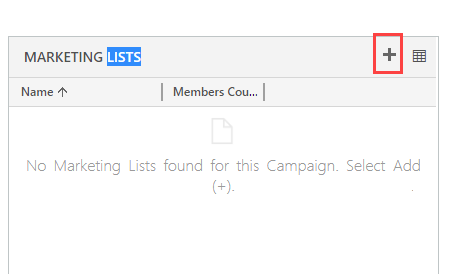
I am facing an issue while adding the marketing list from a sub grid in Campaign page. The + button is not functioning.When i click on the button, it does not responds. Below is the screenshot for better understanding.
pastedimage1588770741316v1.png

I am the system admin and there is not security role customized for this. I can create marketing list if i navigate to marketing List entity. If i click on the next icon to + button where i can see the associated records and add list from there, still it did not get added.

I tried to publish the instance, application ribbon but still this button is not working.

I can suspect this issue only in UAT instance and in all other instances(dev, test and prod) it works absolutely fine. I even tried to import solution from other instance to UAT but still did not work.

Can anyone suggest me what else i could do to get this rectified?

Any help would be really appreciated

I have the same question (0)
  • Miguel Lourenco Profile Picture
    on at

    happy to know that!

    mark it as answered please

  • Learner001 Profile Picture
    40 on at

    Hey it worked!!!

    I compared my ribbon workbench and compared all the microsoft scrips and rules in it. There were some discrepency in the javascript function in my UAT instance.

    When i copied the  javascript used in one of the lower environment, it started working!!

  • Miguel Lourenco Profile Picture
    on at

    Hi, you can compare the ribbon with a new org and your org.

    you can also create a service request and paste the number here. I will take care of it

  • Learner001 Profile Picture
    40 on at

    Is there any other way that i could try to get it working? Any workaround?

  • Miguel Lourenco Profile Picture
    on at

    Hi, can you open a service request ?

  • Learner001 Profile Picture
    40 on at

    Sorry i rechecked and it is Version 1710 (9.1.0.16541) online

  • Learner001 Profile Picture
    40 on at

    All my instances are of Version 9.1.0.15340

  • Miguel Lourenco Profile Picture
    on at

    What version do you have ?

  • Learner001 Profile Picture
    40 on at

    This debugging process was new to me but i work in classic UI.

    And this only works in the Unified Interface and not on the classic UI.

    Also just for the information i do not have any custom functions running on that button but i cant really find out which the inbuilt functions maybe causing the error.

    Do you know how i can debug this? or any workaround that i should try.

  • Suggested answer
    Miguel Lourenco Profile Picture
    on at

    hi,

    If you add 

    &ribbondebug=true to your URL and navigate.

    go to command checker:

    pastedimage1588785734437v1.png

    Choose the button on your left and click on Command properties on your right.

    pastedimage1588785781997v3.png

    what do you have inside functionname and library?

Under review

Thank you for your reply! To ensure a great experience for everyone, your content is awaiting approval by our Community Managers. Please check back later.

Helpful resources

News and Announcements

Season of Giving Solutions is Here!

Quick Links

Responsible AI policies

As AI tools become more common, we’re introducing a Responsible AI Use…

Neeraj Kumar – Community Spotlight

We are honored to recognize Neeraj Kumar as our Community Spotlight honoree for…

Leaderboard > Customer experience | Sales, Customer Insights, CRM

#1
Pallavi Phade Profile Picture

Pallavi Phade 94

#2
Tom_Gioielli Profile Picture

Tom_Gioielli 69 Super User 2025 Season 2

#3
TAHER Mehdi Profile Picture

TAHER Mehdi 58

Last 30 days Overall leaderboard

Product updates

Dynamics 365 release plans
