web
You’re offline. This is a read only version of the page.
close
Skip to main content

Notifications

Announcements

No record found.

Community site session details

Community site session details

Session Id :
Microsoft Dynamics CRM (Archived)

Restricting the Regarding object lookup & Customer party list IN Service Appointment

(0) ShareShare
ReportReport
Posted on by

Hi,

In my Service Appointment ,

I have two fields which are look up and I want to reset to certain lookup types only - not all entity types present in the system.

Entity : Service Appointment

One field is regardingobjectid

Data type : look up

Want this lookup restrict to only : Incident (Case)

Another is customers  

Data type : Party list

want this list to have contact lookup records only.

I tried to manipulate these fields using JavaScript on Form load

Various Methods used in Code :

Method 1

var control1= Xrm.Page.getControl("regardingobjectid");
control1getAttribute().setLookupTypes(["incident"]);

var control2 = Xrm.Page.getControl("customers");
control.getAttribute().setLookupTypes(["contact"]);

Still I'm able to access other entities records in these fields
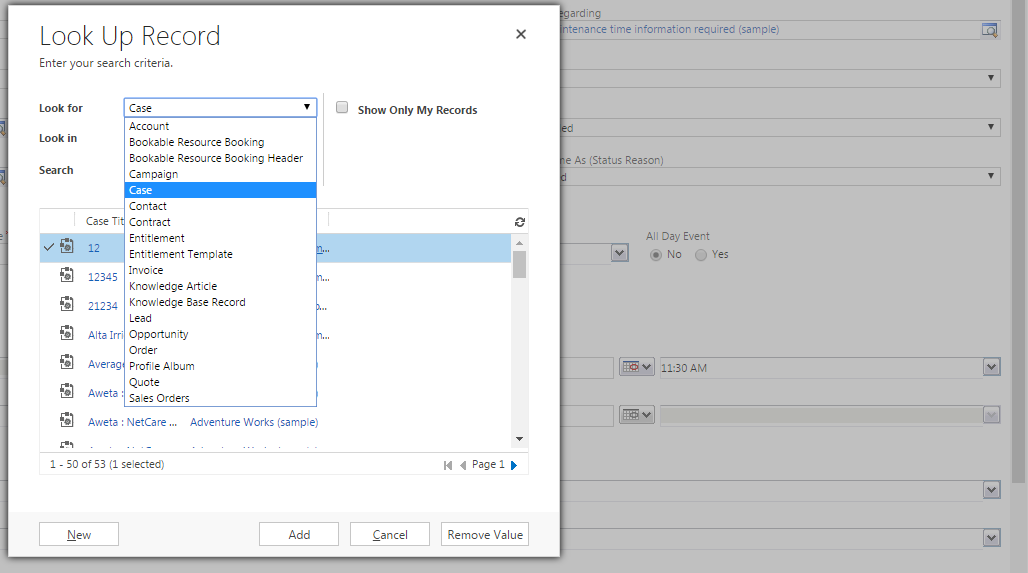
4_2D00_26_2D00_2017-2_2D00_28_2D00_45-PM.png4_2D00_26_2D00_2017-2_2D00_30_2D00_37-PM.png

Method 2 : 

var lookupData = Xrm.Page.getAttribute('regardingobjectid').getLookupDataAttribute();
 
 
if (lookupData.getSupportedLookupTypes().length > 1
     && lookupData.getSingleLookupTypeId() !== 112) {
    lookupData.setLookupTypes(['incident']);
}


Here I'm getting error : Xrm.Page.getAttribute(....).getLookupDataAttribute(); is not defined 

Method 3 :

Using DOM elements , it will not work in current version - CRM Dynamics 365

http://mscrmgoodies.blogspot.com/2012/02/custom-lookup-in-crm-2011.html

I don't know why its not working in that entity where I tried method 1 which is working in Case entity with similar kind of fields. Can anyone help me in this problem ?

References (I used till now):

https://community.dynamics.com/crm/f/117/t/186304

https://missdynamicscrm.blogspot.dk/2014/06/crm-20112013-filter-look-for-lookup-activity-party.html

http://www.powerobjects.com/2016/03/24/filtering-partylist-fields-with-javascript-addpresearch/#collapse1

https://community.dynamics.com/crm/b/dynamicscrmdevdownunder/archive/2016/06/01/restricting-the-customer-lookup

https://dreamingincrm.com/2016/06/02/restricting-the-customer-lookup/

https://community.dynamics.com/crm/f/117/p/218302/582721#582721

Best,

Deepthi

*This post is locked for comments

I have the same question (0)
  • sjbbaggie Profile Picture
    20 on at

    Were you able to resolve this issue?

  • naZir Profile Picture
    850 on at

    Hi,

    You can use this code to control what are the entities you want to show in regarding field

    function restrictRegardingField()

    {

    Xrm.Page.getAttribute("regardingobjectid").setLookupTypes(["account", "opportunity"]);

    }

  • Suggested answer
    Andreas Cieslik Profile Picture
    9,267 on at

    As described here it should work:

    dynamicsobjects365.wordpress.com/.../filtering-partylist

    Is it possible that you have activated lecagy form rendering in the System Settings? If so try to turn it off.

  • Suggested answer
    Community Member Profile Picture
    on at

    I had the same problem in CRM 2016 but when I installed SP1 it worked.

  • Ash06 Profile Picture
    104 on at

    Were you able to resolve this prob?

  • Inogic Profile Picture
    682 on at

    Hi Deepthi,

    You can use following code to achieve your requirement:


    To Default Regarding Field to Incident:


      var requiredObjectControl = Xrm.Page.getControl("regardingobjectid");


            // Validate Regarding Object Control

            if (isValid(requiredObjectControl)) {


                // Check if multiple type dropdowns enabled for this lookup

                if (requiredObjectControl.getEntityTypes().length > 1) {


                    // Set entity type to incident

                    requiredObjectControl.setEntityTypes(['incident']);

                }

            }


    To Default Customer Field to Contact:    


            var customerControl = Xrm.Page.getControl("customers");


            // Validate Customer Control

            if (isValid(customerControl)) {


                // Check if multiple type dropdowns enabled for this lookup

                if (customerControl.getEntityTypes().length > 1) {


                    // Set entity type to contact

                    customerControl.setEntityTypes(['contact']);

                }

            }


    Hope this helps!


    Thanks!

Under review

Thank you for your reply! To ensure a great experience for everyone, your content is awaiting approval by our Community Managers. Please check back later.

Helpful resources

Quick Links

Responsible AI policies

As AI tools become more common, we’re introducing a Responsible AI Use…

Neeraj Kumar – Community Spotlight

We are honored to recognize Neeraj Kumar as our Community Spotlight honoree for…

Leaderboard > 🔒一 Microsoft Dynamics CRM (Archived)

#1
SA-08121319-0 Profile Picture

SA-08121319-0 4

#1
Calum MacFarlane Profile Picture

Calum MacFarlane 4

#3
Alex Fun Wei Jie Profile Picture

Alex Fun Wei Jie 2

Last 30 days Overall leaderboard

Featured topics

Product updates

Dynamics 365 release plans



