web
You’re offline. This is a read only version of the page.
close
Skip to main content

Announcements

No record found.

News and Announcements icon
Community site session details

Community site session details

Session Id :
Microsoft Dynamics AX (Archived)

Overwrite the default value of the InventDim.WMSLocationId

(0) ShareShare
ReportReport
Posted on by 1,260

Hi,

I have created a custom field "Location" in InventTransaferTable. The user can add the field manually when creating a new Transfer order. If a user add the Location value in InventTransferTable, this value should overwrite the default value for Location field i.e. InventDim.WMSLocationId that is present in the Transfer order lines. If the user does not add any value then show the default value for InventDim.WMSLocationId.

I am using the following code change, but doesn't seem to working

public boolean validateWrite()
{
   boolean ret;
   ret = super();
   if(InventTransferTable.RegisterLocation != "")
   {
      InventTransferLine.Location = InventTransferTable.RegisterLocation;
   }
   else
   {
       InventTransferLine.Location = InventDim.wmsLocationId;
   }
   return ret;
}


Here below, I have creation a Location column and added value as "NewLocationValue_800". Now this should update/change all the location for the three lines with item numbers 02132, 03577, 00740 as "NewLocationValue_800" instead of A271,A540,A430.
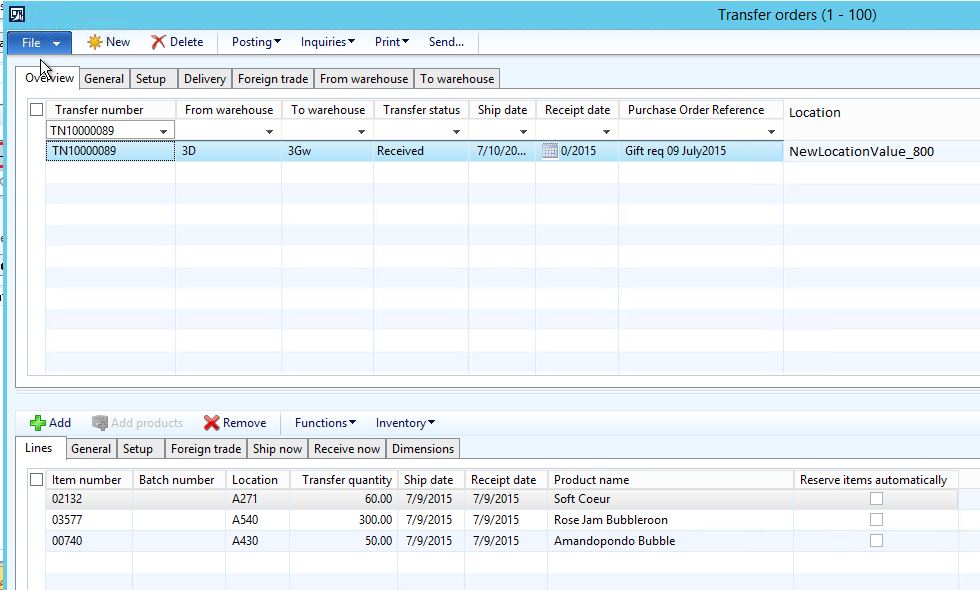
Transfer_5F00_new.JPG

*This post is locked for comments

I have the same question (0)
  • Daljit Kaur Rahsi Profile Picture
    1,260 on at

    Note - I had an existing thread but I think I was not good in my explanation for my requirement so here is the new thread from scratch. Please provide your advice on how this can be done?

  • Suggested answer
    Mea_ Profile Picture
    60,286 on at

    Hi D_Meethu R ,

    1) You should not update any fields in validate* methods, because they should only validate data, not update.

    2) You talking about updating InventDim.wmsLocationId from InventTransferLine.Location  but in your code you do it vise versa, so what do you actually want ?

    3) If you want to update InventDim.wmsLocationId of each InventTransferLine with value of InventTransaferTable.location you can write next code in write() method of InventTransaferTable datasource

    while select forUpdate inventTransferLine
        where inventTransferLine.TransferId == InventTransferTable.TransferId
    {
        inventDim = inventTransferLine.inventDim();
        inventDim.WMSLocationId = InventTransferTable.Location;
        inventTransferLine.inventDimId = InventDim::findOrCreate(inventDim).inventDimId;
        inventTransferLine.update();
    }


Under review

Thank you for your reply! To ensure a great experience for everyone, your content is awaiting approval by our Community Managers. Please check back later.

Helpful resources

Quick Links

Introducing the 2026 Season 1 community Super Users

Congratulations to our 2026 Super Stars!

Meet the Microsoft Dynamics 365 Contact Center Champions

We are thrilled to have these Champions in our Community!

Congratulations to the March Top 10 Community Leaders

These are the community rock stars!

Leaderboard > 🔒一 Microsoft Dynamics AX (Archived)

#1
CP04-islander Profile Picture

CP04-islander 39

#2
Michel ROY Profile Picture

Michel ROY 14

#3
imran ul haq Profile Picture

imran ul haq 8

Last 30 days Overall leaderboard

Featured topics

Product updates

Dynamics 365 release plans
