web
You’re offline. This is a read only version of the page.
close
Skip to main content

Announcements

No record found.

News and Announcements icon
Community site session details

Community site session details

Session Id :
Microsoft Dynamics AX (Archived)

SSRS: Journal > Lines: How Can I Get The Tax Main Account and Tax Account Name For The Line?

(0) ShareShare
ReportReport
Posted on by 1,044

Hello awesome community! I'm new to Ax and its development still training and I seek your help if you please! :)

(Excuse my noob Ax langauge in describing)

First Location:

General Ledger > Journals > General Journals > Lines

I'm developing a report about a payment voucher, I have multiple lines, some lines have a "Sales Tax Group".

What I need to get is the tax "Main Account" Number and Its "Account Name" 

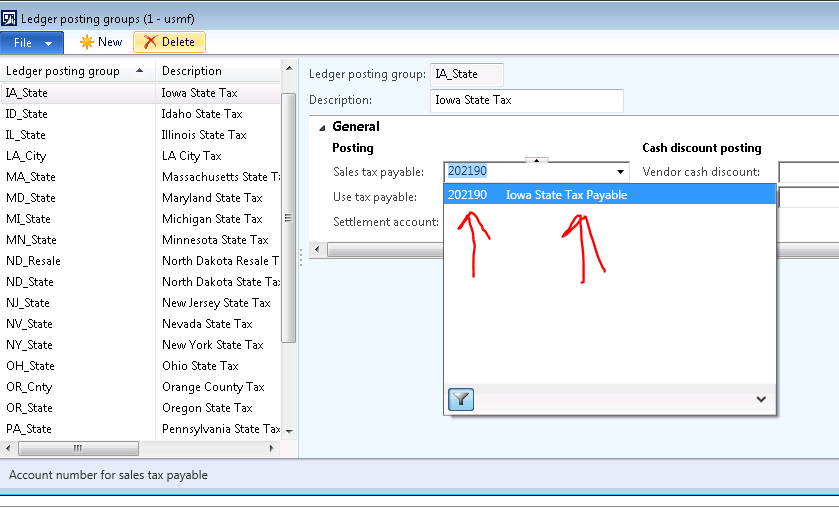
Here is the a screenshot that shows the values I want to get:
7268.Capture-3.PNG

1348.capture-5.PNG

The above picture shows the 2 data I need, the "Main Account" and next to it the "Name"

I have this select statement 

        select * from _mainaccount join
        TaxLedgerAccountGroup  join
        DimensionAttributeValuecombination
        where 
        TaxLedgerAccountGroup.TaxOutgoingLedgerDimension == DimensionAttributeValuecombination.RecId &&
        DimensionAttributeValuecombination.MainAccount == _MainAccount.RecId ;

         VatMainAccount = _mainaccount.MainAccountId;
         Vatmainaccountname = _mainaccount.Name;

Because i'm a noob, I don't know what should I change in the above "Select" statement to make it bring the correct main account and name related to the line.

What should I modify in it to make it bring the "Main Account" and "Name" related to the current line in my query?

Thanks in Advance! 

*This post is locked for comments

I have the same question (0)
  • Momochi Profile Picture
    1,044 on at

    The select statement is brining me a main account and a name but not the correct ones, not the ones related to the current line. it always brings me the same main account and name on everyline. How can I modify the select statement so it can bring me the related data to the current line?

  • Momochi Profile Picture
    1,044 on at

    I think what should be added is the LedgerJournalTrans.LedgerDimension....so it can help the DimensionAttributeValuecombination.RecId to bring the correct record....but I don't know how...

  • Community Member Profile Picture
    on at

    Hi Momochi,

    is the below image that you want to get ? if yes, u may see it in

    Table: LedgerJournalTrans

    FieldName: TaxGroup  

    momochi.png

  • Suggested answer
    JII SAADUDDIN Profile Picture
    1,832 on at

    Hi Momochi!

    Try adding these lines.

           dimensionAttributeValueCombination  =   DimensionAttributeValueCombination::find(generalJournalAccountEntry.LedgerDimension);

           mainAccount                         =   MainAccount::find(dimensionAttributeValueCombination.MainAccount);

           financialDimension                  =   "";

           while select * from dimAttrView

               where dimAttrView.ValueCombinationRecId == generalJournalAccountEntry.LedgerDimension

               join dimensionAttribute

                   where dimensionAttribute.RecId == dimAttrView.DimensionAttribute

                       && dimensionAttribute.BackingEntityType != tableNum(DimAttributeMainAccount)

           {

               financialDimension  =   strLen(financialDimension) > 0 ? financialDimension + "-" + dimAttrView.DisplayValue : dimAttrView.DisplayValue;

           }

  • Momochi Profile Picture
    1,044 on at

    Hi Marielle!

    No, what I want is shown in the first picture of my question.

    The "Sales Tax Payable"  account and name

    Thanks for your time and help!

  • Momochi Profile Picture
    1,044 on at

    Hello Jii!

    First thank you for your time to help!

    I believe the code you wrote does not return the values I need, what I need is to bring the data shown in the first picture of my question the "Sales Tax Payable" account and name. if i'm wrong please correct me :)

    Thanks again!

  • Verified answer
    Momochi Profile Picture
    1,044 on at

    I found a solution, here is the select:

    select _mainaccount
            join DimensionAttributeValueCombination
            join TaxLedgerAccountGroup
            join TaxTable
            where TaxTable.TaxCode == LJtrans.TaxItemGroup &&
            TaxLedgerAccountGroup.TaxAccountGroup == TaxTable.TaxAccountGroup &&
            DimensionAttributeValueCombination.RecId == TaxLedgerAccountGroup.TaxOutgoingLedgerDimension &&
            _mainaccount.RecId == DimensionAttributeValueCombination.MainAccount;
            reportLine.VatMainAccount = _mainaccount.MainAccountId;
            reportLine.VatAccountName = _mainaccount.Name;


    But Note*: This select will only get correct data IF ONLY the TaxCode and TaxItemGroup have the same name! if the environment has them with different names, we need to add more tables to the above select in order to get the correct result, the tables are I believe: "TaxGroupHeading, TaxGroupData, TaxOnItem and TaxItemGroup"

    Hope it's clear, the above select is working in my environment since the TaxCode and TaxItemGroup share the same names. 

    I was blinded by the LedgerDimension when I didn't actually needed it in this case

    Thanks guys for your help!

Under review

Thank you for your reply! To ensure a great experience for everyone, your content is awaiting approval by our Community Managers. Please check back later.

Helpful resources

Quick Links

Introducing the 2026 Season 1 community Super Users

Congratulations to our 2026 Super Stars!

Meet the Microsoft Dynamics 365 Contact Center Champions

We are thrilled to have these Champions in our Community!

Congratulations to the March Top 10 Community Leaders

These are the community rock stars!

Leaderboard > 🔒一 Microsoft Dynamics AX (Archived)

#1
CP04-islander Profile Picture

CP04-islander 39

#2
Michel ROY Profile Picture

Michel ROY 14

#3
imran ul haq Profile Picture

imran ul haq 8

Last 30 days Overall leaderboard

Featured topics

Product updates

Dynamics 365 release plans
