web
You’re offline. This is a read only version of the page.
close
Skip to main content

Announcements

News and Announcements icon
Community site session details

Community site session details

Session Id :
Small and medium business | Business Central, N...
Suggested Answer

Is it possible to see a query behind the "Bin Contents List"?

(0) ShareShare
ReportReport
Posted on by 15

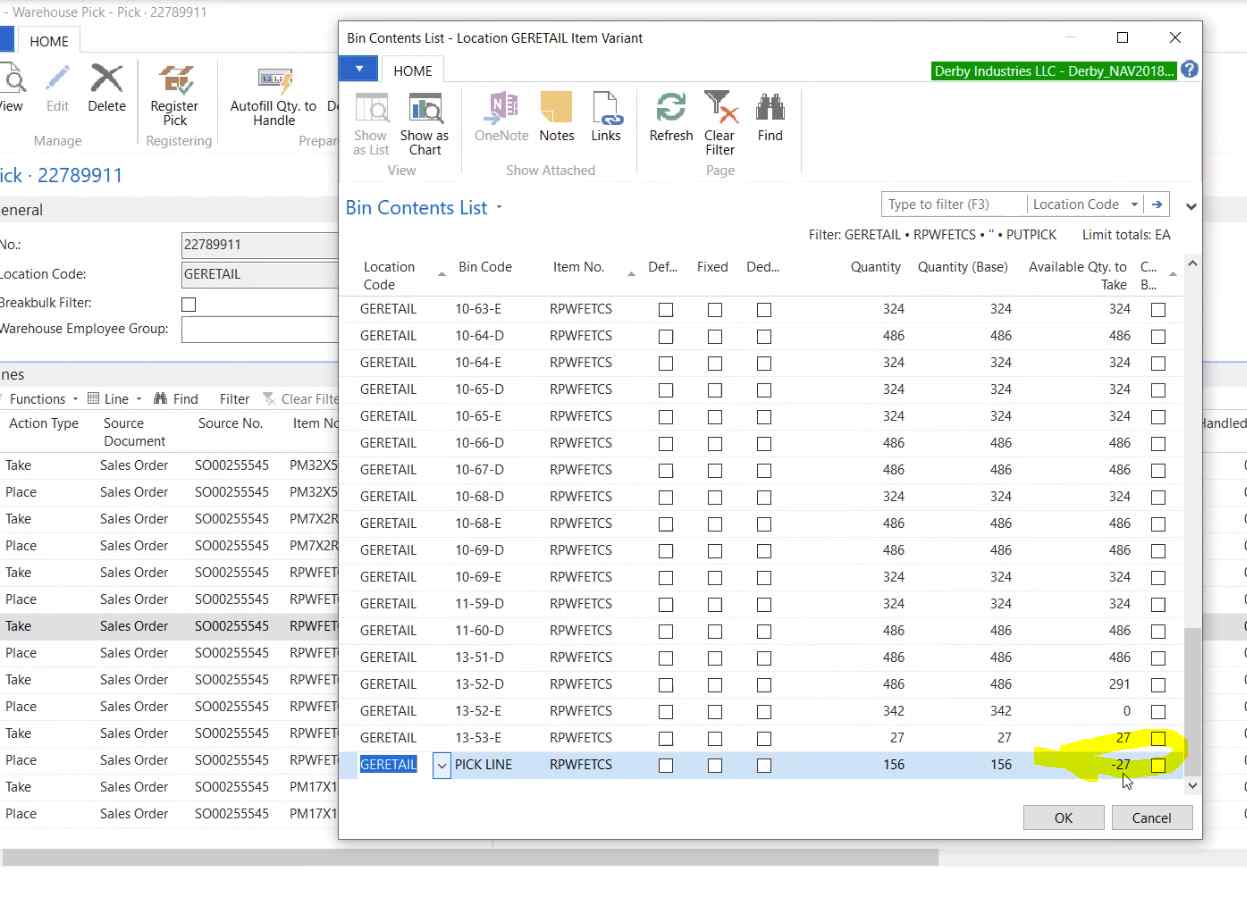
I am working on SSRS report to alert supervisors when bin contents are negative.  MS Nav 2018 has "Bin Contents List" screen to calculate and show this information. Please see the attached image. I was wondering if it possible to get a query running behind this screen to incorporate it into SSRS report. 
Negative-Qty-to-take.PNG

Thank you.

I have the same question (0)
  • navision begginers Profile Picture
    387 on at

    Hi,

    Bin Content is calculated from 'Warehouse Entry' table. there have two fields, Quantity and Qty Base. Bin Content shows the total sum quantity of 'Warehouse Entry' table fields (Quantity and Qty Base.) with different bin wise. So, you can follow the table  'Warehouse Entry'.

    I hope it will help you.

  • MichaelGreen Profile Picture
    15 on at

    Capturessss.PNG

    Hi,

    thank you for your help.  You are right,  fields: "Quantity" and "Qty Base." are stored in 'Warehouse Entry' table. However, in order to calculate "Available Qty to take" we need to know where to get  "Pick Quantity (Base)". This is where I get really lost. If you look at the attached image, "Available Qty to take" =  "Qty Base." -  "Pick Quantity (Base)"

  • navision begginers Profile Picture
    387 on at

    Hello Dear,

    Your screenshot indicates, you are trying to post the excess quantity. You can not post more than available quantity. Please go in warehouse activity lines and manage it in pick lines....(quantity to handle). Hope you can understand.

  • Suggested answer
    Bilal Haider Profile Picture
    485 on at

    Hi,

    Most of the fields in this page are calculated using flow fields. For the field Available Qty to take query is not used but formula is used i.e.

    Available Qty to take = Qty"Quantity (Base)" - (("Pick Quantity (Base)" + "ATO Components Pick Qty (Base)") - ExcludeQtyBase + "Negative Adjmt. Qty. (Base)"))

    You can get it in more detail by opening code from table 7302.

  • Suggested answer
    Suresh Kulla Profile Picture
    50,280 Super User 2026 Season 1 on at

    There are several calculations to calculate the availability, you can check the function CalcQtyAvailToTake in table Bin Content and which in turn calls me other functions to calculate quantities to take/pick.... and son on

Under review

Thank you for your reply! To ensure a great experience for everyone, your content is awaiting approval by our Community Managers. Please check back later.

Helpful resources

Quick Links

Season of Sharing Community Challenge Launch!

Jump in, show your community spirit, and win prizes!

Women in Power Builds Momentum

Expanding mentorship, skilling, and AI innovation

Congratulations to the April Top 10 Community Leaders

These are the community rock stars!

Leaderboard > Small and medium business | Business Central, NAV, RMS

#1
OussamaSabbouh Profile Picture

OussamaSabbouh 2,497 Super User 2026 Season 1

#2
YUN ZHU Profile Picture

YUN ZHU 1,778 Super User 2026 Season 1

#3
AndrewThomas81 Profile Picture

AndrewThomas81 1,507

Last 30 days Overall leaderboard

Featured topics

Microsoft Training Manuals

Product updates

Dynamics 365 release plans



