web
You’re offline. This is a read only version of the page.
close
Skip to main content

Announcements

No record found.

News and Announcements icon
Community site session details

Community site session details

Session Id :
Microsoft Dynamics AX (Archived)

Cannot close period1 when there are source documents remaining to be journalized with an accounting date within the period

(0) ShareShare
ReportReport
Posted on by

Dear all,

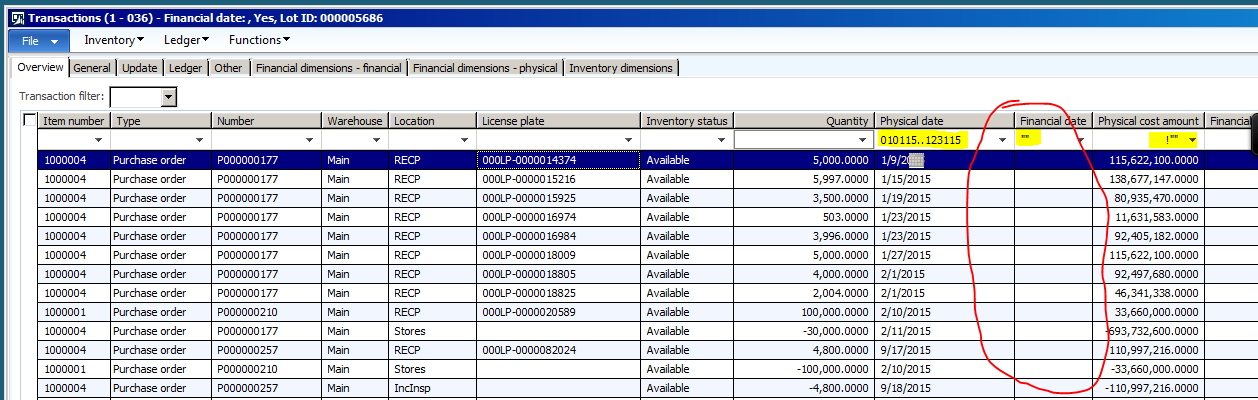
When I did change Period status to "Closed" I got above error message. Then I opened Inventory transaction to check all transaction that had "Physical Date" but "Financial Date" is blank, and existing Physical amount as below screen short:
inv-trans.PNG

I view detail PO to check and found that these lines is Product receipt cancelled lines:

5282.PR.PNG

Because we did product receipt by using mobile device, so there are existing workID with status is "Closed". So when we did cancel the incorrect PR, we have to create new negative line and post Receipt for this negative.

Do you think these above transactions are the root cause of error message when I tried to close period?

*This post is locked for comments

I have the same question (0)
  • Suggested answer
    Ludwig Reinhard Profile Picture
    Microsoft Employee on at

    Hi,

    Can you check whether some transactions are pending in the "subledger Journal entries not yet transferred" window in GL under inquiries? If something is there, can you post it?

    Ludwig

  • Community Member Profile Picture
    on at

    Hi Ludwig,

    There are empty in "Subledger journal entries not yet transferred" screen.

    I still wonder about the steps that we did cancel Product receipt as above screen short, as I known there are possible to cancel Product Receipt that have related Work is "closed".

    But we did cancel Product receipt by create a new Negative line and post PR.

  • Ludwig Reinhard Profile Picture
    Microsoft Employee on at

    Hi,

    Have you tried whether you get an error message when you set the period status to on-hold? Closing a period or a year should only be done if everything is through incl. for example adjustments required by auditors etc. asb you can't reopen a closed period.

    Ludwig

  • Community Member Profile Picture
    on at

    When I did set the period to ON-HOLD, there are not any issue.

    I just got error message when I change to CLOSE.

  • Suggested answer
    Ludwig Reinhard Profile Picture
    Microsoft Employee on at

    Hello nglehang,

    If you if you are fine with putting the period on-hold I would not do something else.

    Yet, if you still want to close the period, you can probably find some additional information on the issue you run in by having a look at the following prior Forum discussion: community.dynamics.com/.../113881

    Unfortunately, there is no verified answer and I can thus not tell you whether the Job described there will help.

    Yet, I think it is worth taking a look at what is described and discussed there.

    All the best,

    Ludwig

Under review

Thank you for your reply! To ensure a great experience for everyone, your content is awaiting approval by our Community Managers. Please check back later.

Helpful resources

Quick Links

Introducing the 2026 Season 1 community Super Users

Congratulations to our 2026 Super Stars!

Meet the Microsoft Dynamics 365 Contact Center Champions

We are thrilled to have these Champions in our Community!

Congratulations to the April Top 10 Community Leaders

These are the community rock stars!

Leaderboard > 🔒一 Microsoft Dynamics AX (Archived)

#1
CP04-islander Profile Picture

CP04-islander 39

#2
Michel ROY Profile Picture

Michel ROY 14

#3
imran ul haq Profile Picture

imran ul haq 8

Last 30 days Overall leaderboard

Featured topics

Product updates

Dynamics 365 release plans
