web
You’re offline. This is a read only version of the page.
close
Skip to main content

Announcements

No record found.

News and Announcements icon
Community site session details

Community site session details

Session Id :
Customer experience | Sales, Customer Insights,...
Suggested Answer

Unable to display the actual HTML in rich text editor upon creating emails thru plugin

(1) ShareShare
ReportReport
Posted on by 193

Hi all!

As we know, Dynamics CRM now offers now conversion of multilline text field to a rich text editor.

We implemented this on our email "Description" field and to one of our custom entities description field.

Now we have a plugin that triggers on create of our custom entity that will create and send CRM email which contains the "Notes" from the custom entity. We created the html formatting (need to display in a table format) thru plugin as seen on the screenshot below. As you can see, it displayed the whole html including the tags.
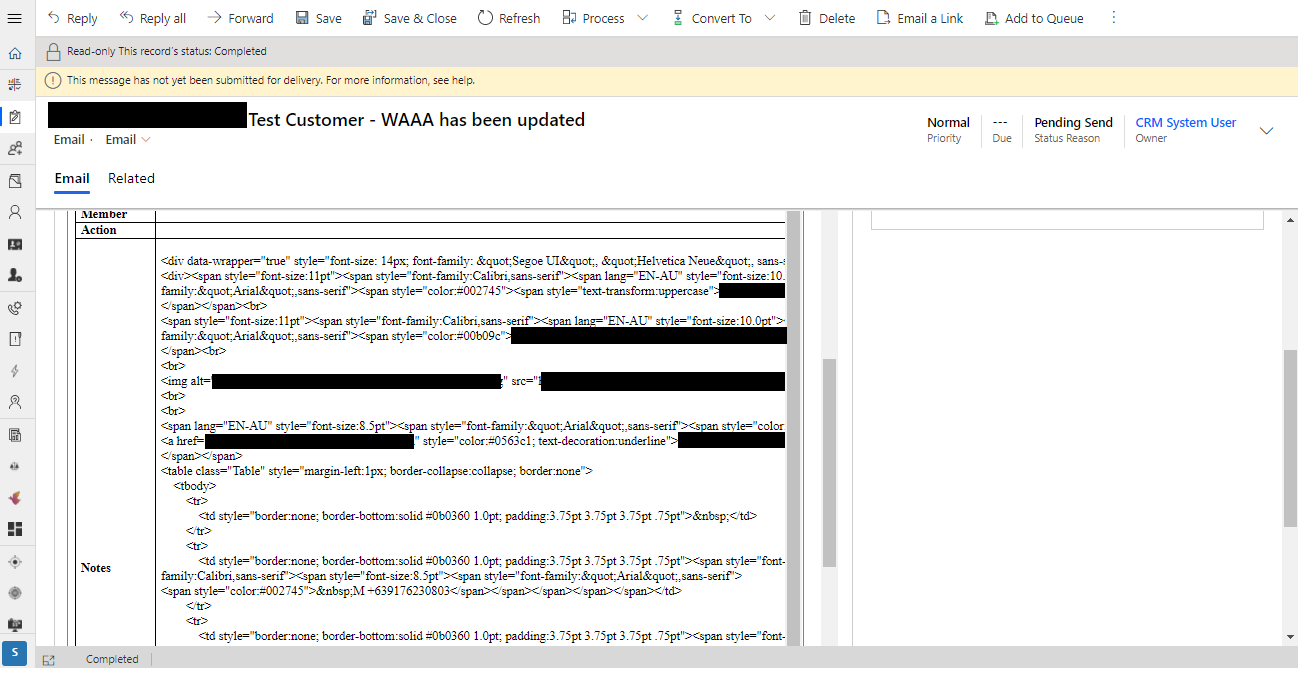
pastedimage1598920116279v1.png

Any idea on how can we fix this? Thank you in advance!

I have the same question (0)
  • Suggested answer
    LeoAlt Profile Picture
    16,331 Moderator on at

    Hi Partner,

    Now in D365, email does not support html code, the rich text editor has already contained most functions we need.

    If you want to use html code with custom styles, you could Power Automate to do this.

    https://stirna.is/2020/08/14/sending-html-emails-through-dynamics-365/#:~:text=Dynamics%20365%20does%20not%20support,an%20email%20with%20HTML%20content.

    For example I have a html file which will show some words like before.

    pastedimage1598943822297v1.png

    pastedimage1598943840858v2.png

    Then I created a Power Automate like the links descripted and it worked well.

    pastedimage1598943936348v3.png

    pastedimage1598943956336v4.png

    Best Regards,

    Leo 

  • JZot Profile Picture
    193 on at

    Hi Leo,

    Actually the email that is being created comes from the "Task" entity's Description field.

    So the sceario would be:

    1. User creates a Task record and populates the "Description" field with rich text editor components and saves the record

    2. An email has been created with table formatting like in the screenshot below.

    pastedimage1598947255230v1.png

    Please note that all the content and formatting (tables rows/colums) are being created from the custom workflow.

  • LeoAlt Profile Picture
    16,331 Moderator on at

    Hi Partner,

    Sorry that it is by design.

    The email could not show the html in its rich editor.

    You may raise an idea to Microsoft about this feature.

    Regards,

    Leo

Under review

Thank you for your reply! To ensure a great experience for everyone, your content is awaiting approval by our Community Managers. Please check back later.

Helpful resources

Quick Links

Introducing the 2026 Season 1 community Super Users

Congratulations to our 2026 Super Stars!

Meet the Microsoft Dynamics 365 Contact Center Champions

We are thrilled to have these Champions in our Community!

Congratulations to the April Top 10 Community Leaders

These are the community rock stars!

Leaderboard > Customer experience | Sales, Customer Insights, CRM

#1
ManoVerse Profile Picture

ManoVerse 130 Super User 2026 Season 1

#2
11manish Profile Picture

11manish 117

#3
Muhammad Shahzad Shafique Profile Picture

Muhammad Shahzad Sh... 69 Most Valuable Professional

Last 30 days Overall leaderboard

Product updates

Dynamics 365 release plans
