web
You’re offline. This is a read only version of the page.
close
Skip to main content

Notifications

Announcements

Community site session details

Community site session details

Session Id :
Finance | Project Operations, Human Resources, ...
Answered

Link between Data Sources

(0) ShareShare
ReportReport
Posted on by 50

Hello, 

I have created a new table in which I want to display a drop-down menu with the list of customers (no problem there). And depending on the selected customer account, I want to display the name of the customer in an additional column by retrieving the name directly from the customer table. 

I created a new form like this : 
pastedimage1645547997594v2.png

In the Data source I added a link from CustTable table. 
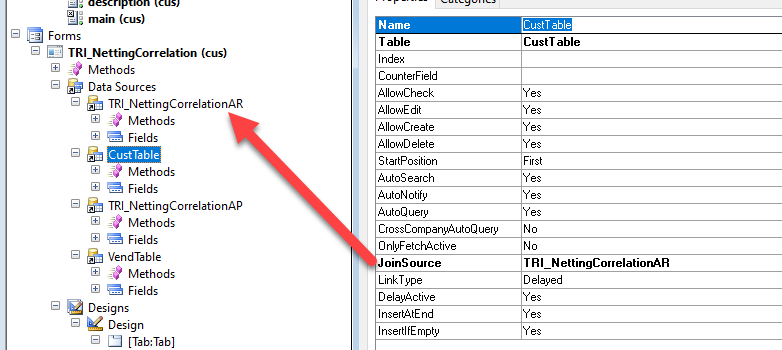
pastedimage1645548087486v3.png

I added the custable.name in my form. 
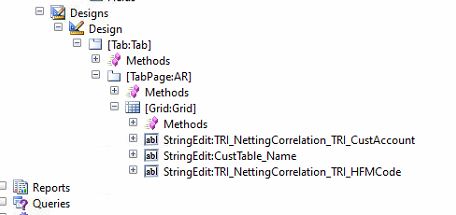
pastedimage1645548132971v4.png

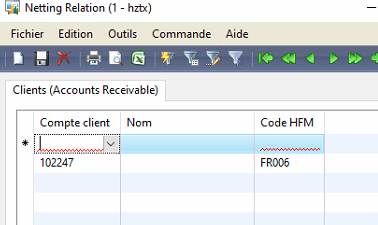
But my issue is when I try to add a new record in my new table "TRI_NettingCorrelationAR", the customer name becomes blank : 
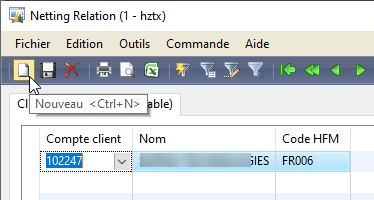
pastedimage1645548286433v5.png

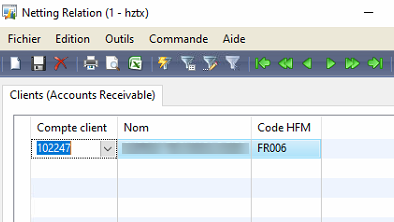
pastedimage1645548318330v6.png

pastedimage1645548337245v7.png

Could you help me please ? 

Thanks a lot. 

I have the same question (0)
  • Gunjan Bhattachayya Profile Picture
    35,423 on at

    Hi mimi51340,

    Could you try changing the join type to "Active" and check if that resolves your issue? You should also set the AllowEdit, AllowCreate and AllowDelete properties to "No" for CustTable.

  • mimi51340 Profile Picture
    50 on at

    Hi Gunjan Bhattachayya ,

    Same problem with the option "Active".

    It is very strange because I tried to create a second record. I closed the windows and reopened it. 

    And I can see the name of the customer because only if I click on the field : 

    pastedimage1645560004948v1.png

    Else the field is empty:

    pastedimage1645560056554v2.png

    Thanks.

  • Gunjan Bhattachayya Profile Picture
    35,423 on at

    Hi mimi,

    Yes. I didn't think through that. Active won't work for you. The easiest solution will be to add a display method in the new table that returns customer name and you can then add that to the grid.

  • mimi51340 Profile Picture
    50 on at

    in the table or in the form I need to create the display method ?

  • Suggested answer
    Gunjan Bhattachayya Profile Picture
    35,423 on at

    You can create it in the table only. You can use the name of the method in the data method property in the form control.

  • mimi51340 Profile Picture
    50 on at

    I created this method in the new table :

    display CustName custName()
    {
        CustTable   custTable;
    
        ;
    
        return custTable::find(this.TRI_CustAccount).Name;
    
    }

    I added the method in the form, but the field is empty in the form...

    Thanks

  • Gunjan Bhattachayya Profile Picture
    35,423 on at

    Please share screenshot of the form control properties with this data method.

  • mimi51340 Profile Picture
    50 on at

    Yes no problem. 

    On the field from the form : 

    pastedimage1645565694860v1.png

    pastedimage1645565729145v2.png

  • Verified answer
    Gunjan Bhattachayya Profile Picture
    35,423 on at

    You need to fill in the Data source property as well with the table name. That should get it working.

  • mimi51340 Profile Picture
    50 on at

    Perfect now it works :) .

    It is a pity that the link does not work directly on the data source. There must be a wrong parameter somewhere...

Under review

Thank you for your reply! To ensure a great experience for everyone, your content is awaiting approval by our Community Managers. Please check back later.

Helpful resources

Quick Links

Responsible AI policies

As AI tools become more common, we’re introducing a Responsible AI Use…

Congratulations to our 2025 Community Spotlights

Thanks to all of our 2025 Community Spotlight stars!

Leaderboard > Finance | Project Operations, Human Resources, AX, GP, SL

#1
André Arnaud de Calavon Profile Picture

André Arnaud de Cal... 650 Super User 2026 Season 1

#2
Abhilash Warrier Profile Picture

Abhilash Warrier 287 Super User 2026 Season 1

#3
Martin Dráb Profile Picture

Martin Dráb 225 Most Valuable Professional

Last 30 days Overall leaderboard

Product updates

Dynamics 365 release plans