web
You’re offline. This is a read only version of the page.
close
Skip to main content

Announcements

No record found.

News and Announcements icon
Community site session details

Community site session details

Session Id :
Microsoft Dynamics AX (Archived)

Restrict duplicate while select the value for Query

(0) ShareShare
ReportReport
Posted on by 770

Dear All,

I have added one data source in Query : PayrollStatementGenerationQuery. This is default for Generate pay statement. While i select the record in Query it loaded all the record which filed i gave as range. In table for that field some values are repeated. I want to Restrict duplicate while select the value for Query ?
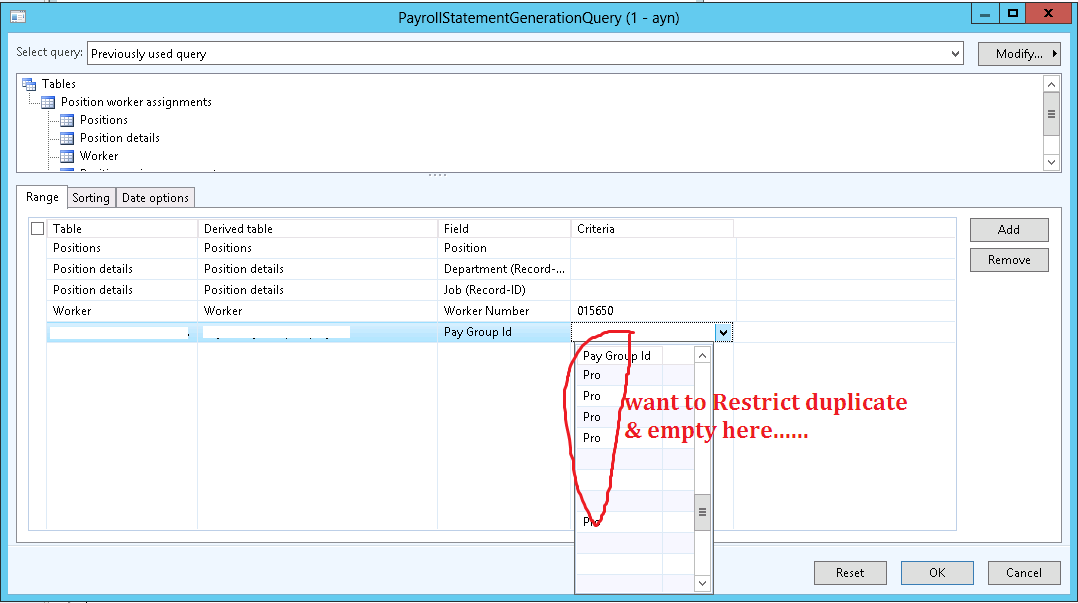
7220.Doubt.png

Thanks in advance.

*This post is locked for comments

I have the same question (0)
  • Iulian Cordobin Profile Picture
    8,201 on at

    This looks strange. Are you sure those are duplicates and not actual records in the Pay Group table, so can you check this?

  • MUHAMMAD HAARIS Profile Picture
    770 on at

    Thanks Iulian.

    But actually Pay group id not from Pay Group table.. That is from our new Table.

    we related Query Datasource(PayrollStatementGenerationView) with our new Table.. In that table duplicate pay group id is allowed....

    How to restrict in mentioned lookup?

  • Mariano Gracia Profile Picture
    on at

    You can't do it unless you create a view using your new table and grouping PayGroupId in the view, then you'll need to link the view in the query instead the new table, but then, I don't know if the query will return the results you're expecting.

  • MUHAMMAD HAARIS Profile Picture
    770 on at

    Hi All,

    Can anyone solve my above query?

  • Martin Dráb Profile Picture
    239,451 Most Valuable Professional on at

    If you let me select "Pro", how will you whether it means the first Pro record in your table, or the second one, or the third one etc.?

    It sounds like a wrong design to me. Either you want to pick a pay group ID, and therefore your lookup should refer to pay group table. Or you want to pick a record from your new table, but pay group ID isn't sufficient for that, because it doesn't uniquely identify records there. You would have to pick the primary key of your table.

  • Iulian Cordobin Profile Picture
    8,201 on at

    Martin's comment is right. Looks like you have an issue with the design (logic) of your query. But in the current scenario, what you are looking for is not possible (displaying Pro only one time).

Under review

Thank you for your reply! To ensure a great experience for everyone, your content is awaiting approval by our Community Managers. Please check back later.

Helpful resources

Quick Links

Introducing the 2026 Season 1 community Super Users

Congratulations to our 2026 Super Stars!

Meet the Microsoft Dynamics 365 Contact Center Champions

We are thrilled to have these Champions in our Community!

Congratulations to the April Top 10 Community Leaders

These are the community rock stars!

Leaderboard > 🔒一 Microsoft Dynamics AX (Archived)

#1
CP04-islander Profile Picture

CP04-islander 39

#2
Michel ROY Profile Picture

Michel ROY 14

#3
imran ul haq Profile Picture

imran ul haq 8

Last 30 days Overall leaderboard

Featured topics

Product updates

Dynamics 365 release plans
