web
You’re offline. This is a read only version of the page.
close
Skip to main content

Notifications

Announcements

No record found.

Community site session details

Community site session details

Session Id :
Microsoft Dynamics AX (Archived)

Installing Reporting Services Extension in AX 2012 R3

(0) ShareShare
ReportReport
Posted on by 3,801

Hi all,

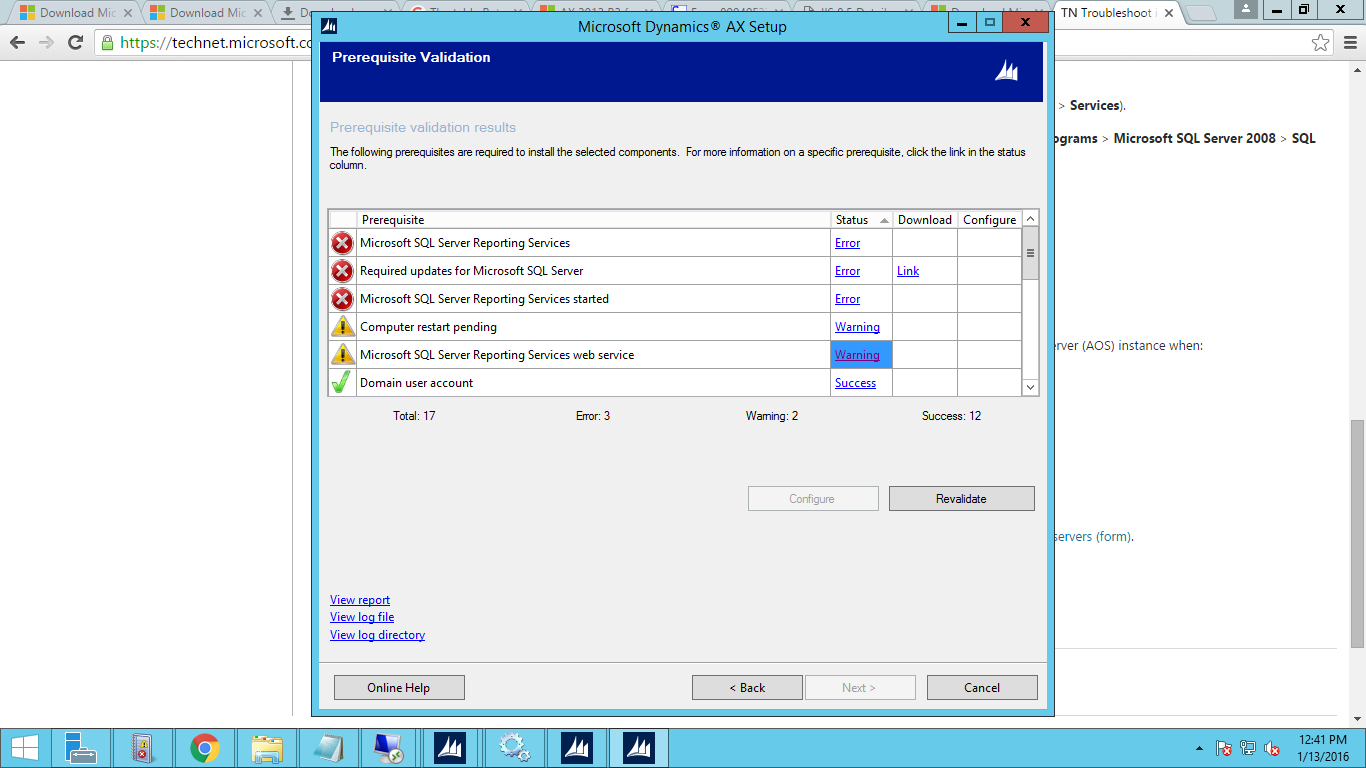
I want to add "Reporting Services Extension" in to my environment. But I am unable to do it.

I have one server for SQL&Databases and one for AX Client & AOS.

Please tell me how to resolve this issue.
error-reportin.png

*This post is locked for comments

I have the same question (0)
  • Martin Dráb Profile Picture
    237,878 Most Valuable Professional on at

    Please follow the links (in the dialog) to learn more about these errors.

  • Suggested answer
    Anup Shah MSFT Profile Picture
    on at

    Looks like you are missing some pre-reqs. Reporting extensions can only be installed on a server that has the SQL Server Reporting Services installed - see technet.microsoft.com/.../gg751340.aspx for a complete checklist.

    If this doesn't help then please share more details like What version of AX you are using, version of SQL Server, and what have you done to Install and configure SSRS so far.

  • Hassan_rulz Profile Picture
    3,801 on at

    Hi Martin,

    I have read.

    I am just confused about how to make connection between databases server to AOS server? Because everything has installed and configured on database server and still it giving me these errors.

  • Hassan_rulz Profile Picture
    3,801 on at

    Hi Shah,

    Just tell me one thing, I have to install Reporting Services on SQL Server or AX Server?

  • Anup Shah MSFT Profile Picture
    on at

    Hi Martin, it can only be installed on the Report Server, the extensions are for the Report server not AOS.

  • Suggested answer
    Brandon Wiese Profile Picture
    17,788 on at

    SSRS can be installed separately from either.  In other words, it doesn't have to be installed with SQL Server or the AOS.  You could have a cluster of dedicated SSRS servers that connect to a shared SQL Server.

    I tend to prefer to install SSRS along with SQL Server since I think it's more "workload compatible" with SQL Server than it is with the AOS.

  • Hassan_rulz Profile Picture
    3,801 on at

    I have only 2 servers.

    One is SQL (All SQL features are installed on it)

    2nd for AX (AOS, Client Installed on it)

    Now, tell me on which server I have to install "Reporting Services" for AX?

  • Ali Zaidi Profile Picture
    4,657 on at

    Kindly check SQL server reporting services are running. It is possible you just installed and some how the other Sql Server reporting services are not running. Second kindly check pre-requisite required for installation. Click on error and read what is missing.

  • Suggested answer
    Anup Shah MSFT Profile Picture
    on at

    Hello Hasan ( I wrote Mike by mistake in earlier reply), its the SQL Server that has the Report Server installed. However before installing the AX Report Services extension, you need to configure the Report Server as detailed in the Checklists I shared earlier (technet.microsoft.com/.../dd362085.aspx)

  • Hassan_rulz Profile Picture
    3,801 on at

    Hi Anup,

    Thanks for the info.

    Now, I am stuck here. Any solution?

    8712.error-2.png

Under review

Thank you for your reply! To ensure a great experience for everyone, your content is awaiting approval by our Community Managers. Please check back later.

Helpful resources

Quick Links

Responsible AI policies

As AI tools become more common, we’re introducing a Responsible AI Use…

Neeraj Kumar – Community Spotlight

We are honored to recognize Neeraj Kumar as our Community Spotlight honoree for…

Leaderboard > 🔒一 Microsoft Dynamics AX (Archived)

#1
Priya_K Profile Picture

Priya_K 4

#1
Martin Dráb Profile Picture

Martin Dráb 4 Most Valuable Professional

#3
Ali Zaidi Profile Picture

Ali Zaidi 2

Last 30 days Overall leaderboard

Featured topics

Product updates

Dynamics 365 release plans
