web
You’re offline. This is a read only version of the page.
close
Skip to main content

Notifications

Announcements

No record found.

Community site session details

Community site session details

Session Id :
Microsoft Dynamics CRM (Archived)

CRM 2016 Settings Tab

(0) ShareShare
ReportReport
Posted on by

At some point in the past in a previous version, someone in my team has messed up the titles for the settings tab. As you can see below they are set to Unknown25, Unknown26, Unknown27 and Unknown28.
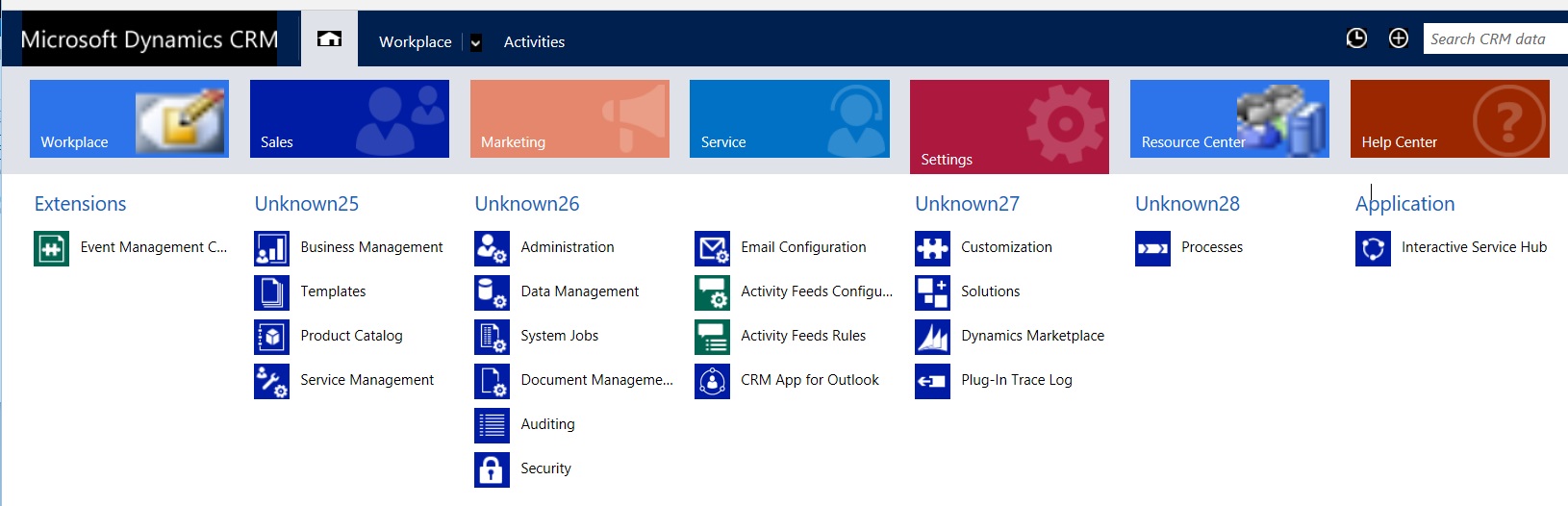
CRM-Settings.JPG

These titles have survived the upgrades from CRM 2011 and it's time to fix them. Please can you tell me how to change them and also what they should be changed to? Thanks

*This post is locked for comments

I have the same question (0)
  • Suggested answer
    a33ik Profile Picture
    84,331 Most Valuable Professional on at

    Hello,

    To change labels you can use http://www.xrmtoolbox.com/ plugin Sitemap Editor.

    Unknown 25 should be Business

    Unknown 26 should be Administration

    Unknown27 - Customization

    Unknown28 - Process Center

  • Suggested answer
    Abed Haniyah Profile Picture
    4,287 on at

    You can rename them by using sitemap editor on XRMToolBox : xrmtoolbox.codeplex.com

    Have a look to : www.demianrasko.com/.../xrmtoolbox-sitemap-editor.html

  • Suggested answer
    tw0sh3ds Profile Picture
    5,600 on at

    Hi,

    The previous suggestions are ok, but I would also try to backup existing sitemap, export a sitemap from clean organization, import this clean sitemap to your organization and set everything that you have customized on sitemap again (unless you have plenty of them, but usially there are only a few changes on sitemap and they can be easily recreated using XrmTollBox SiteMap editor). Because now I can see that you have very old type of sitemap (probably system migrated from CRM 2011) and it looks really ugly.

  • Abed Haniyah Profile Picture
    4,287 on at

    Instead of exporting a sitemap from clean organization, you can user Sitemap editor to reset the sitemap to the default one:

    8446.1.PNG

  • Suggested answer
    Alagunellaikumar Profile Picture
    6,212 on at

    You can use xmltoolbox. Please refer the below link

    sitemapeditor.codeplex.com

    us.hitachi-solutions.com/.../crm-2013-how-to-change-the-tiles-on-the-menu-sitemap

Under review

Thank you for your reply! To ensure a great experience for everyone, your content is awaiting approval by our Community Managers. Please check back later.

Helpful resources

Quick Links

Responsible AI policies

As AI tools become more common, we’re introducing a Responsible AI Use…

Neeraj Kumar – Community Spotlight

We are honored to recognize Neeraj Kumar as our Community Spotlight honoree for…

Leaderboard > 🔒一 Microsoft Dynamics CRM (Archived)

#1
SA-08121319-0 Profile Picture

SA-08121319-0 4

#1
Calum MacFarlane Profile Picture

Calum MacFarlane 4

#3
Alex Fun Wei Jie Profile Picture

Alex Fun Wei Jie 2

Last 30 days Overall leaderboard

Featured topics

Product updates

Dynamics 365 release plans



