web
You’re offline. This is a read only version of the page.
close
Skip to main content

Announcements

No record found.

News and Announcements icon
Community site session details

Community site session details

Session Id :
Microsoft Dynamics AX (Archived)

Dynamics AX 2012 R2 - Server terminated unexpectedly with 90 exitcode during backup and restoration

(0) ShareShare
ReportReport
Posted on by

Hello All,

Please just backup my my Live AX 2012 Database  and restore a full installation on Local Server .

The new server has already installed MS AX in the same version of the Live Server but the AX application  could not start .

Please see the error below when trying to restart the AOS Services
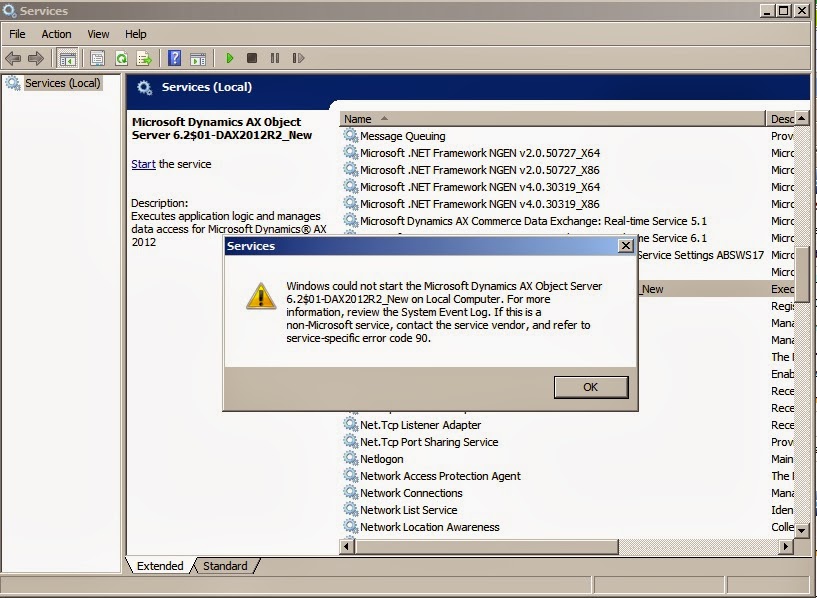
Dynamics AX 2012 R2 - Server terminated unexpectedly with 90 exitcode

6862.AX-error.jpg

Kindly Advice on what to do.

*This post is locked for comments

I have the same question (0)
  • Mahmoud Hakim Profile Picture
    17,887 on at

    Check event viewer to see more details about this error

  • Hariharans87 Profile Picture
    36 on at

    Please check the log and let us know. Make sure that restored database name is same as configured in AX 2012 server configuration. You can also configure AX with different database by configuring in the server configuration utility.

  • dapdomma Profile Picture
    on at

    Hello All

    please see below error I got from event Viewer, Kindly Advice


    1.Object Server 01: Server terminated unexpectedly with 90 exitcode.


    2. Object Server 01: The database AXSERVER2018\MicrosoftDynamicsAX_model is not recognized as a model store.


    3.Object Server 01: SQL diagnostics: [Microsoft][SQL Server Native Client 10.0][SQL Server]Login failed for user 'NT AUTHORITY\NETWORK SERVICE'.. Connect information was: Userid = [], Database = [MicrosoftDynamicsAX], Server = [AXSERVER2018], DSN = [], Other = []


    4. Object Server 01: Fatal SQL condition during login. Error message: "[Microsoft][SQL Server Native Client 10.0][SQL Server]Login failed for user 'NT AUTHORITY\NETWORK SERVICE'."

    Thanks

  • Suggested answer
    Mahmoud Hakim Profile Picture
    17,887 on at

    Try to start service with another account

    And check database model resorted correctly

  • Suggested answer
    BorisD Profile Picture
    2,826 Moderator on at

    Hello dapdomma,

    Based on the log information you have provided. it appears that your USERINFO needs updating after the refresh. You can use the script below to update your USERINFO.

    UPDATE USERINFO

    SET Name = 'YourName',

      SID = 'S-1-REPLACE',

      NetworkDomain = 'Your_Domain',

      NetworkAlias = 'Your_DomainUser'

    WHERE ID = 'Admin'

    You can get your SID from your other AX DB and copy your SID from your user's record of table USERINFO.

Under review

Thank you for your reply! To ensure a great experience for everyone, your content is awaiting approval by our Community Managers. Please check back later.

Helpful resources

Quick Links

Introducing the 2026 Season 1 community Super Users

Congratulations to our 2026 Super Stars!

Meet the Microsoft Dynamics 365 Contact Center Champions

We are thrilled to have these Champions in our Community!

Congratulations to the March Top 10 Community Leaders

These are the community rock stars!

Leaderboard > 🔒一 Microsoft Dynamics AX (Archived)

#1
CP04-islander Profile Picture

CP04-islander 26

#2
imran ul haq Profile Picture

imran ul haq 8

#3
André Arnaud de Calavon Profile Picture

André Arnaud de Cal... 4 Super User 2026 Season 1

Last 30 days Overall leaderboard

Featured topics

Product updates

Dynamics 365 release plans
