web
You’re offline. This is a read only version of the page.
close
Skip to main content

Notifications

Announcements

No record found.

Community site session details

Community site session details

Session Id :
Microsoft Dynamics CRM (Archived)

Add filter button to the "Look up record" pop-up

(0) ShareShare
ReportReport
Posted on by 40

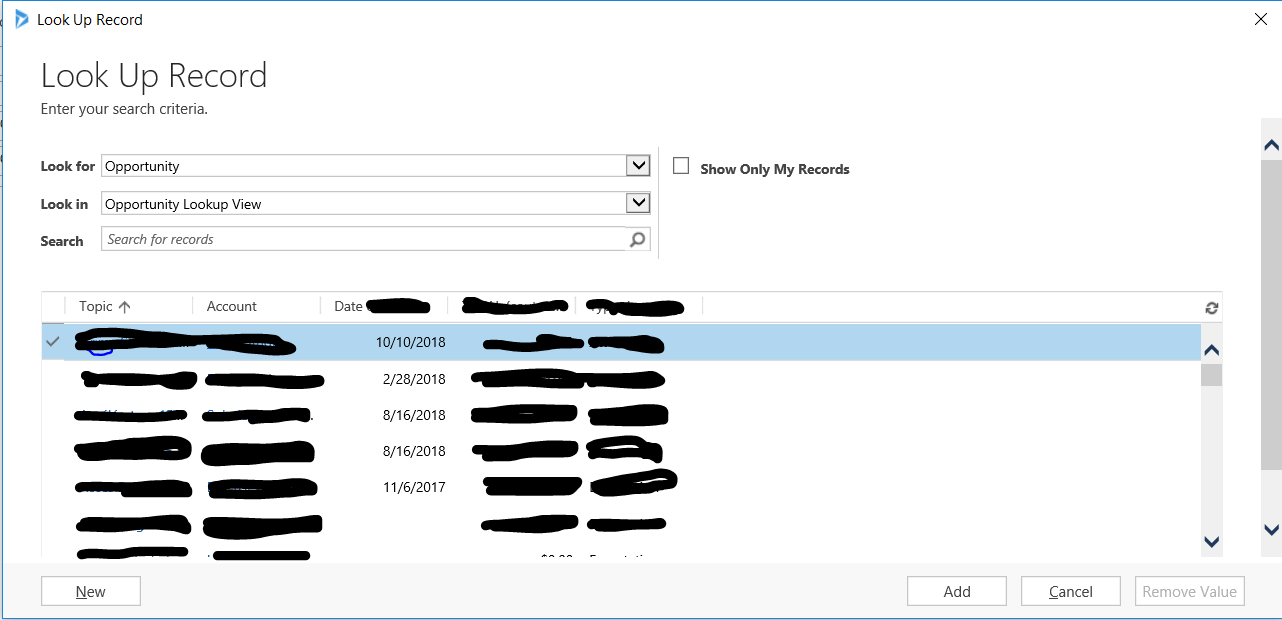
I don't want to filter data regarding the user. What I'm looking for is to add a button so that users can filter easily the Accounts. 
We have lots of clients associated with several opportunities at the same time. so, when user sends an email or books a meeting and needs to link it to an opportunity, then he needs to follow these steps:


- He opens Outlook and then the email/appointment

- He clicks on the "regarding" field. The "Look up record" pop-up is displayed

- He selects the value "opportunity" in the "Look for" field, and the view he needs in the "Look in" field. Opportunities are displayed

Bang! This is our issue. User doesn't know by heart all the opportunities' names (some times they are registered by another user), so, he doesn't know what to select. Since he knows the Account name, he would be able to select the record if both, the Account and the opportunities were displayed. (Well, each line displays properly this info, but since all accounts are displayed it's really long to find the right opportunity).

We don't want to ask users to open Dynamics, open the account, identify the opportunity name, remember it, then go back to Outlook, and then, do the proper "regarding" link. (it doesn't make sense). We could avoid these steps if a filter button is displayed on the column name. This way he could filter the Account and then see ONLY opportunities associated with it. We have so many clients so the sorts by name feature is not helping us. 

Is this a config, issue? Is this button is not available, is there any workarround?

Thanks, 
crm6.PNG

*This post is locked for comments

I have the same question (0)
  • Suggested answer
    Wouter Madou Profile Picture
    3,392 on at

    It is not a full solution to your problem, but in my opinion a possible work around.

    I would create a field on opportunity that concatenates the name of the potential customer <account> and the name of the opportunity ( and the number, why not..).

    Next I would add this field to the lookup view so it becomes searchable.

    From this moment on the user can just type in a search query for specific accounts using the full name in the beginning of the field or parts of the company name combined with parts of the opportunity.

    <account name> * <part of opportunity name > * <part of number id>

    Eg: Micros*dynamics*123

  • Suggested answer
    TylerS.Dev Profile Picture
    729 on at

    You need to edit the quick find view under opportunity, choose Add Find Columns and choose what field you want to use as search criteria.

    Below is a link to a tutorial:

    community.dynamics.com/.../lookup_2d00_multiple_2d00_field_2d00_search

    please mark as verified if this answers your question.

  • Palani Profile Picture
    196 on at

    Hi,

    As Tyler suggested, you can configure the quick find view to add the find column which can allow the users to find the opportunities related to an account based on the keyword entered.

    Another possibility is you can build a PowerApp where you can create a step-by-step process to first select an specifically account and then select an opportunity and using that opportunity you can set the regarding field of the email. You can use a combination of Microsoft Flow to automate this too if there's a specific matching criteria.

    Regards,

    Palani

Under review

Thank you for your reply! To ensure a great experience for everyone, your content is awaiting approval by our Community Managers. Please check back later.

Helpful resources

Quick Links

Responsible AI policies

As AI tools become more common, we’re introducing a Responsible AI Use…

Neeraj Kumar – Community Spotlight

We are honored to recognize Neeraj Kumar as our Community Spotlight honoree for…

Leaderboard > 🔒一 Microsoft Dynamics CRM (Archived)

#1
SA-08121319-0 Profile Picture

SA-08121319-0 4

#1
Calum MacFarlane Profile Picture

Calum MacFarlane 4

#3
Alex Fun Wei Jie Profile Picture

Alex Fun Wei Jie 2

Last 30 days Overall leaderboard

Featured topics

Product updates

Dynamics 365 release plans



