web
You’re offline. This is a read only version of the page.
close
Skip to main content

Announcements

No record found.

News and Announcements icon
Community site session details

Community site session details

Session Id :
Microsoft Dynamics AX (Archived)

Post General Journal with Ledger Accruals

(1) ShareShare
ReportReport
Posted on by 185

Hi!

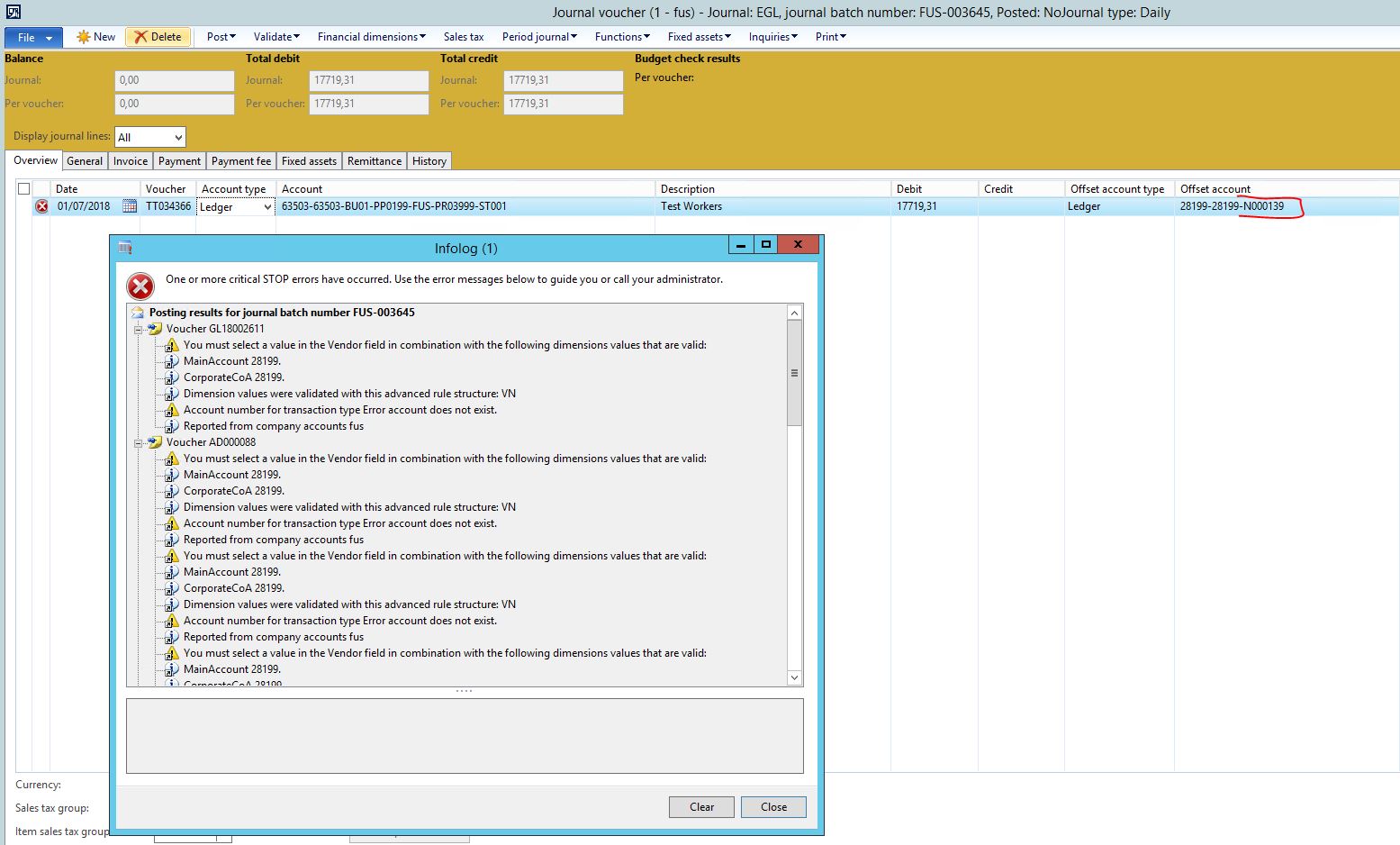
I'm trying to post a GL Journal, using the Ledger Accruals (GL Journal > Lines > Functions > Ledger accruals), but when I try to post, show the error message below:
6204.Capture.JPG

"You must select a value in the Vendor field in combination with the following dimensions values that are valid:
MainAccount 28199.
CorporateCoA 28199.
Dimension values were validated with this advanced rule structure: VN
Account number for transaction type Error account does not exist."

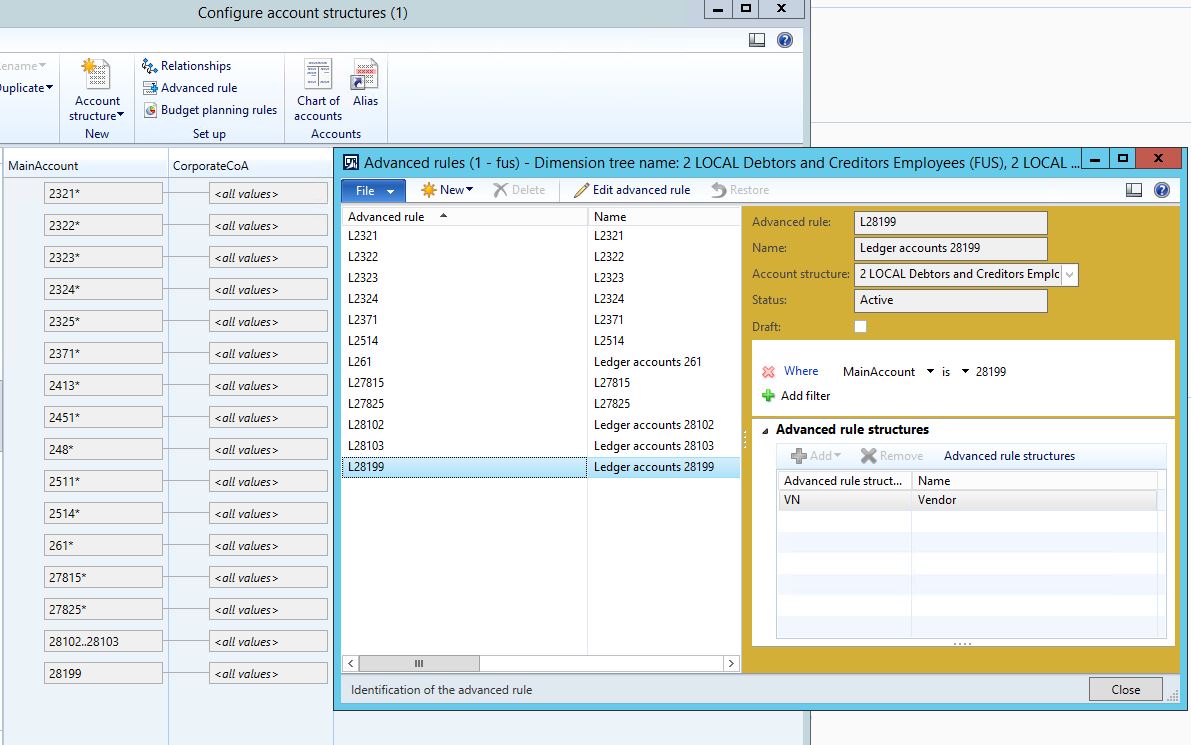
The advanced rule structure VN is configurated to request Vendor, but the vendor is filled in Offset account (vendor: N000139).

The accounts structure is below:
87583.Capture2.JPG

How can I fix it?

*This post is locked for comments

I have the same question (0)
  • Suggested answer
    Ludwig Reinhard Profile Picture
    Microsoft Employee on at

    Hi, What does your advanced rule VN specify? Is the value N000139 allowed to be used in the advanced rule? Maybe the value N000139 is blocked or has not been included in the advanced rule structure. Would be great if you could check this. Many thanks and best regards, Ludwig

  • Rafael Araujo Profile Picture
    185 on at

    Hi Dr. Ludwig!

    The VN is to require the vendor account. I believe is allowed to be used in the advanced rule, because I did not select a specific vendor. The vendor N000139 is not hold (blocked).

  • Suggested answer
    Ludwig Reinhard Profile Picture
    Microsoft Employee on at

    Hi Rafael,

    Can you share details of the advanced rule that has been setup?

    Best regards,

    Ludwig

  • Rafael Araujo Profile Picture
    185 on at

    7725.Capture3.JPG

  • Suggested answer
    Ludwig Reinhard Profile Picture
    Microsoft Employee on at

    Good Morning Rafael,

    With this setup AX should actually post the voucher.

    Can you double check that the account structure is not in a draft mode but active?

    Probably try to deactivate and reactivate it.

    In addition, can you test if the voucher can be posted if an error account is setup in the automatic posting section in GL?

    Have you tried making a similar posting in your test/demo environment?

    Does it work there, i.e. can you post this voucher there?

    Best regards,

    Ludwig

  • Rafael Araujo Profile Picture
    185 on at

    Good morning!

    The account structure was actived, but I deactived and reactived. Do not solved.

    Where can I check if the voucher can be posted with error?

    The issue is in production and test environments.

  • Suggested answer
    Ludwig Reinhard Profile Picture
    Microsoft Employee on at

    Hello Rafael,

    In your test environment you can setup a specific account for the error account. This is done in the GL setup section in the accounts for automatic transactions. In addition, you should ensure that your GL parameters allow for postings on the error account. There is a specific parameter available that says 'Interrupt in case of error account'. This parameter should not be selected.

    Please test if this allows you posting in your test system.

    Best regards,

    Ludwig

  • Rafael Araujo Profile Picture
    185 on at

    I tested and it not allowed the posting.

    The "Interrupt in case of error account" parameter is disabled (unmarked).

    The "Accounts for automatic transactions" setup is below.

    3107.4.JPG

  • Ludwig Reinhard Profile Picture
    Microsoft Employee on at

    Hello Rafael,

    This means that the infolog message about the missing error account does not apply.

    The infolog is actually longer. Do you see other informations in this infolog that indicate other missing setups?

    And... another thing that I would like to know is whether this is an intercompany transaction.

    Best regards,

    Ludwig

Under review

Thank you for your reply! To ensure a great experience for everyone, your content is awaiting approval by our Community Managers. Please check back later.

Helpful resources

Quick Links

Introducing the 2026 Season 1 community Super Users

Congratulations to our 2026 Super Stars!

Congratulations to our 2025 Community Spotlights

Thanks to all of our 2025 Community Spotlight stars!

Leaderboard > 🔒一 Microsoft Dynamics AX (Archived)

#1
Joris dG Profile Picture

Joris dG 5

#2
Alexey Lekanov Profile Picture

Alexey Lekanov 2

#2
Henrik Nordlöf Profile Picture

Henrik Nordlöf 2 User Group Leader

Last 30 days Overall leaderboard

Featured topics

Product updates

Dynamics 365 release plans
