web
You’re offline. This is a read only version of the page.
close
Skip to main content

Notifications

Announcements

No record found.

Community site session details

Community site session details

Session Id :
Microsoft Dynamics 365 | Integration, Dataverse...
Suggested Answer

How to use Connections in UUI?

(0) ShareShare
ReportReport
Posted on by 35

When trying to create a new connection in UUI for contact there are two buttons, "+ new connection" and "connect":
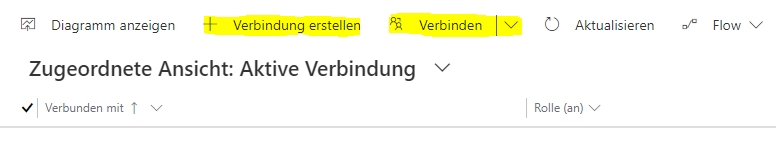
7532.Capture1.PNG

When doing the same in classic UI there is only one button "connect":
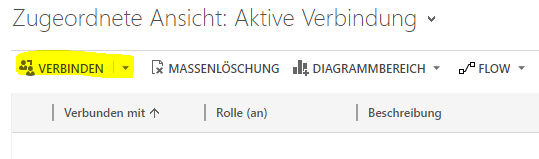
20883.Capture2.PNG

Also when creating a new connection record in UUI both lookups are prefilled, which makes no sense to me:
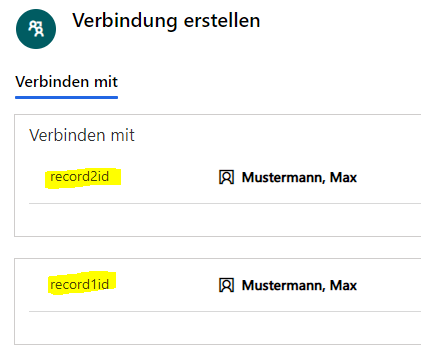
2335.Capture3.PNG

Is there a reason for why the behaviour changed from classic UI to UUI?

I have the same question (0)
  • Community Member Profile Picture
    on at

    Hi partner,

    What version of the dyanmics are you using?

    I’m using 2021 release wave 1 enabled, There is a slight difference between my interface and yours.

    pastedimage1622082502075v2.png

    And connections tab of contact entity show as following screenshot, it shows one 'Connect' button, but you can expand it to list other two buttons(To Another and To Me)

    pastedimage1622082557838v3.png

    To Another:

    pastedimage1622082798735v4.png

    To Me:

    pastedimage1622082967393v5.png

    Regards,

    Leah Ju

    Please mark as verified if the answer is helpful. Welcome to join hot discussions in Dynamics 365 Forums.

  • alx.kpk Profile Picture
    35 on at

    Hi. I'm also using 2021 Release Wave 1. And I've the same options:

    1425.Capture.PNG

    But additionally I've this "+ new connection" button which opens a new record and prefills both lookups with the same contact value.

  • Suggested answer
    Community Member Profile Picture
    on at

    Hi partner,

    It’s so strange, there is no ”+ new connection" button in the view by default.

    Have you customized the connection sub-grid view?

    Maybe you can try to use Ribbon Workbench to hide the button if necessary.

    This is the download page for Ribbon Workbench:

    http://www.develop1.net/public/rwb/ribbonworkbench.aspx

    This is the basic tutorial of Ribbon Workbench:

    https://community.dynamics.com/crm/b/develop1/posts/mastering-ribbon-workbench-2016

    Regards,

    Leah Ju

    Please mark as verified if the answer is helpful. Welcome to join hot discussions in Dynamics 365 Forums.

Under review

Thank you for your reply! To ensure a great experience for everyone, your content is awaiting approval by our Community Managers. Please check back later.

Helpful resources

Quick Links

Responsible AI policies

As AI tools become more common, we’re introducing a Responsible AI Use…

Neeraj Kumar – Community Spotlight

We are honored to recognize Neeraj Kumar as our Community Spotlight honoree for…

Leaderboard > Microsoft Dynamics 365 | Integration, Dataverse, and general topics

#1
Martin Dráb Profile Picture

Martin Dráb 62 Most Valuable Professional

#2
#ManoVerse Profile Picture

#ManoVerse 57

#3
Pallavi Phade Profile Picture

Pallavi Phade 49

Last 30 days Overall leaderboard

Product updates

Dynamics 365 release plans



